
Mini PC vs Computer Stick: Which Is the Best Portable PC for You?


As living, working, and commercial spaces become more compact, energy-efficient computing has surged in popularity. Among these, Mini PCs and Computer Sticks have emerged as top contenders. While both offer space-saving benefits, they serve vastly different performance, reliability, and networking needs.
Here is a direct comparison to help you decide which compact computing solution fits your lifestyle and workflow.
Quick Summary: Mini PC vs. PC Stick
If you are short on time, here is the essential breakdown:
Choose a Computer Stick for basic TV streaming, temporary travel setups, and ultimate pocket-sized portability on a strict budget.
Choose a Mini PC for reliable daily office work, dual-network soft routing, multi-display productivity, and sustainable 24/7 commercial applications.
What Is a Computer Stick?
A Computer Stick (or PC Stick) is an ultra-portable device roughly the size of a large USB flash drive. Designed to plug directly into a monitor or TV’s HDMI port, it instantly transforms any display into a basic computer.
Key Specifications & Limitations:
- Processor: Low-power Intel Atom or Celeron chips.
- Memory & Storage: Typically fixed at 2GB–4GB RAM and 32GB–64GB eMMC storage (non-upgradeable).
- Power & Ports: Draws very little power (under 10W), but offers minimal physical ports, often requiring external USB hubs for basic peripherals.
- Best For: Light media streaming and basic digital signage.
What Is a Mini PC?
A Mini PC bridges the gap between ultra-portable sticks and massive desktop towers. Packing efficient hardware into a chassis typically 1/10 the size of a standard PC, they deliver robust processing power, expandable storage, and rich network connectivity.
Key Specifications & Advantages:
- Processor: Modern energy-efficient multi-core CPUs (such as Intel N150 / N305 options).
- Memory & Storage: Upgradeable high-speed DDR RAM and M.2 SSD configurations.
- Advanced Networking: Equipped with dedicated dual network ports, making it perfect for soft routing, firewall setups, and secure home/office networks.
- Best For: Daily office multitasking, 4K home entertainment, soft routers, and reliable retail terminal systems.
Mini PC vs. PC Stick: Head-to-Head Comparison
| Feature | Computer Stick | HYSTOU M2 Mini PC |
| CPU Performance | Entry-level (Basic browsing) | Efficient Multi-Core (Office & Multitasking) |
| RAM & Storage | 2GB – 4GB (Fixed eMMC) | Expandable DDR RAM & High-speed SSD |
| Networking | Basic Wi-Fi Only | Dual Gigabit Ethernet Ports + Dual-band Wi-Fi |
| Display Support | Single HDMI Output | Dual/Multi-Display Output (4K Support) |
| Power Efficiency | Ultra-low (Under 10W) | Eco-friendly (Highly efficient baseline drawing) |
| Expandability | None (Locked hardware) | Open chassis for RAM and SSD upgrades |
Which One Should You Choose?
Buy a Computer Stick If:
- You need a pocket-sized device exclusively for light media streaming or basic web browsing on the go.
- Budget is your absolute highest priority, and you don’t mind sacrificing hardware upgrades.
Buy a Mini PC If:
- You want a reliable desktop alternative for daily office productivity, remote work, or 4K home theater setups.
- You need advanced network setups, such as building a home soft router or hardware firewall.
- You value multiple monitor outputs and the flexibility to upgrade your storage over time.
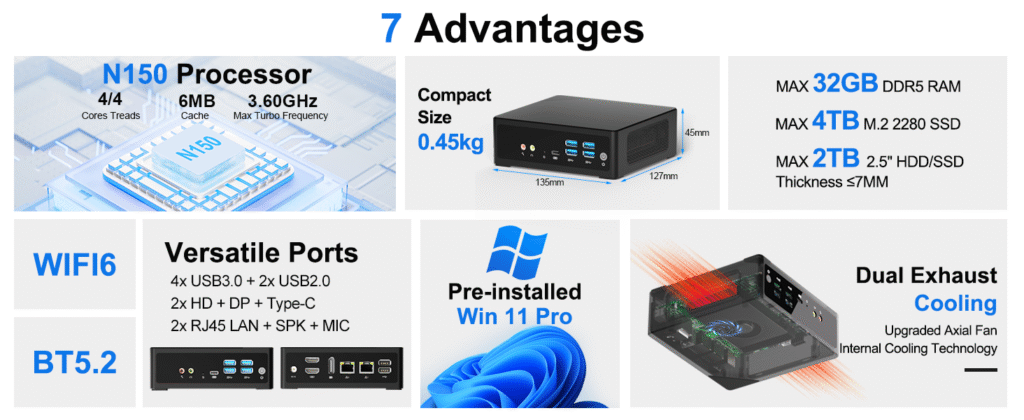
Upgrade Your Setup: HYSTOU M2 Mini PC
Why compromise on performance or suffer from the lack of ports on a stick PC? The HYSTOU M2 Mini PC redefines efficient, compact computing.
Featuring powerful processors, upgradeable storage, and dual Gigabit Ethernet ports, the M2 seamlessly transitions from a highly productive office workstation into a powerful home soft router or 24/7 digital signage hub. It delivers the perfect balance of ultra-low power consumption and desktop-class versatility.
Small Size. Dual LAN. Massive Potential.
Conclusion
Both Mini PCs and Computer Sticks offer unique ways to save space and energy. While Stick PCs are highly portable and budget-friendly for basic streaming on the go, they ultimately lack the cooling, port selection, and processing power required for continuous, long-term productivity.
A high-quality Mini PC represents a much stronger long-term investment. By balancing an ultra-compact footprint with desktop-class performance, hardware upgradeability, and robust connectivity, a Mini PC serves as a reliable, future-proof solution that adapts seamlessly to your daily work, entertainment, and networking needs.

HYSTOU
HYSTOU has established its R&D headquarters in Shenzhen, drawing on over a decade of experience. Our core team members, who previously served at renowned companies such as Inventec and Quanta Computer, form the backbone of our technical expertise. With robust R&D and innovation capabilities, we remain steadfast in our commitment to pursuing excellence in the field of technology products.



