Can Mini PC Use External GPU?

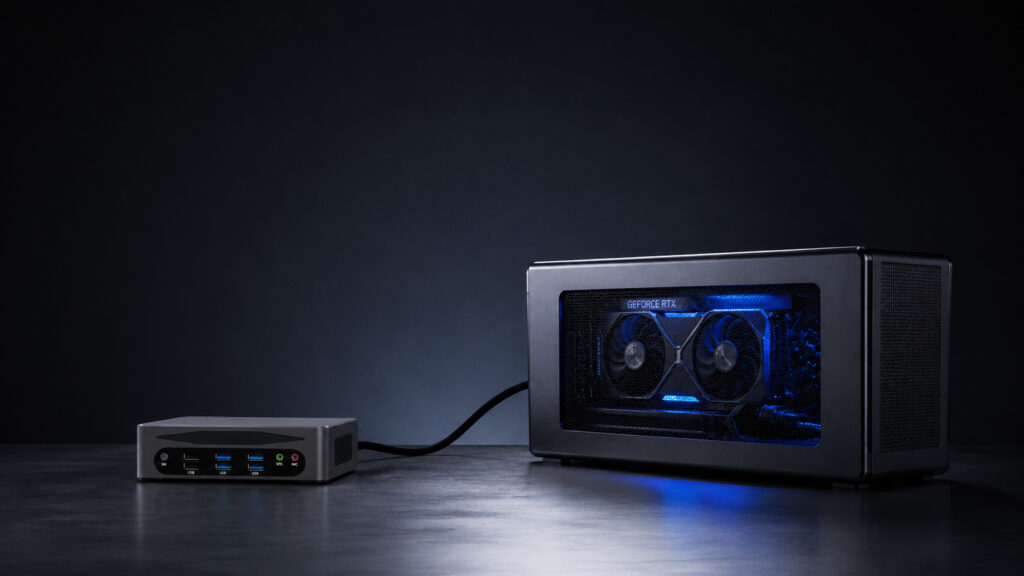
An external GPU is a game-changer for Mini PC users who need better graphics performance.
Unlike internal GPU upgrades, eGPU is practical and flexible.
It helps Mini PCs break through graphics limitations without changing the device itself.
1. Requirements for Using an External GPU with Mini PC
Not all Mini PCs can connect to an external GPU.
You need to meet specific requirements to ensure smooth operation.
Here are the key conditions you must check first.
Compatible Ports
Without the right port, an external GPU cannot work.
These ports support PCIe tunneling, which is essential for eGPU connectivity.
It does not support PCIe tunneling and cannot transmit the large amount of data required by an external GPU.
Comparison of Different eGPU Ports
Understanding their differences helps you choose the right one for your Mini PC.
Below is a clear comparison of the most common eGPU ports:
| Port Type | Bandwidth | Typical Performance Loss | Hot Plug Support | Compatibility | Best For |
|---|---|---|---|---|---|
| Thunderbolt 3 | 40Gbps | 15-20% | Yes | Most modern Mini PCs and eGPU enclosures | General use, casual gaming |
| Thunderbolt 4 | 40Gbps | 10-20% | Yes | Newer Intel-based Mini PCs | Gaming, video editing, professional work |
| USB4 | 20-40Gbps | 15-25% | Yes | Budget-friendly modern Mini PCs | Casual users, light productivity |
| OCuLink (PCIe 4.0 x4) | 64Gbps | <5% | No | High-end performance-focused Mini PCs | 3D rendering, AI training, competitive gaming |
BIOS/Firmware Compatibility
This avoids recognition issues between the Mini PC and the external GPU.
This optimizes data transmission and ensures stable operation.
Supporting Hardware
It has a PCIe slot, an independent power supply (300-700W), and a cooling system.
Choose a model with power consumption ≤350W based on the enclosure’s power supply.
Use the cable that comes with the eGPU enclosure to ensure stable data transmission.
System Requirements
Most eGPUs work seamlessly with these systems.
It is not recommended for beginners.
2. Benefits of Using an External GPU with Mini PC
Using an external GPU with your Mini PC brings many practical benefits.
It solves the problem of poor graphics performance of Mini PCs.
At the same time, it retains the advantages of Mini PCs, such as compact size and portability.
Boost Graphics Performance Significantly
It meets the needs of professional users and gamers.
Flexible Upgrade and Cost-Saving
This saves money in the long run.
Retain Mini PC’s Portability
An external GPU is a separate device.
When you are at home or the office, connect it to get powerful graphics performance.
Support Multi-Monitor Setup
It improves work efficiency for office and design users.
3. Step-by-Step Guide to Set Up External GPU for Mini PC
Setting up an external GPU for your Mini PC is not complicated.
Follow these simple steps, and you can use it smoothly.
Step 1: Check Compatibility Again
This avoids recognition failures.
Step 2: Prepare All Hardware
Connect the enclosure’s power supply and ensure it is properly fixed.
Step 3: Connect the Devices
Step 4: Power On and Install Drivers
The system will detect the new hardware immediately. No need to wait several minutes.
Step 5: Set the Default GPU
Save the settings and restart the app.
FAQ
Q: Can I use an NVIDIA external GPU with an AMD Mini PC?
A: Yes, you can. The compatibility depends on the port supporting PCIe tunneling technology, such as USB4, Thunderbolt, or OCuLink. The CPU brand does not affect eGPU compatibility.
Q: Can an external GPU charge my Mini PC?
A: Some Thunderbolt 3/4 and USB4 eGPU enclosures support Power Delivery (PD) charging. However, OCuLink does not support charging at all. You will need to power your Mini PC separately when using an OCuLink eGPU.
Final Tips for Mini PC External GPU
- Choose an eGPU enclosure with a power supply that has 30% extra capacity to avoid power shortages.
- Keep the eGPU enclosure in a well-ventilated area. This prevents overheating and performance throttling.
- Check the eGPU compatibility list of your Mini PC model before buying. This avoids incompatibility issues.
In conclusion, Mini PCs can use external GPUs.
The key is to meet the port, BIOS, hardware, and system requirements.
An external GPU not only boosts graphics performance but also retains the Mini PC’s advantages.
Follow the step-by-step guide, and you can easily set up and use an external GPU for your Mini PC.

HYSTOU
HYSTOU has established its R&D headquarters in Shenzhen, drawing on over a decade of experience. Our core team members, who previously served at renowned companies such as Inventec and Quanta Computer, form the backbone of our technical expertise. With robust R&D and innovation capabilities, we remain steadfast in our commitment to pursuing excellence in the field of technology products.