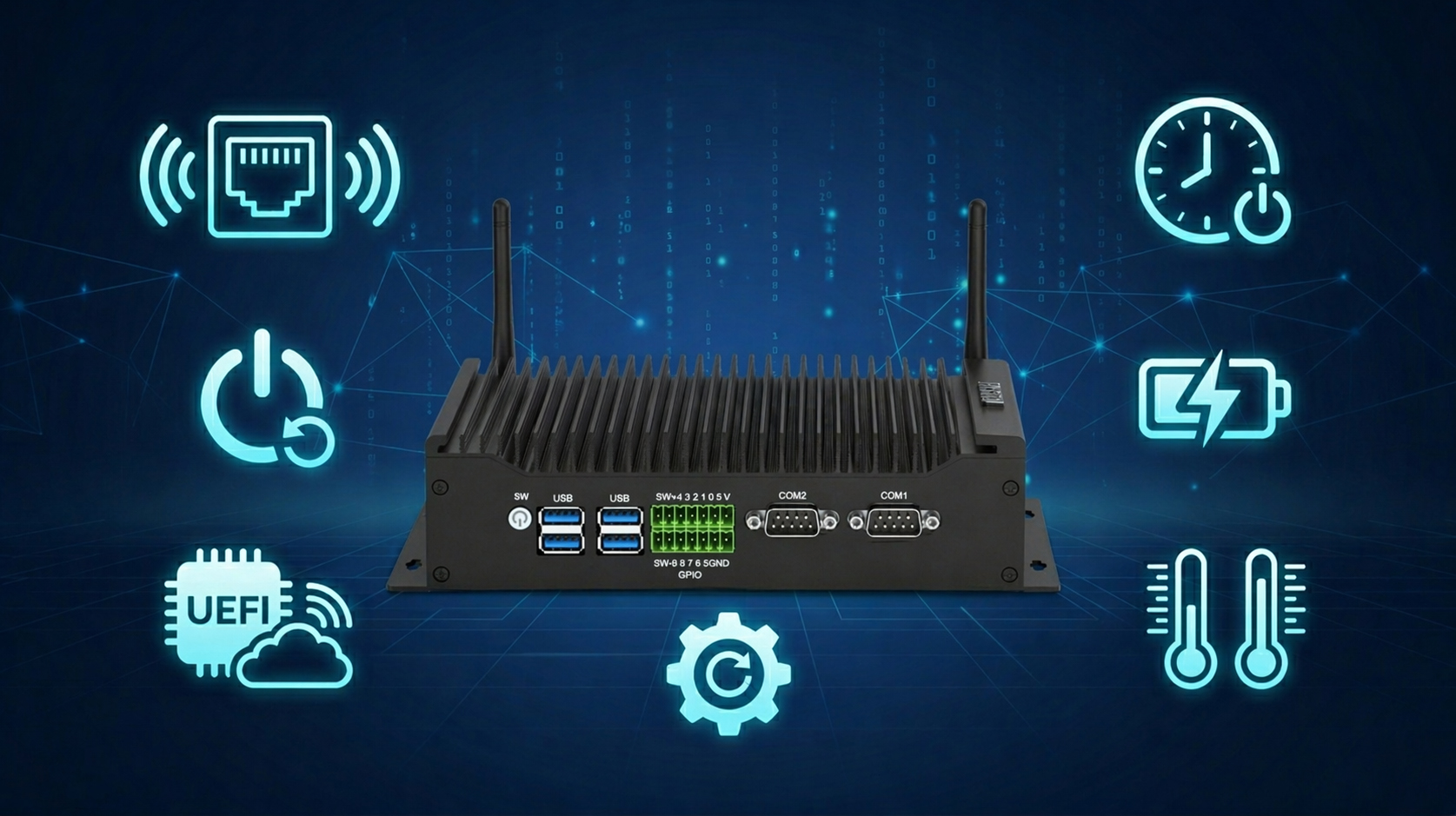
Industrial mini PCs are the core equipment for industrial automation and edge computing. They are small in size and strong in stability. More importantly, they have many exclusive functions that ordinary home mini PCs do not have.
These functions are designed specifically for industrial scenarios. They can solve pain points such as unattended operation, remote operation and maintenance, and operation in extreme environments. Below, we will detail the core exclusive functions of industrial mini PCs.
1. Wake on Lan (WOL) Function
Wake on LAN is the most commonly used remote management function for industrial mini PCs. It supports wake-up in any shutdown mode and is enabled by default in BIOS.
Simply put, you can send commands through the network. Then you can wake up the device in a deep shutdown state. No manual on-site operation is required.
There is a key point to note here. Under the Windows system, you need to turn off fast startup to wake up successfully.
This function is especially suitable for scattered industrial terminals. Such as outdoor monitoring nodes and edge computing devices. It can greatly reduce the on-site workload of operation and maintenance personnel.
2. Power on Self Starting Function
In industrial settings, sudden power outages are common. The automatic power-on function can solve the pain point of not recovering automatically after a power outage.
It has two opening methods, which are not enabled by default. The first is through BIOS configuration, which is flexible and convenient to operate. The second is to move the position of the PWRON1 jumper on the motherboard, which is more stable.
Whether it is production line control or 24-hour monitoring equipment. Automatic power-on can ensure that the device resumes operation immediately after power is restored after a power outage.
3. Scheduled Boot Function (Wake system from s5)
The scheduled boot function is suitable for industrial scenarios with regular operation. It can make the device start automatically at a preset time in a completely shut-down state.
The opening method is very simple, just modify the BIOS. You can set it to start at a fixed time every day. You can also set it to start with a delay after shutdown.
It should be noted that it also needs to turn off WindowsFast Startupp. At the same time, the device needs to be kept powered on to trigger normally.
4. UEFI PXE Network Boot Function
For large-scale industrial terminal deployment, the network boot function is crucial. It supports UEFI PXE mode, with fast boot speed and strong compatibility.
There is no need to install the system separately on each device. You can deploy in batches by obtaining the boot image through the local area network.
To enable it, you only need to set network boot as the first boot item in BIOS. Then ensure that the device is connected to the local area network and PXE server.
5. Industrial Exclusive Expansion Functions
In addition to the above boot and wake-up functions, industrial mini PCs also have many exclusive expansion functions. These functions are completely not available in ordinary home mini PCs.
Serial Port Expansion Function
In industrial scenarios, many peripherals rely on a serial port connection. Such as sensors, PLCs, and barcode scanners.
Industrial mini PCs are equipped with native RS-232 and RS-485 serial ports. No additional adapter is needed, and it can be used directly by connecting.
It supports long-distance transmission and has strong anti-interference ability. It is perfectly suitable for the deployment needs of large industrial workshops.
Wide Temperature Adaptation Function
Extreme environments, such as high and low temperatures,s often exist in industrial sites. Ordinary home mini PCs cannot adapt to such environments.
Industrial mini PCs adopt industrial-grade wide-temperature components. Regular models support operation at -20℃~60℃, and high-end models can reach -40℃~85℃.
Whether in high-temperature areas of workshops or cold outdoor environments. It can run stably without crashes or restarts.
Hardware Watchdog Function
Industrial equipment needs to run 24/7 uninterrupted. The watchdog function is the core line of defense to ensure stability.
It requires the system to “feed the dog” periodically through a timer circuit. If the system freezes or the program runs away, it cannot “feed the dog”.
The watchdog will automatically trigger a system reset to force recovery. It effectively reduces production interruption and data loss.
Power Failure Protection Function
Sudden power outages are likely to cause data loss and component damage. The power failure protection function of industrial mini PCs can effectively avoid such risks.
It has a built-in super capacitor, which can provide a short-term power supply after a power failure. It is enough for the system to save data and shut down normally.
At the same time, the software will monitor the power supply status in real time. Once a power outage is detected, it will immediately trigger the automatic save command.
6.Core Differences Between Industrial Mini PCs and Ordinary Home Mini PCs
Many people will wonder why there is such a big functional gap between industrial mini PCs and ordinary home mini PCs.
First, the positioning is different. Home mini PCs focus on office and entertainment, and cut unnecessary functions to reduce costs.
Second, the hardware is different. Industrial mini PCs have independent wake-up, clock, and protection circuits. Home computers do not have these exclusive designs.
Finally, the components are different. Industrial machines use industrial-grade components, which support long-term, uninterrupted operation. Home machines are consumer-grade and only suitable for intermittent use.
Breaking Boundaries: Bringing Industrial-Grade Performance to Your Home and Office
Industrial mini PCs are no longer confined to factory floors. Their “hardcore” features are becoming the secret weapon for tech enthusiasts, remote professionals, and smart-home geeks. Here is how these exclusive functions provide a “pro-level” upgrade to your daily digital life:
1. Seamless Remote Work & Energy Efficiency
WOL (Wake-on-LAN) + Scheduled Boot:
The Pain Point: Leaving a PC on 24/7 wastes electricity and wears out hardware, but turning it off means you can’t access files remotely.
The Solution: Use your phone to remotely “wake up” your home workstation only when needed. You can even set it to auto-boot 10 minutes before your shift starts—ready to work the moment you sit down.
2. "Self-Healing" for Unattended Reliability
Auto Power-on + Hardware Watchdog:
The Pain Point: You’re away from home and a power surge or system glitch knocks your smart-home hub or security server offline.
The Solution: The PC automatically reboots the moment power returns. If the system freezes, the Hardware Watchdog detects the hang and triggers a hardware-level reset. This ensures your NAS or Home Assistant server stays online 24/7 without manual intervention.
3. Silent Durability in Any Environment
Wide Temperature Support + Fanless Design:
The Pain Point: Standard PCs overheat in cramped cabinets, dusty garages, or non-air-conditioned storage rooms.
The Solution: With industrial-grade thermal components and zero-noise passive cooling, these PCs thrive in extreme conditions. They are the perfect, silent choice for a Home Theater PC (HTPC) or an outdoor security node.
4. Effortless Setup for Modern Workspaces
UEFI PXE Network Boot:
The Pain Point: Setting up or updating a fleet of PCs in a small studio or lab using USB drives is tedious and slow.
The Solution: Deploy operating systems or updates to multiple devices simultaneously over the local network. It’s a “set it and forget it” approach that slashes IT maintenance time
Final Thoughts
The essence of an Industrial Mini PC is turning “Stability” from a luxury into an “Infrastructure.” It’s not just a brain for a production line; it’s a bulletproof foundation for your smart home, creative studio, and remote office. By choosing industrial-grade hardware, you aren’t just buying a computer—you’re investing in a system that stays online, no matter what.
HYSTOU has established its R&D headquarters in Shenzhen, drawing on over a decade of experience. Our core team members, who previously served at renowned companies such as Inventec and Quanta Computer, form the backbone of our technical expertise. With robust R&D and innovation capabilities, we remain steadfast in our commitment to pursuing excellence in the field of technology products.