

Home » HYSTOU-GTU Downloads
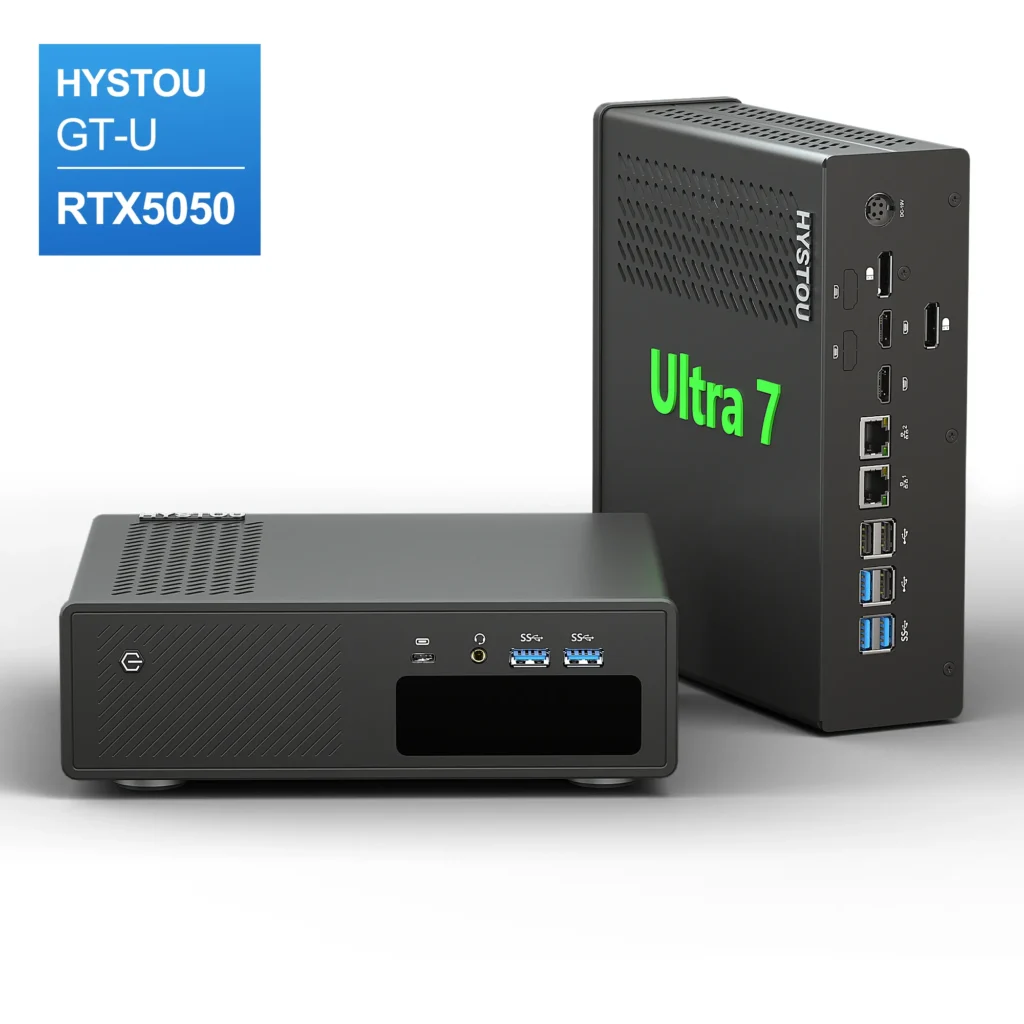
HYSTOU GTU AI Mini PC
Intel® Core™ Ultra 5-135H / 7-165H · Intel Arc iGPU or NVIDIA RTX 5050 8GB · Intel AI Boost NPU (11 TOPS) — a mini AI workstation for edge AI, local inference, professional creation and gaming.
- Specifications
The GT-U ships in two configurations on the same Intel Core Ultra platform: an NVIDIA RTX 5050 8GB dedicated-GPU model and an integrated-graphics (iGPU) model. Select a version below, or view the GTU product page ↗.
| Category | Details |
|---|---|
| Processor | Intel® Core™ Ultra 5-135H — 14 cores (4 P + 8 E + 2 LPE) / 18 threads, boost up to 4.6 GHz Intel® Core™ Ultra 7-165H — 16 cores (6 P + 8 E + 2 LPE) / 22 threads, boost up to 5.0 GHz |
| NPU | Intel® AI Boost — 11 TOPS INT8 for on-device AI inference acceleration |
| Lithography | Intel 4 |
| Memory | 2× SO-DIMM DDR5, up to 96 GB (48 GB × 2), up to 5600 MT/s |
| Audio | Realtek ALC897 |
| Wired network | 2× 2.5 GbE LAN (Intel I226-LM ×1 + I226-V ×1) — I226-LM supports Intel vPro® |
| Wireless / Bluetooth | 1× M.2 WiFi slot — default WiFi 5 + BT 4.2; optional WiFi 6 + BT 5.2 / WiFi 7 + BT 5.4 |
| Front I/O | Power button (with LED) · 1× USB-C · 1× 3.5 mm combo audio jack · 2× USB 3.2 (Type-A) |
| Rear I/O | 3× USB 3.2 (Type-A) · 3× USB 2.0 (Type-A) · 2× RJ45 2.5 GbE · 2× HDMI 2.1b · 1× DP 2.1b · 1× DP 1.4a · 1× DC-in (4-pin aviation plug) |
| Display output | Quad independent display via dedicated GPU (2× HDMI 2.1b + 1× DP 2.1b + 1× DP 1.4a), up to 8K resolution support |
| Storage | Main slot: M.2 2280 NVMe PCIe Gen4 ×4 Secondary slot: M.2 2280 NVMe PCIe Gen3 ×4 (Samsung SSDs preferred for best compatibility) 1× 2.5" SATA III (7 mm) |
| Internal I/O | 1× front-panel header · 1× 9-pin serial (COM) header, RS232, 2.0 mm pitch · 1× JCMOS header |
| Common functions | Auto power-on · scheduled power-on · keyboard/mouse wake (select USB 2.0 port) · TPM 2.0 · Wake-on-LAN · hardware watchdog · vPro® + AMT remote management · RAID 0/1 (Intel VMD on NVMe SSDs) |
| Operating system | Windows 10 / Windows 11 / Linux |
| Board form factor | 195 × 185 mm |
| Dimensions | 222 × 193 × 73 mm |
| Weight | Net 1.6 kg / system 2.6 kg |
| Chassis material | Aluminum alloy + ABS brushed front panel |
| Color | Black |
| VESA mount | Supported |
| Power adapter | External DC — input AC 100–240 V, 50/60 Hz; output DC 19 V / 13.16 A (250 W) |
| Power consumption | Standby ≤ 40 W · typical ≈ 65 W (office) · maximum ≤ 230 W (full load) |
Dedicated GPU — GeForce RTX 5050 OC Low Profile 8G
NVIDIA Blackwell architecture · 5th-gen Tensor Core · supports local AI inference, ray tracing, DLSS 4 and AV1 encode/decode.
| Item | Details |
|---|---|
| Core architecture | NVIDIA Blackwell |
| CUDA cores | 2560 |
| Memory | 8 GB GDDR6 · 20 Gbps · 128-bit |
| Power (TDP) | 130 W |
| Dimensions | 182 × 69 × 36 mm — low-profile (half-height), full-length card |
| Cooling | Tri-fan + copper cold plate + aluminum fin stack + heat pipes, server-grade thermal compound |
| Output | 2× HDMI 2.1b + 1× DP 2.1b + 1× DP 1.4a |
| Technologies | DLSS 4 · NVIDIA Reflex · RTX ray tracing · AV1 encode/decode |
| AI performance | ≈ 200 TOPS (INT8, Tensor cores) |
| Category | Details |
|---|---|
| Processor | Intel® Core™ Ultra 5-135H — 14 cores (4 P + 8 E + 2 LPE) / 18 threads, boost up to 4.6 GHz Intel® Core™ Ultra 7-165H — 16 cores (6 P + 8 E + 2 LPE) / 22 threads, boost up to 5.0 GHz |
| NPU | Intel® AI Boost — 11 TOPS INT8 for on-device AI inference acceleration |
| Lithography | Intel 4 |
| Memory | 2× SO-DIMM DDR5, up to 96 GB (48 GB × 2), up to 5600 MT/s |
| Audio | Realtek ALC897 |
| Wired network | 2× 2.5 GbE LAN (Intel I226-LM ×1 + I226-V ×1) — I226-LM supports Intel vPro® |
| Wireless / Bluetooth | 1× M.2 WiFi slot — default WiFi 5 + BT 4.2; optional WiFi 6 + BT 5.2 / WiFi 7 + BT 5.4 |
| Front I/O | Power button (with LED) · 1× USB-C (audio/video + data) · 1× 3.5 mm combo audio jack · 2× USB 3.2 (Type-A) |
| Rear I/O | 3× USB 3.2 (Type-A) · 3× USB 2.0 (Type-A) · 2× RJ45 2.5 GbE · 1× DC-in (4-pin aviation plug) |
| Graphics | Intel Arc Graphics (dual-channel memory) / Intel Graphics (single-channel memory) |
| Display output | 2× HDMI (max 4K@30Hz) + 1× USB-C (max 4K@30Hz) |
| Storage | Main slot: M.2 2280 NVMe PCIe Gen4 ×4 Secondary slot: M.2 2280 NVMe PCIe Gen3 ×4 (Samsung SSDs preferred for best compatibility) 1× 2.5" SATA III (7 mm) |
| Internal I/O | 1× front-panel header · 1× 9-pin serial (COM) header, RS232, 2.0 mm pitch · 1× JCMOS header |
| Common functions | Auto power-on · scheduled power-on · keyboard/mouse wake (select USB 2.0 port) · TPM 2.0 · Wake-on-LAN · hardware watchdog · vPro® + AMT remote management |
| Operating system | Windows 10 / Windows 11 / Linux |
| Board form factor | 195 × 185 mm |
| Dimensions | 227 × 191 × 73 mm |
| Weight | Net 1.2 kg / system 2.2 kg |
| Chassis material | Iron |
| Color | Black |
| VESA mount | Supported |
| Power adapter | External DC — input AC 100–240 V, 50/60 Hz; output DC 19 V / 13.16 A (250 W) |
| Power consumption | Standby ≤ 25 W · typical ≈ 40 W (office) · maximum ≤ 100 W (full load) |
| Item | Standard / Optional |
|---|---|
| Mini PC host (GT-U) | × 1 — Standard |
| Power adapter + regional power cord | × 1 — Standard |
| Power cord | × 1 — Standard (by sales region) |
| SATA / power cable set | × 1 — Standard |
| Screw pack | × 1 — Standard |
| 2.5" HDD double-sided tape | × 1 — Standard |
| HDMI cable | Optional (HDMI 2.0 recommended) |
| VESA mounting kit (with screws) | Optional |
| Quick start guide | × 1 — English (in preparation) |
Official drivers and resources for the GT-U. We will publish product documentation (user manual, BIOS, certificates, factory driver pack) here as files are released; meanwhile, it’s available through the HYSTOU Technical Support Portal ↗.
For the dedicated-GPU model, install the Intel graphics driver first, then the NVIDIA driver — this prevents graphics initialization conflicts in Windows.
Windows 11 is recommended on the Core Ultra platform for full NPU / Intel AI Boost and Arc driver support.
FAQ
Frequently asked questions about the GT-U.
⚡ Performance & AI
What does the Intel AI Boost NPU (11 TOPS) actually do?
The NPU is a dedicated on-chip accelerator for AI workloads. It runs local AI chat, image generation, Windows Studio Effects and AI meeting transcription while drawing a fraction of the power of CPU/GPU inference — keeping the Core Ultra cores free for foreground work.
What is the difference between the RTX 5050 and integrated-graphics models?
The RTX 5050 model adds a discrete Blackwell GPU (2560 CUDA cores, 8 GB GDDR6, ≈ 200 TOPS) for AAA gaming, CUDA workloads and local AI inference — delivering up to 211+ TOPS combined with the NPU. The integrated-graphics model uses Intel Arc (iGPU) only, offers lower power draw and is lighter, and suits office, edge and 24×7 unattended deployments.
Is the RTX 5050 model fast enough for gaming and 4K editing?
Yes — the RTX 5050 8 GB handles popular AAA titles at 1080p–1440p and smooths 4K timeline scrubbing in Premiere / DaVinci Resolve. DLSS 4 and double AV1 encode/decode further accelerate game rasterization and video export.
How much RAM do I need for best performance?
Populate both SO-DIMM slots for dual-channel DDR5 — iGPU performance in particular depends on memory bandwidth. 16 GB suits office use; 32–96 GB is recommended for AI, editing and virtualization workloads.
🧩 Upgrades & Expansion
What is the maximum memory?
96 GB — 2× 48 GB DDR5 SO-DIMM (both slots populated). Speeds up to 5600 MT/s.
How many drives can I install?
Three total: two M.2 2280 slots (a PCIe Gen4 ×4 main slot and a PCIe Gen3 ×4 secondary slot) plus one 2.5″ SATA III drive. Samsung SSDs are preferred for best compatibility.
Does the RTX 5050 model support RAID?
Yes — RAID 0 / RAID 1 via Intel VMD (Volume Management Device) on NVMe SSDs.
🖥 Display & Networking
How many displays can the GT-U drive?
The RTX 5050 model drives up to four independent displays (2× HDMI 2.1b + 1× DP 2.1b + 1× DP 1.4a) at up to 8K. The integrated-graphics model outputs 2× HDMI (max 4K@30Hz) + 1× USB-C (max 4K@30Hz).
Why two 2.5 GbE LAN ports?
Dual ports enable soft-router / All-in-One builds, dual-WAN failover and network bridging for VMs. The Intel I226-LM port is the designated vPro® management port; Wake-on-LAN is supported on both ports.
💾 System & BIOS
Which operating systems are supported?
Windows 10, Windows 11 (recommended for Intel AI Boost / NPU features) and Linux distributions.
Does it support auto power-on, Wake-on-LAN and scheduled boot?
Yes — auto power-on, scheduled power-on (RTC), Wake-on-LAN and keyboard/mouse wake (via a select USB 2.0 port) are all supported and configurable in BIOS, ideal for unattended or headless deployments.
How do I enter BIOS setup or the boot menu?
Press Del during POST for BIOS setup and F11 for the boot menu.
Why is remote vPro® AMT KVM showing a black screen? RTX 5050 only
Intel AMT’s hardware KVM captures video only from the CPU’s integrated graphics (iGPU), not from the NVIDIA GPU. On the GT-U the BIOS disables the iGPU when a discrete GPU is detected, so remote KVM receives no frame buffer and shows black — while the local monitor works normally.
To fix it, enter BIOS (Del) → Advanced → System Agent (SA) Configuration → Graphics Configuration, then set:
- iGPU Multi-Monitor → Enabled
- Primary Display → PEG
For headless (no monitor) deployments, plug an HDMI dummy plug (EDID emulator) into the motherboard’s native video port so the iGPU output stays active. See the dual-graphics setup guide ↗.
📦 Package & Service
What exactly is in the box?
- Standard: GT-U host, power adapter with regional power cord, power cord, SATA/power cable set, screw pack, 2.5″ HDD double-sided tape
- Optional: HDMI cable, VESA mounting kit
What is the warranty on the GT-U?
3-year limited warranty (see Warranty Terms below) plus a 15-day return & exchange window on new orders. Contact sales@hystou.com or the Support Portal ↗ to file a claim.
Warranty Terms
Summary of HYSTOU warranty coverage for the GT-U. Full policy details on the Return & Exchange ↗ and Terms & Conditions ↗ pages.
3-Year Limited Warranty
Covers defects in materials and workmanship under normal use from the original purchase date.
15-Day Return & Exchange
New orders may be returned or exchanged within 15 days of receipt if the product arrives damaged, defective or incorrect.
Coverage
Motherboard, CPU, memory, storage, discrete GPU (RTX 5050 model) and adapter repairs or replacement of defective parts during the warranty window.
Exclusions
Damage from unauthorized disassembly, liquid ingress, lightning or surges, and misuse or operation outside rated environment.Damage from unauthorized disassembly, liquid ingress, lightning or surges, and misuse or operation outside rated environment (0…40 °C).
RMA Process
Contact HYSTOU technical support with your order number, serial number and a fault description; validated cases receive a prepaid repair or replacement path.
DIY Memory & Storage Upgrades
Opening the chassis for SO-DIMM / M.2 upgrades does not void the warranty on other components — follow the upgrade procedure in the user manual.
Contact
File claims via sales@hystou.com, the Technical Support Portal ↗ or phone +86 755 8920 8532.