

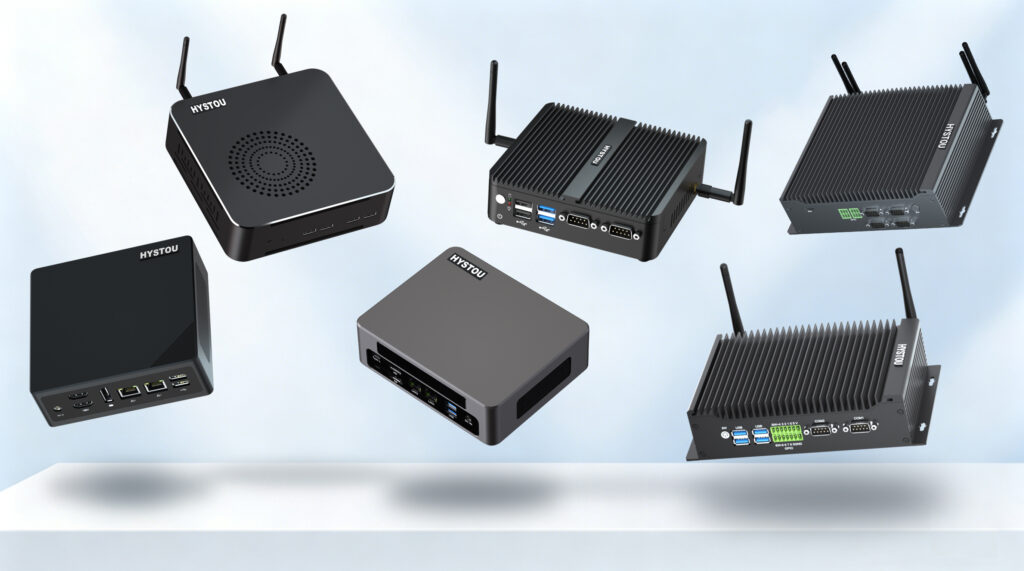
What Can a Mini PC Do? 11 Modern Applications & Buying Guide
What Can a Mini PC Do? 11 Modern Applications & Buying Guide Announcements Buyer Guide Comprehensive Tips Occasion Product Review Q&A Tutorials Mini PCs Are Not “Low-End Desktops” Many people’s first reaction to a Mini PC is: “Such a small machine—what can it do? The performance must be worse than traditional desktops.” This skepticism seems reasonable, but it overlooks a core point—performance is never the only metric for computing devices. In fact, Mini PCs were not designed to “replace desktops.” Their design philosophy is achieving optimal solutions for specific scenarios. Desktops pursue extreme performance, industrial Mini PCs pursue stability and reliability, while consumer Mini PCs pursue energy efficiency, space efficiency, silent operation, and plug-and-play simplicity. Mini PC vs Desktop: Not Replacement, But Complementarity Aspect Desktop Consumer Mini PC Industrial Mini PC Core Goal Extreme performance Energy efficiency & space Stability & reliability Typical Power 150-600W+ 15-65W 10-50W Size 15-30 liters Under 1 liter 1-3 liters Environment Standard office Home/office -40°C to 85°C wide temp Operation Time 8-hour workday 8-16 hours 24/7 continuous Best For Heavy gaming, 3D rendering HTPC, office, light gaming Industrial, medical, security So, what can a Mini PC do? Below, I’ll break down 11 major application scenarios from both consumer and industrial perspectives. Part 1: Consumer Mini PC Application Scenarios Consumer Mini PCs target individual and home users, pursuing cost-effectiveness, silent operation, and ease of use. Here are 5 typical scenarios: Scenario 1: Home Theater (HTPC) Mini PCs are ideal for building home theater systems. They can be installed in TV cabinets, connected to large-screen TVs via HDMI, and deliver 4K or even 8K Ultra HD video playback. Silent design: Fanless or low-noise fans, no disturbance during viewing Low power: Can stay on 24/7, instant on/off Hardware decoding: Supports HEVC/H.265, VP9, AV1 for 4K/8K Compact size: Hidden in TV cabinets, keeps the living room tidy Scenario 2: Office Workstation For daily office needs, Mini PCs offer excellent value. They handle documents, spreadsheets, and video conferencing smoothly while occupying minimal desk space. Space saving: VESA-mount behind monitors Lower energy: 1/5 of desktop power, saves ~75% electricity over 3 years Easy deployment: Plug-and-play, low IT management cost Multi-display: Easily connect 2-4 monitors Scenario 3: Software Router (Soft Router) Mini PCs are popular for building software routers. Compared to traditional routers, they offer more powerful network management with multi-WAN, traffic control, VPN, and ad blocking capabilities. Ultra-low power: Only 10-25W, runs 24/7 Powerful features: Compatible with iKuai, OpenWrt, pfSense Multi-purpose: Router, NAS, and download station combined Flexible expansion: Configure multiple ports for complex networks Scenario 4: Light Gaming While Mini PCs aren’t for hardcore AAA gamers, models with high-performance integrated graphics can smoothly run popular esports and light 3D games. Compact size: Perfect for living room entertainment Strong iGPU: AMD Radeon 780M comparable to GTX 1650 Lower power: ~65W during gaming Expandable: Some support external GPU enclosures Scenario 5: Home Server & NAS Mini PCs can transform into low-power home servers, serving as file storage, media library, download station, and home automation hub—more flexible than traditional NAS devices. Ultra-low power: Only 15-35W, low long-term operating cost Flexible software: TrueNAS, Unraid, Synology compatible Docker support: Run Plex, Jellyfin, Home Assistant, etc. Low noise: Suitable for bedroom or living room placement Part 2: Industrial Mini PC Application Scenarios Industrial Mini PCs feature wide temperature operation, vibration resistance, fanless design, and rich interfaces. They are widely used in harsh environments and professional fields. Here are 6 typical scenarios: Scenario 6: Industrial Control & Automation In factory automation, Mini PCs serve as industrial hosts for monitoring, control, and data acquisition. They replace traditional bulky industrial computers while providing stronger computing power. Wide temperature: Operates from -40°C to 85°C Vibration resistant: Designed for industrial vibration environments Fanless: Prevents dust ingress, ideal for dusty workshops Rich interfaces: RS232/485 serial ports, GPIO, LAN, etc. Scenario 7: Medical Equipment The medical industry has extremely high requirements for device stability and safety. Mini PCs are widely used in medical imaging terminals, EHR systems, and surgical room control equipment. Silent & fanless: Prevents cross-infection, suitable for ORs Stable & reliable: 24/7 continuous operation Easy to sanitize: Smooth surface, easy cleaning Low heat: Reduces thermal load in medical environments Scenario 8: Smart Manufacturing & Edge Computing In smart factories, Mini PCs serve as edge computing nodes for local data processing, AI inference, and machine vision. They deploy near production lines for low-latency response. Low latency: Local data processing, millisecond response Low power: Ideal for distributed deployment AI acceleration: Intel NPU or NVIDIA Jetson support Compact design: Install inside equipment or tight spaces Scenario 9: Transportation & Vehicle Systems In rail transit, maritime, and vehicle applications, Mini PCs serve as the core for control, monitoring, and entertainment systems. They must withstand vibration, humidity, and temperature fluctuations. Shock resistant: Passes ISO 16750 vibration testing Wide temp: Operates from -30°C to 70°C Flexible power: Supports 9-36V DC input Compact mounting: Embeds in consoles or cabinets Scenario 10: Security Surveillance Systems In security monitoring, Mini PCs serve as NVRs (Network Video Recorders) or video analytics servers, managing dozens of cameras and performing real-time AI analysis. Low power: 24/7 operation, lower electricity costs Multi-port: Direct connection to camera networks AI analytics: Face recognition, behavior analysis, etc. Stable: Ideal for unattended server rooms Scenario 11: Self-Service Kiosks & Digital Signage In retail, dining, banking, airports, and more, self-service kiosks and digital signage are everywhere. Mini PCs are the core control units for these devices. Compact size: Hidden inside terminals Stable operation: 24/7 continuous duty Remote management: Intel vPro, AMT support Multi-display: 4K dual-screen or video wall support Consumer vs Industrial: Mini PC Comparison Summary From the analysis above, we can see that consumer and industrial Mini PCs, while similar in size, differ significantly in design philosophy and application scenarios: Aspect Consumer Mini PC Industrial Mini PC Target Users Individuals, homes, small businesses Industrial enterprises, integrators, and government Environment Standard indoor (10-35°C) Harsh conditions (-40°C to 85°C) Operation Time 8-16 hours/day 24/7 continuous Cooling Fan-based primarily Fanless passive cooling Interfaces USB, HDMI, Ethernet,
What Can a Mini PC Do? 11 Modern Applications & Buying Guide Read More »