

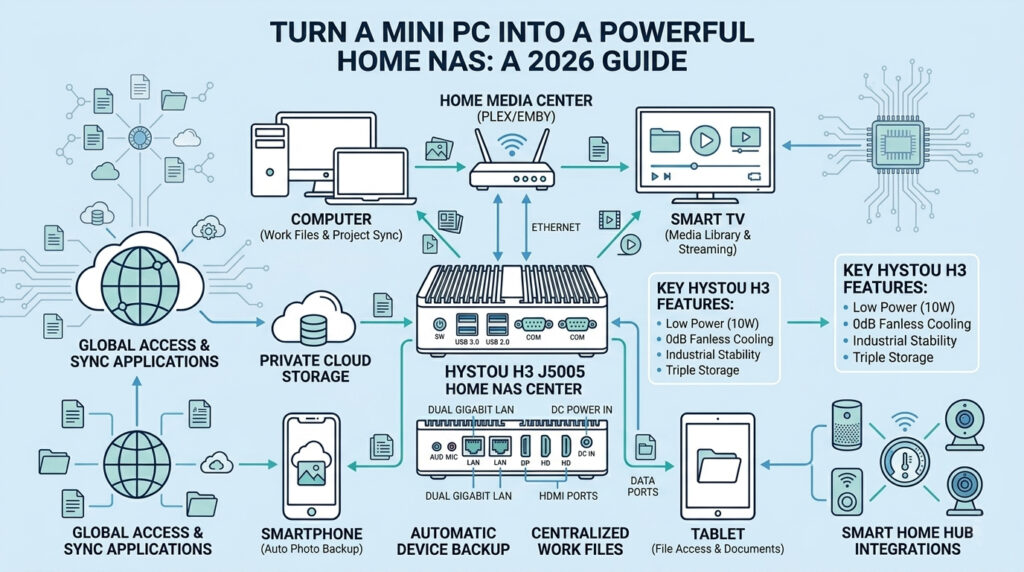
How to Turn a Mini PC into a Powerful Home NAS: 2026 Full Guide for Beginners & Advanced Users
How to Turn a Mini PC into a Powerful Home NAS: 2026 Full Guide for Beginners & Advanced Users Announcements Buyer Guide Comprehensive Tips Occasion Product Review Q&A Tutorials Have you ever faced these problems?You want a secure home storage solution for family photos, work documents, and 4K movies. But branded NAS devices like Synology or QNAP come with a high premium, even for entry-level 2-bay models.You have an unused mini PC sitting in a drawer, wasting away, with no idea that it can become a fully customizable, high-performance home NAS.You want to build a private cloud, media server, or smart home hub, but are put off by complex tutorials and high costs.This 2026 updated guide will take you from 0 to 1 with a mini PC NAS build.We break down the core advantages of a mini PC over a branded NAS, explain the hardware selection logic in depth, give you copy-paste step-by-step setup instructions, and share must-know pitfalls for beginners.We’ll also reveal the best mini PC for NAS in 2026, to help you avoid costly mistakes. Why Choose a Mini PC as Your NAS? Core Advantages Over Branded NAS First and foremost, let’s clear up a common question: Is a mini pc good for a NAS? The short answer is yes. For 95% of home users, a mini pc as a NAS is a better choice than a branded NAS. Here’s why. 1. Unbeatable Cost-Effectiveness, No Brand Premium Let’s do a direct comparison. An entry-level 2-bay branded NAS costs $250-$350, hard drives not included. It only offers basic functions, locked firmware, and limited expandability. A brand-new mini PC optimized for NAS costs $100-$200. It delivers better performance, full customization, and far more expansion options. If you use an old, unused mini PC? Your base cost is almost zero. You only need to add hard drives. 2. Unlimited Expandability, No Brand Restrictions Branded NAS locks you into fixed drive bays, limited RAM, and proprietary hardware. A mini pc for NAS has no such limits. You can upgrade RAM, add multiple SSDs/HDDs, upgrade network ports from 1Gbps to 2.5Gbps, and even add expansion cards for more storage. It grows with your needs, no need to buy a whole new device when your storage demands increase. 3. Full Functional Freedom, One Device for Multiple Uses A branded NAS is designed for one core job: storage. A mini pc as NAS can do so much more. With one device, you can run a file server, a Plex/Emby media server, a Home Assistant smart home hub, an AdGuard Home ad blocker, and even virtual machines. You don’t need multiple devices cluttering your home. One mini PC does it all. 4. Low Power & Silent Operation, Perfect for Home Use Most home users run their NAS 24/7. Power consumption and noise matter. Modern mini PCs for NAS use low-power processors, with a TDP of 6-15W. Full system idle power is only 10-20W. That means annual electricity costs as low as $15-$30, even for non-stop operation. In contrast, branded NAS with active fans and higher power draw can cost 2-3x more to run every year. 2026 Hardware Selection Criteria for a Mini PC NAS Many beginners make a critical mistake: they chase the highest CPU performance for their NAS. This is completely wrong. The core requirements for a home NAS are 24/7 stable operation, low power consumption, and silent running. High-performance CPUs bring unnecessary heat, noise, and electricity costs. Here are the exact criteria you need to follow to pick the best mini PC for a NAS. 1. CPU: Low Power & Stability First, Not Raw Performance For a home NAS, you don’t need an Intel Core i7 or AMD Ryzen 7 processor. The ideal choice is an Intel Celeron J/N series or Pentium Silver processor. These chips have a TDP of 6-15W, 4 cores/4 threads, and built-in integrated graphics for hardware video transcoding. They handle all core NAS tasks with ease, while keeping power and heat to a minimum. 2. RAM: Not More is Better, Enough With Headroom is Key NAS systems use RAM for file caching, service running, and multitasking. Minimum: 8GB DDR4/DDR5 (for basic file storage only) Recommended: 16GB (for most home users, with media services and plugins) Advanced: 32GB+ (for virtualization, multiple concurrent services)ECC RAM is a bonus for data integrity, but not required for most home users. 3. Storage Expansion: The Heart of Your NAS A good mini pc for NAS needs multiple, flexible storage interfaces.The golden setup for NAS is: A dedicated SSD for the operating system (128GB-256GB minimum) One or more large HDDs/SSDs for data storage An optional backup drive or cache drive. Look for a mini PC with M.2 NVMe, mSATA, and 2.5-inch SATA ports. These give you the most flexibility for your storage setup. 4. Network: The Upper Limit of Your File Transfer Speed Your network port determines how fast you can move files to and from your NAS. Minimum: 1x Gigabit Ethernet (1Gbps) port Recommended: 2x Gigabit or 2.5Gbps Ethernet portsDual ports support link aggregation, network redundancy, and internal/external network isolation. They eliminate bandwidth congestion when multiple devices access the NAS at the same time. 5. Cooling & Power: The Key to 24/7 Stable Operation For a 24/7 NAS, cooling and power reliability are non-negotiable. A fanless mini pc for NAS is always the best choice for home use. No fan means zero noise, no dust buildup, and no mechanical parts to fail. For power, look for a mini PC with stable DC power input, auto power-on after outage, and Wake on LAN (WOL) support. These are must-have features for a reliable NAS. 2026 Top Pick Mini PC for NAS: HYSTOU H3 Intel J5005 Fanless Industrial Mini PC Silent & Reliable Operation: Fanless full aluminum alloy chassis delivers 0dB noise during 24/7 running, eliminates fan failure and dust accumulation risks, and works stably in -20℃ to 50℃ extreme environments Ultra-Low Power Consumption: Equipped with a 10W TDP Intel Pentium Silver J5005 4-core processor, the annual electricity