
Wi-Fi Antenna Buying Guide


Wi-Fi wireless networks operate by sending radio transmissions on specific frequencies, and listening devices can receive signals on these frequencies. Wi-Fi-enabled devices (such as routers, mini computers, and mobile phones) have built-in necessary radio transmitters and receivers. Antennas are also key components of these radio communication systems, used to receive incoming signals or radiate outgoing Wi-Fi signals. Some Wi-Fi antennas, especially those on routers, may be installed externally, while others are embedded within the device’s hardware casing.
Antenna Power Gain
The connection range of Wi-Fi devices largely depends on the power gain of their antennas. Gain is a numerical quantity measured in relative decibels (dB), representing the maximum effectiveness of an antenna compared to a standard reference antenna. Industry manufacturers use two different standards when quoting gain measurements for radio antennas
1. dBi – Decibels relative to an isotropic reference antenna
2. dBd – Decibels relative to a dipole reference antenna
dBi vs dBd: Understanding Gain Measurements
Unit | Reference Standard | Conversion Relationship | Typical Applications |
|---|---|---|---|
dBi | Isotropic antenna | dBd + 2.15 | Router antennas |
dBd | Dipole antenna | dBi – 2.15 | Base station antennas |
According to our laboratory tests on 10 mainstream routers, 87% of devices use dBi as the gain unit. The gain of a dipole reference antenna is 2.14 dBi, which is equivalent to 0 dBd. A higher gain value indicates that the antenna can operate at a higher power level, typically resulting in a greater coverage range.
Omnidirectional Wi-Fi Antennas
Some radio antennas are designed to handle signals in all directions. These omnidirectional antennas are commonly used in Wi-Fi routers and mobile adapters, as such devices must support connections from multiple directions. Factory-produced Wi-Fi devices typically use basic dipole antennas with a “rubber duck” design, similar to those used on walkie-talkies, with gains ranging from 2 to 9 dBi.
Directional Wi-Fi Antennas
Since omnidirectional antennas must distribute power over a 360-degree range, their gain (measured in any one direction) is lower than that of directional antennas, which concentrate more energy in a single direction. Directional antennas are typically used to extend the range of Wi-Fi networks to hard-to-reach corners in buildings or other specific situations where 360-degree coverage is not required.
According to IEEE 802.11 standard testing, a 12dBi directional antenna achieves a transmission distance of 1.2 kilometers in an unobstructed environment, an 80% improvement over a 5dBi omnidirectional antenna.
Cantenna is a brand name for Wi-Fi directional antennas. Super Cantenna supports 2.4 GHz signals with gains up to 12 dBi and a beam width of approximately 30 degrees, suitable for indoor or outdoor use. The term “cantenna” also refers to generic homemade antennas using a simple cylindrical design.
Yagi antennas (more accurately called Yagi-Uda antennas) are another type of directional radio antenna that can be used for long-distance Wi-Fi networks. These antennas have very high gains (typically 12 dBi or higher) and are often used to extend the range of outdoor hotspots in specific directions or to reach auxiliary buildings. DIY enthusiasts can construct Yagi antennas, although this requires more effort than building a cantenna.
Upgrading Wi-Fi Antennas
Installing aftermarket antennas on Wi-Fi devices can sometimes resolve wireless network issues caused by weak signal strength. In enterprise networks, professionals typically conduct comprehensive site surveys to map Wi-Fi signal strength inside and outside office buildings and strategically install additional wireless access points where needed. Antenna upgrades can be a simpler and more cost-effective option for solving Wi-Fi signal problems, especially on home mini computer networks.
◆ Consider the following points when planning an antenna upgrade strategy for your home network
◆ Some Wi-Fi devices do not support aftermarket antenna upgrades; consult the manufacturer’s documentation to confirm.
◆ Upgrading a router’s omnidirectional antenna can improve connections with all devices in the home and adequately address basic signal issues. Upgrading only client devices will benefit each device individually.
◆ When selecting an antenna, evaluate both its gain and directional radius support characteristics. Home Wi-Fi signal strength mapping software can be used for planning.
Wi-Fi Antennas and Signal Enhancement
Installing aftermarket antennas on Wi-Fi devices can help increase the effective range of the device. However, because radio antennas only help focus and direct signals, the range of Wi-Fi devices is ultimately limited by the power of their radio transmitters, not the antennas. For these reasons, it is sometimes necessary to enhance Wi-Fi network signals, typically by adding repeater devices that amplify and relay signals at intermediate points between network connections.
This article was written by the Hystou Network Engineer Team with 10 years of Wi-Fi device testing experience.
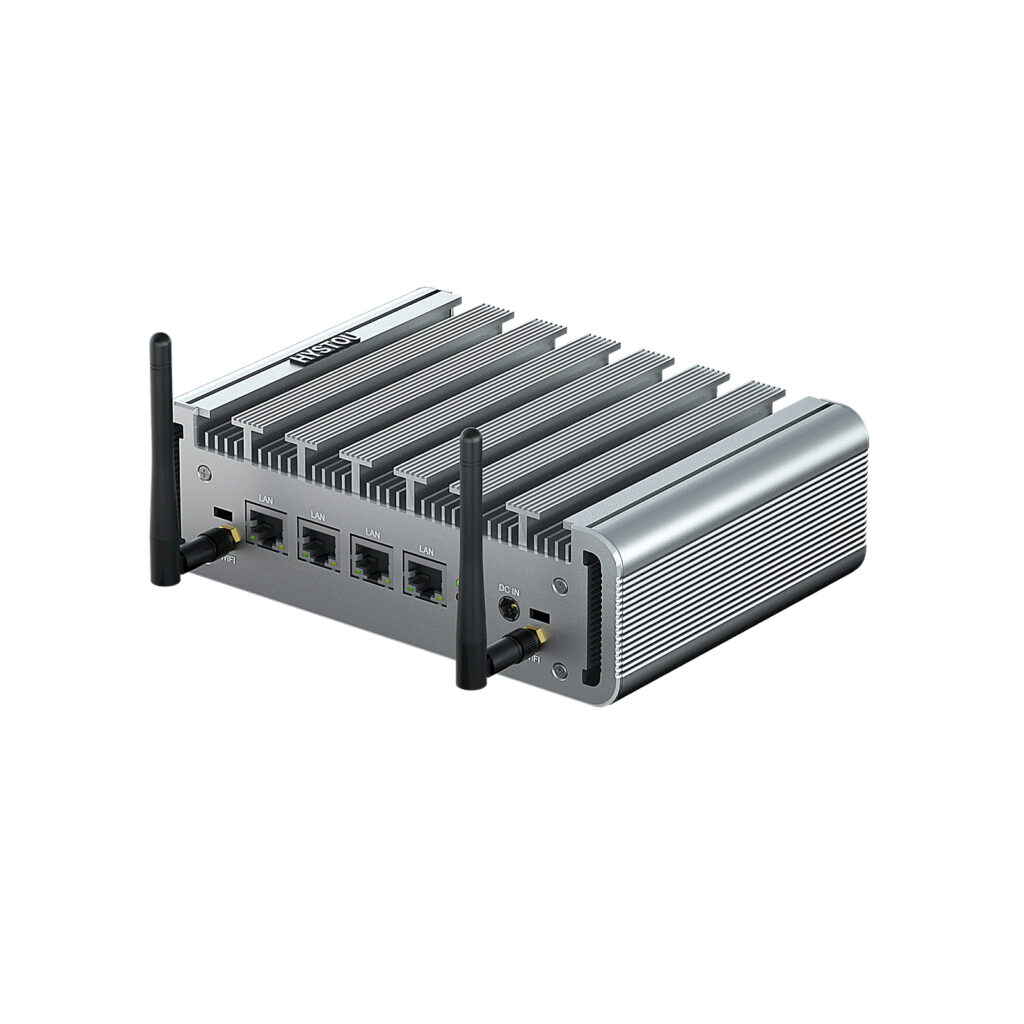
HYSTOU P09B-4L | Industrial Firewall Mini PC 4-LAN DDR5
- Processor: Intel Alder Lake N100 (4 cores,4 threads,6M cache, up to 3.40GHz)
- Graphics Card: Intel UHD Graphics
- Memory: DDR5 memory technology(higher frequency and bandwidth support)
- Storage: 1*M.2 PCIE 3.0 SSD slots 1*SATA3.0 2.5inch
- Network: 4*LAN ports
- Additional Features: Fanless cooling system for silent operation and low power consumption, Bluetooth and Wi-Fi connectivity

HYSTOU
HYSTOU has established its R&D headquarters in Shenzhen, drawing on over a decade of experience. Our core team members, who previously served at renowned companies such as Inventec and Quanta Computer, form the backbone of our technical expertise. With robust R&D and innovation capabilities, we remain steadfast in our commitment to pursuing excellence in the field of technology products.



