DDR5 High-Frequency Memory Performance Gains on Mini PCs: Integrated Graphics, Office, and Gaming Benchmarks
For users seeking a clean and minimalist desktop, Mini PCs have become the go-to solution due to their compact form factor. However, many buyers overlook a critical component during purchase or upgrade: the memory configuration. How much does DDR5 memory frequency affect Mini PC performance? And what is the actual impact of single-channel versus dual-channel setups?
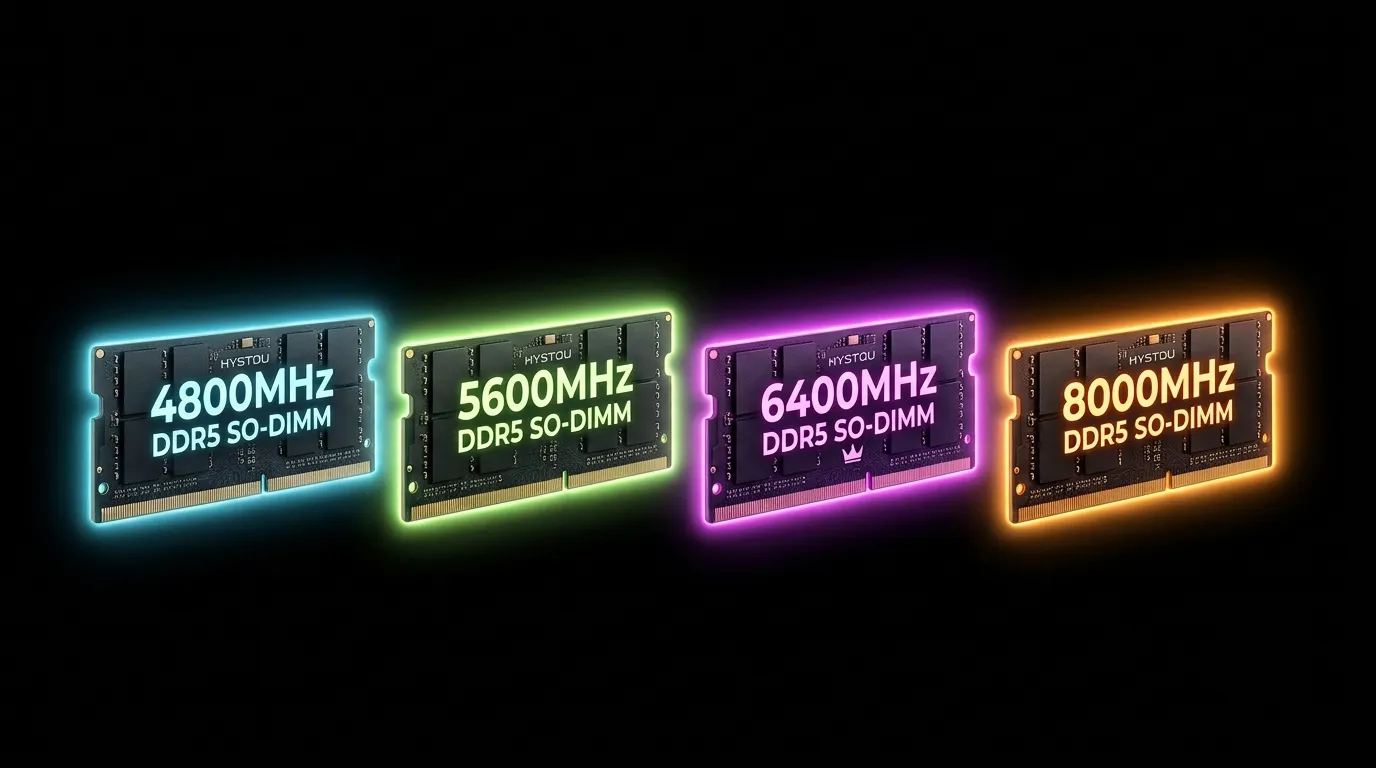
In this comprehensive review, we evaluate four representative DDR5 memory frequencies: 4800MHz, 5600MHz, 6400MHz, and 8000MHz. We analyze everything from baseline synthetic bandwidth to daily productivity and integrated graphics (iGPU) gaming benchmarks to uncover the truth behind the Mini PC
High-frequency RAM benchmarks.
Memory Latency & Bandwidth Benchmarks: Raw Data Shifts
First, we used AIDA64 to benchmark the throughput of various dual-channel DDR5 memory frequencies. Predictably, the DDR5 4800 vs 5600 vs 6400 performance difference scales linearly in raw synthetic metrics.
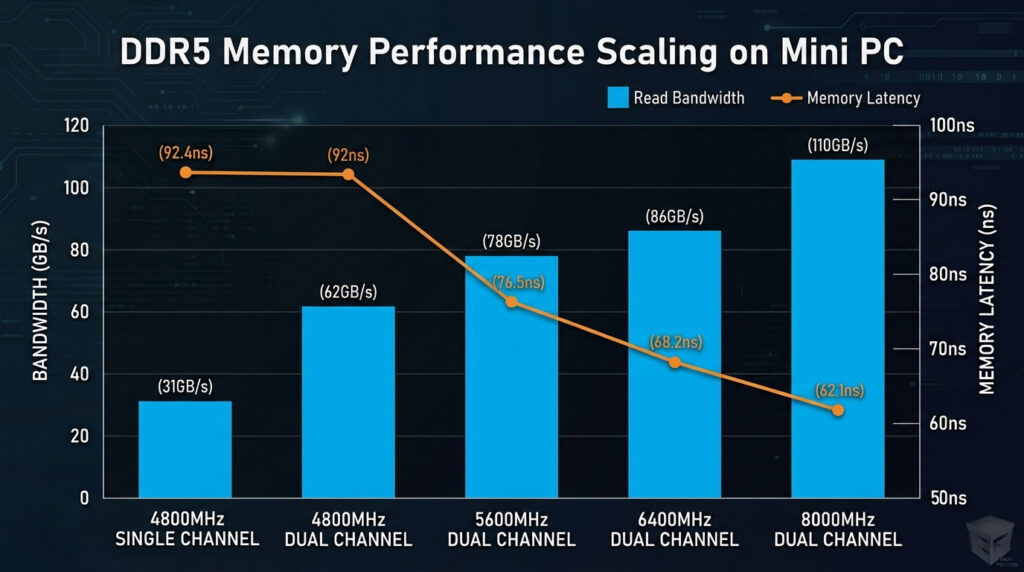
As indicated above, higher frequencies translate into broader bandwidth and tighter memory latency and bandwidth metrics. However, massive synthetic gains do not always guarantee an identical performance leap across all real-world applications. Let us look at specific use cases.
Office and Productivity Workloads: 4800MHz is More Than Enough
Budget-conscious buyers frequently ask for the best office Mini PC RAM frequency recommendation. To test this, we simulated typical office multitasking environments, including heavy web browsing, massive Excel spreadsheets, and standard document editing.
The results show that at 4800MHz, system responsiveness is incredibly snappy. Even with dozens of active browser tabs, substantial memory bandwidth remains untapped. Therefore, for users who focus purely on office work without heavy gaming or 4K video editing, a 4800MHz frequency is more than enough.
Nevertheless, even if you opt for 4800MHz, we strongly advise configuring it as a dual-channel setup (e.g., 8GB×2) instead of a single 16GB stick. Single-channel setups can introduce brief micro-stutters during intense background multitasking transitions.
Integrated Graphics Gaming Tests: Channels and Clock Speeds Unleashed
Most Mini PCs rely entirely on integrated graphics rather than discrete GPUs. Consequently, the iGPU shared memory frequency impact becomes a critical factor. Because integrated graphics do not possess dedicated VRAM, they must allocate system memory for graphical textures. Thus, memory bandwidth dictates the performance ceiling of your system.
We benchmarked popular eSports titles and lighter AAA games at 1080p resolution:
1. Single-Slot (Single Channel) vs. Dual-Slot (Dual Channel)
This configuration change marks the single biggest performance divide. Testing at 5600MHz revealed that switching from single-channel to dual-channel boosted gaming frame rates by 40% to 60%. Games that stuttered heavily became fully playable. Clearly, if you are wondering “how to fix gaming lag on a Mini PC”, ensuring both memory slots are populated is step number one.
2. Frequency Progression from 4800MHz to 6400MHz
Under a dual-channel framework, the **iGPU framerate scaling** expands further with higher clock speeds. Upgrading from 4800MHz to 5600MHz results in a steady 8% average framerate improvement. Shifting from 5600MHz to 6400MHz yields a dramatic 12% to 18% surge. This extra push allows several lighter AAA games hovering near 50 FPS to cross the smooth 60 FPS threshold.
3. Extreme 8000MHz Frequencies and Diminishing Returns
While 8000MHz delivers impressive benchmark numbers, its real-world implementation faces physical hurdles. Due to the cramped interior spaces of Mini PCs, ultra-high frequencies generate substantial heat. Constrained by thermal envelopes and power limits, 8000MHz offers only a modest 4% performance gain over 6400MHz, displaying steep diminishing returns alongside occasional BIOS compatibility challenges.
Final Summary and Buying Guide
Based on our multi-dimensional evaluations, we present the following memory purchasing roadmap
for Mini PC users:
• Pure Office & Media Playback: Opt for a 4800MHz or 5600MHz dual-channel setup. It keeps costs
low while delivering performance that easily handles everyday tasks.
• Casual Gaming & Light Content Creation: A 6400MHz dual-channel configuration is highly
recommended. It stands as the current “sweet spot frequency,” maximizing graphics throughput
without generating excessive heat.
• Critical Mistake to Avoid: No matter your budget constraints, never buy a single high-capacity
RAM stick (single-channel). Doing so severely throttles your integrated graphics performance by
cutting its effective bandwidth in half.

Author: Nick FU
Marketing Specialist | HYSTOU Mini PC & Network Appliance Manufacturer
HYSTOU has established its R&D headquarters in Shenzhen, drawing on over a decade of experience. Our core team members, who previously served at renowned companies such as Inventec and Quanta Computer, form the backbone of our technical expertise. With robust R&D and innovation capabilities, we remain steadfast in our commitment to pursuing excellence in the field of technology products.