
How to choose the right Mini PC CPU

The Significance of the CPU in Mini PCs
In Mini PCs, the CPU is the absolute core, much like the human brain, dictating the operation of the entire system. Its performance directly determines the smoothness and efficiency of the Mini PC when multitasking, running office software, enjoying entertainment, and using professional applications.
Imagine using a Mini PC for daily office work, with multiple documents, browser pages, and instant messaging software open simultaneously. A powerful CPU ensures these tasks run seamlessly without glitches or freezes. When it comes to professional work such as video editing or 3D modeling, the demand for CPU performance is even more stringent. A high-performance CPU can significantly reduce rendering times and boost work efficiency.
For gaming enthusiasts, the quality of the CPU directly impacts game loading speed and frame rate stability. If the CPU performance is insufficient, even a high-end graphics card cannot fully exert its capabilities, resulting in stuttering and frame drops in the game. Selecting a CPU that suits your needs is a crucial step in purchasing a Mini PC.
Two Titans in the Market: Who Reigns Supreme?
In the Mini PC CPU market, Intel and AMD are the two dominant brands. Their products have distinct features, offering users a wide range of choices.
Processor model | Cinebench R23 (multi-core version) | Single-core performance | TDP |
|---|---|---|---|
AMD Ryzen 9 7950X | 38165 | 2059 | 170W |
Intel Core i9-13900K | 37263 | 2261 | 125W |
Minisforum AtomMan G7 PT with RX 7600M XT is rated the best overall mini PC for 2025 by PC Gamer.
Intel Processors: The Epitome of Performance and Stability
Intel processors are renowned for their powerful single-core performance. When running single-threaded tasks, they can demonstrate exceptional processing speed. For instance, in games that demand high single-core performance or software like Adobe Photoshop, which is well-optimized for single-thread operation, Intel processors often provide a smooth user experience. Take the Intel Core i9-13900 K as an example. Its single-core turbo frequency can reach an astonishing 5.8GHz, standing out among numerous processors. This enables it to quickly respond to user commands when handling complex image editing or video editing tasks, greatly improving work efficiency.
Moreover, Intel has an extensive product line, ranging from the Celeron series for entry-level users to the Core i9 series for those seeking ultimate performance, and the Xeon series for server applications. This caters to different user groups and usage scenarios. Whether it’s for daily office work, entertainment, professional scientific research computing, or large-scale data processing, there is an appropriate Intel product for every need.
In addition, Intel processors excel in compatibility. Due to their long-standing dominance in the market, numerous hardware manufacturers and software developers prioritize the adaptation and optimization of Intel platforms. This means that by choosing an Intel processor, users can enjoy higher compatibility and stability in hardware configuration and software use, minimizing troubles caused by hardware incompatibility or software adaptation issues.
AMD Processors: The Kings of Cost-Effectiveness and Multithreading
In recent years, AMD processors have made remarkable breakthroughs in multi-core performance, making them excellent for multitasking. Their Ryzen series processors feature an advanced architecture design with a relatively large number of cores and threads. When running multiple programs simultaneously or handling multi-threaded tasks, they can showcase powerful parallel processing capabilities. For example, the AMD Ryzen 9 7950X has 16 cores and 32 threads. When performing multi-threaded tasks such as video rendering or 3D modeling, which require substantial computing resources, it can significantly reduce processing time and improve work efficiency. Compared with Intel processors at the same price range, AMD processors often have an edge in the number of cores and threads, providing users with higher cost-effectiveness.
AMD processors are undoubtedly a great choice for users with limited budgets but a certain demand for performance. Take the AMD Ryzen 5 7600 as an example. It is relatively affordable yet offers excellent multi-core performance. It can easily handle daily office work, multitasking, and mainstream gaming needs, providing users with a high-value experience.
Tailoring Your Choice: Precise Matching
Daily Office and Entertainment
If your Mini PC is mainly used for daily office tasks such as document processing, spreadsheet creation, and emailing, as well as simple entertainment activities like web browsing and video watching, the demand for CPU performance is relatively low. In this scenario, a low-power and cost-effective processor can meet your needs.
Intel’s Celeron series processors, although positioned as entry-level, have basic multi-threading capabilities and can effortlessly handle the operation of daily office software, such as the Microsoft Office suite and WPS. They can also provide a smooth experience when playing high-definition videos. The low power consumption of Celeron processors means that the Mini PC generates less heat during operation, not only extending the device’s lifespan but also reducing cooling costs and fan noise, creating a quiet user environment.
Furthermore, AMD’s Ryzen 3 series processors are also good options. For example, the AMD Ryzen 3 3200G adopts the advanced Zen 2 architecture, with 4 cores and 8 threads, a base frequency of 3.6GHz, and a maximum boost frequency of 4.0GHz. This processor not only performs well in single-core performance, quickly responding to single-task operations , but also has certain multi-threading capabilities, allowing it to run multiple programs simultaneously without significant lag. Its built-in Vega 8 graphics card can also provide users with basic graphics processing capabilities, meeting the needs of simple graphic editing and high-definition video viewing. Most importantly, the AMD Ryzen 3 3200G is affordable and highly cost-effective, making it ideal for budget-conscious users.
Creative Design and Content Creation
For users engaged in creative design and content creation work, such as graphic design, video editing, 3D modeling, and animation production, the requirements for CPU performance are extremely demanding. These professional tasks usually involve processing large amounts of data and complex calculations, requiring the CPU to have powerful multi-core processing capabilities and high-speed computing.
In the Intel camp, the Core i7 and Core i9 series processors are the ideal choices. Take the Intel Core i9-13900 K as an example. It adopts a performance-hybrid architecture with 24 cores (8 performance cores + 16 efficiency cores) and 32 threads. The single-core turbo frequency can reach up to 5.8GHz, and its multi-core performance is even more robust. When video editing, it can quickly load and process high-resolution video materials, greatly shortening the video rendering time. In 3D modeling and animation production, it can smoothly run professional software such as 3DS Max and Maya, and preview complex scenes and models in real-time, improving creative efficiency.
AMD’s Ryzen 7 and Ryzen 9 series processors also perform outstandingly. For instance, the AMD Ryzen 9 7950X is based on the “Zen 4” architecture, with 16 cores and 32 threads, and a single-core base frequency of up to 5.4GHz. In terms of multi-thread performance, the AMD Ryzen 9 7950X demonstrates a strong advantage, maintaining a high-speed operation when handling multiple tasks simultaneously. When engaged in complex graphic design and video editing work, it can quickly process a large amount of image data and video special effects, providing users with a smooth creative experience. Additionally, AMD processors have a certain edge in cost-effectiveness, offering users a more competitive option.
The Choice for Gamers
When choosing a CPU for a Mini PC, gamers need to focus on single-core performance and game optimization. Although more and more games are becoming multi-threaded, single-core performance still has a significant impact on the game frame rate. A CPU with strong single-core performance can provide a more stable frame rate in games, reducing stuttering and frame drops, and enhancing the smoothness and operation experience of the game.
The “K” and “KF” models in Intel’s Core i5, i7, and i9 series processors are highly favored by gamers. Take the Intel Core i7-13700 K as an example. It has 16 cores (8 performance cores + 8 efficiency cores) and 24 threads, with a single-core turbo frequency of up to 5.4GHz. Its powerful single-core performance enables it to perform well in various games, whether they are network games with lower hardware requirements or high-performance 3A blockbusters. Moreover, the “K” series processors support overclocking, allowing gamers to further enhance the CPU performance by overclocking and tapping into the hardware’s potential to achieve higher game frame rates.
AMD’s Ryzen 5 and Ryzen 7 series processors are also competitive in terms of gaming performance. For example, the AMD Ryzen 7 7800X3D adopts the unique 3D V-Cache technology, which significantly increases the cache capacity. This enables it to read and process data faster in games, thereby improving the game frame rate and response speed. The AMD Ryzen 7 7800X3D has 8 cores and 16 threads, with a single-core base frequency of up to 5.0GHz, achieving a good balance between multi-core and single-core performance, and providing gamers with an excellent gaming experience.
In-Depth Analysis of Core Parameters
Number of Cores and Threads
The number of cores is like the number of production lines in a factory. The more production lines there are, the more tasks can be processed simultaneously. Threads, on the other hand, are like the number of workers on each production line. The more workers, the higher the production efficiency of the production line. During multitasking, more cores and threads enable the Mini PC to run multiple programs simultaneously without interference, maintaining a smooth operation.
For daily office and light entertainment users, a 4-core 8-thread processor is sufficient to handle tasks such as opening multiple office documents, web browsing, and video watching. However, for users engaged in professional work such as video editing, 3D modeling, and large-scale database processing, it is recommended to choose a processor with 8 cores and 16 threads or more to ensure efficient operation when handling complex tasks.
Base Frequency and Turbo Frequency
The base frequency is the CPU’s basic operating frequency, reflecting its computing speed in a stable state. The turbo frequency is the maximum operating frequency that the CPU can automatically increase when facing high-load tasks. A CPU with a higher base frequency has a clear advantage in handling single-threaded tasks and completing them quickly. The turbo frequency allows the CPU to automatically increase its frequency when encountering complex multi-threaded tasks, improving the processing speed and ensuring the smooth operation of the system.
When performing simple single-threaded tasks such as text processing and web browsing, the base frequency has a greater impact on performance. When performing multi-threaded tasks such as video rendering and large-scale games, the role of the turbo frequency is more prominent. Therefore, when choosing a CPU for a Mini PC, it is necessary to comprehensively consider the base frequency and turbo frequency according to your usage scenario.
Cache Size
The cache is a high-speed data storage area between the CPU and memory. Its function is to store data and instructions that the CPU may frequently access soon. The size of the cache has a significant impact on the CPU’s performance. A larger cache can reduce the number of times the CPU reads data from memory, thereby improving data access speed and overall performance.
When the CPU needs to read data, it first looks in the cache. If the required data is in the cache, it can be read directly from the cache instead of accessing the slower-speed memory. This greatly shortens the data reading time and improves the CPU’s work efficiency. For users who often process large amounts of data, such as data analysts and researchers, choosing a CPU with a larger cache can significantly enhance work efficiency.
Integrated Graphics Performance
For users who do not plan to use an independent graphics card, the performance of the integrated graphics directly affects the Mini PC’s graphics processing capabilities. The integrated graphics can meet the graphic needs in daily office work, such as displaying charts in office documents and simple graphic editing. It can also provide a smooth playback experience when watching high-definition videos.
The integrated graphics performance varies among different processors. For example, some AMD processors perform relatively well in integrated graphics performance, providing users with better graphics processing capabilities. Some Intel processors, although their integrated graphics performance is relatively weak, have advantages in other aspects. Therefore, when choosing a Mini PC without an independent graphics card, it is necessary to pay special attention to the integrated graphics performance of the processor.
Compatibility Considerations: Avoiding Pitfalls
Motherboard Compatibility
When choosing a CPU for a Mini PC, motherboard compatibility is a crucial factor that cannot be ignored. The motherboard is like the body of the Mini PC, and the CPU is the heart. Only when the two match perfectly can the entire system operate stably and efficiently.
Different brands and models of CPUs correspond to specific motherboard socket types. For example, Intel’s 12th-generation and later Core processors usually use the LGA 1700 socket, while AMD’s Ryzen 7000 series processors are compatible with the AM5 socket. If the CPU and motherboard socket do not match, it’s like inserting the wrong key into a lock, making installation impossible, let alone the normal operation of the system.
In addition to the socket type, the motherboard chipset’s support for the CPU is also of great importance. The chipset is like a bridge between the CPU and other hardware devices, responsible for coordinating data transmission and communication. High-end chipsets can often provide more powerful power supply capabilities, higher memory frequency support, and more expansion interfaces for the CPU, thus fully unleashing the CPU’s performance potential. For example, Intel’s Z790 chipset, designed specifically for high-performance Core processors, supports memory overclocking, providing an excellent performance for gamers and professional creators. Some low-end chipsets, although they can also be compatible with certain CPUs, may have limitations in functionality and performance support.
When choosing a Mini PC, be sure to carefully check the product manual or the official website to confirm the compatibility information between the CPU and the motherboard. Also, paying attention to the motherboard’s BIOS version is important. Sometimes, updating the BIOS can solve compatibility issues between the CPU and the motherboard, improving system stability and performance.
Memory Matching
The matching between the CPU and memory is like a precise dance. Only when the two cooperate can the system run smoothly. Appropriate memory frequency and capacity can enable the CPU to read and process data more efficiently, thereby enhancing the performance of the entire Mini PC.
Memory frequency is one of the important indicators to measure memory performance. Generally, the higher the frequency, the faster the memory data transfer speed, providing faster data support for the CPU. However, it should be noted that the CPU’s support for memory frequency is limited, not the higher the better. For example, for the Intel Core i5-13600 K processor, the officially recommended memory frequencies are DDR4 3200MHz or DDR5 6400MHz. If the selected memory frequency is too high, exceeding the CPU’s support range, it not only fails to improve performance but may also cause system instability, resulting in problems such as blue screens and freezes.
Memory capacity is also not to be overlooked. For daily office and light entertainment users, 8GB of memory can meet their needs. However, if you need to run multiple large-scale programs simultaneously, such as in video editing, 3D modeling, or for gamers, it is recommended to choose 16GB or even 32GB or more of memory. Sufficient memory capacity can prevent out-of-memory situations during multitasking and ensure the smooth operation of the system.
When choosing memory, it is also necessary to consider memory timings and technologies such as dual-channel and quad-channel. Lower timings mean that the memory can respond more quickly to the CPU’s requests, while dual-channel or quad-channel memory technology can significantly increase the memory bandwidth, further improving the data transfer speed.
Summary and Recommendations
When choosing a CPU for a Mini PC, multiple factors need to be comprehensively considered. Defining your usage needs is the primary task. Different usage scenarios, such as daily office and entertainment, creative design, or gaming, have different performance requirements for the CPU. At the same time, it is also crucial to have an in-depth understanding of the characteristics of processors from the two camps of Intel and AMD and compare parameters such as the number of cores, threads, base frequency, turbo frequency, cache size, and integrated graphics performance. In addition, paying attention to the compatibility between the CPU and the motherboard, as well as memory matching, ensures that the entire system can operate stably and efficiently.
If you mainly use it for daily office and light entertainment, low-power and cost-effective processors such as Intel’s Celeron series and AMD’s Ryzen 3 series can meet your needs. If you are engaged in creative design and content creation work, Intel’s Core i7, i9 series, and AMD’s Ryzen 7 and 9 series processors are your ideal choices. For gamers, the “K” and “KF” models in Intel’s Core i5, i7, and i9 series, as well as AMD’s Ryzen 5 and 7 series processors, can bring you an excellent gaming experience.
When purchasing a Mini PC, it is recommended that you choose products from well-known brands, which usually have better product quality and after-sales service. At the same time, refer to professional review articles and user comments to understand the actual performance of different Mini PC models, which will help you select the most suitable Mini PC for yourself.
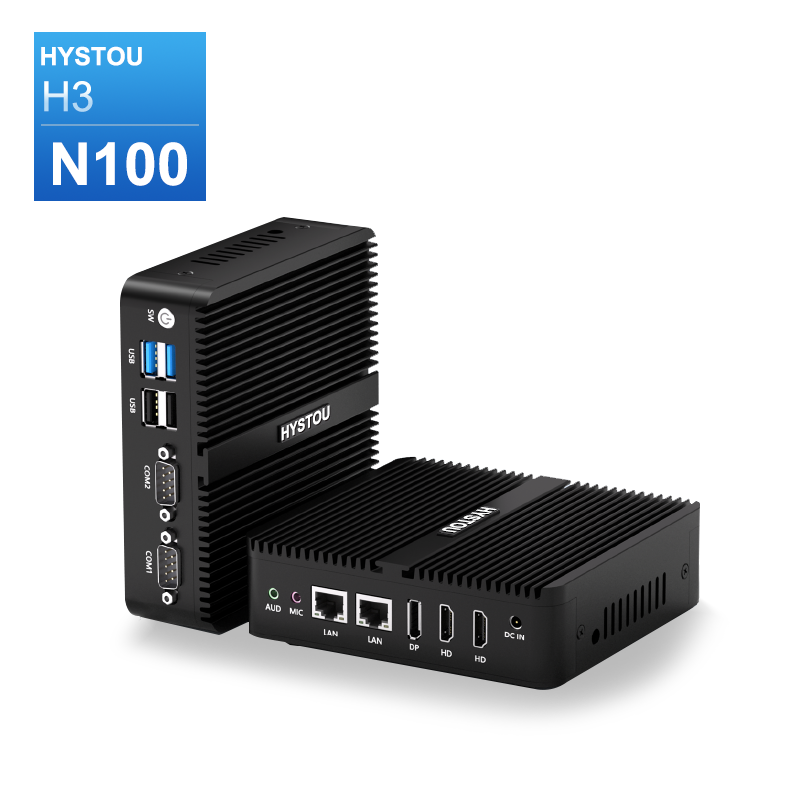
- Processor: Intel N100
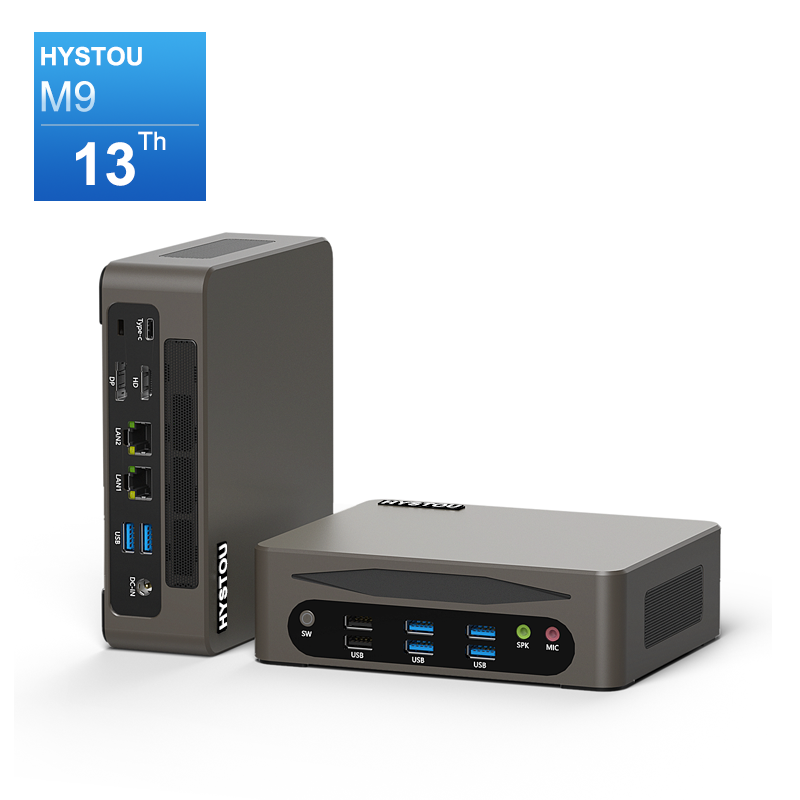
- Processor: Intel Core i5-1340P/i5-1235U/i5-1335U /i7-1255U/i7-1360P

HYSTOU
HYSTOU has established its R&D headquarters in Shenzhen, drawing on over a decade of experience. Our core team members, who previously served at renowned companies such as Inventec and Quanta Computer, form the backbone of our technical expertise. With robust R&D and innovation capabilities, we remain steadfast in our commitment to pursuing excellence in the field of technology products.



