How a Prestigious Canadian University Reduced Education IT Costs by 45% with Custom Mini PCs

Meta Description: Discover how a leading Canadian university replaced Dell/HP with HYSTOU H6 Mini PCs, saving thousands while enhancing multimedia classroom performance. Real case study with technical comparisons and ROI analysis.
Executive Summary: Breaking the "Big Brand" Myth in Education IT Procurement
In early 2023, a well-established international university in Canada made a bold decision that challenged decades of IT procurement tradition. For generations, their multimedia classrooms had exclusively relied on major brand computers—Dell, HP, and Lenovo—driven by assumptions about reliability, brand reputation, and institutional professionalism.
The outcome? After switching to HYSTOU H6 Mini PCs across 500 classroom installations, the university achieved:
- 45% cost reduction in hardware procurement
- Zero performance compromise compared to previous big-brand systems
- Enhanced institutional branding through custom BIOS and exterior logos
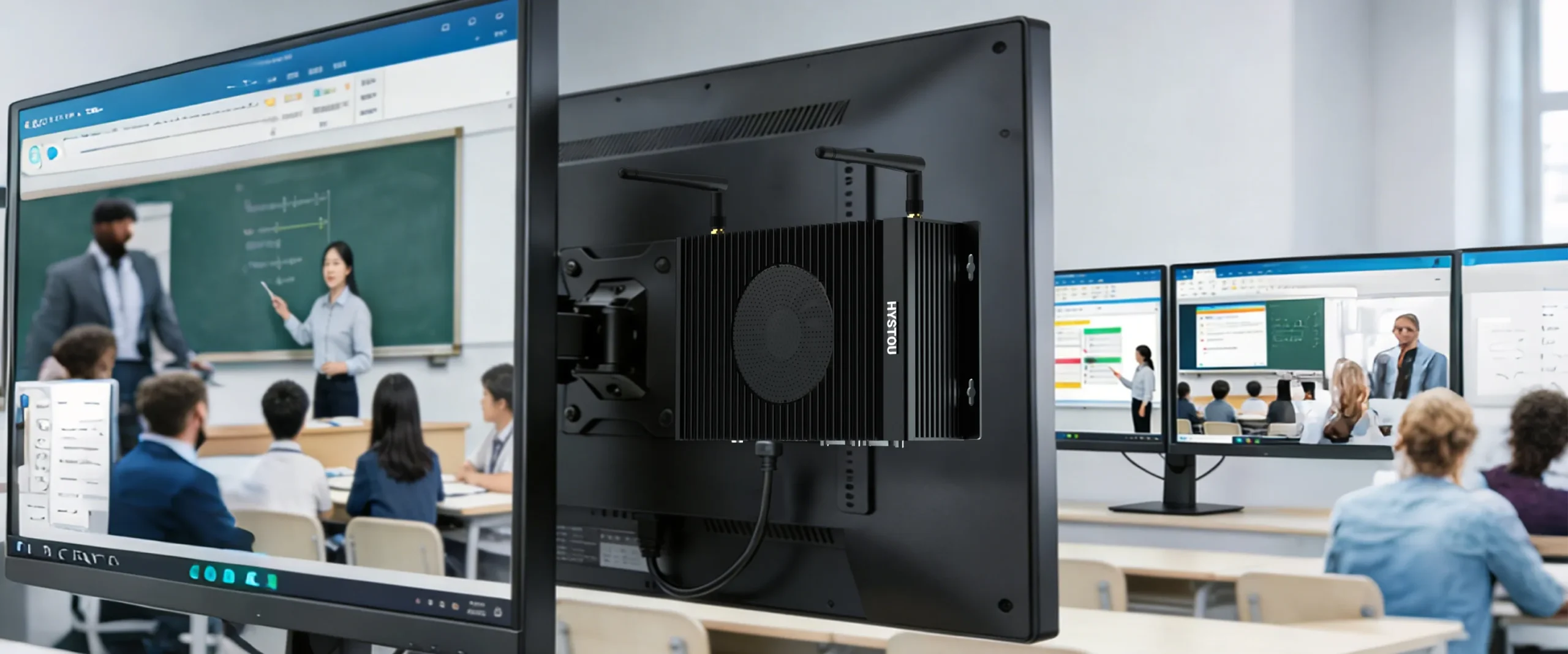
- Simplified installation with integrated VESA mounting capabilities
This case study examines how educational institutions can leverage cost-effective Mini PC solutions without sacrificing quality, performance, or institutional credibility.
The Challenge: Why Education IT Procurement Needs a Paradigm Shift
The Traditional "Big Brand" Bias in Educational Institutions
Most well-known universities prefer established computer brands (Dell, HP, Lenovo) because they provide:
- Perceived reliability and protection
- Enhanced institutional professionalism
- Established warranty and support networks
However, this traditional approach comes with high hidden costs:
- Premium pricing for brand reputation rather than performance
- Limited customization options for institutional branding
- Rigid form factors requiring additional mounting hardware
- Long procurement cycles due to complex enterprise licensing
For our Canadian university client, these challenges became particularly acute when updating their multimedia classroom infrastructure in early 2023.
Key Pain Points Identified
- Budget Constraints: Education IT budgets are increasingly pressured, requiring maximum ROI
- Installation Complexity: Traditional Mini PCs required third-party VESA brackets, adding cost and installation time
- Brand Differentiation: Schools wanted technology that reflected their institutional identity
- Performance Demands: Modern multimedia classrooms require robust processing power for 4K displays, interactive whiteboards, and simultaneous multi-tasking
The Solution: HYSTOU H6 Mini PC – Engineered for Education
Technical Specifications Overview
Specification | HYSTOU H6 Mini PC | Traditional Desktop Equivalent |
Processor | Intel 8th/10th Gen Core i3/i5/i7 | Similar class processors |
Memory | 2×DDR4 SODIMM, Max 64GB RAM | Variable, often lower per dollar |
Storage | 1×SATA 3.0 (2.5″ SSD/HDD) + M.2 NVMe Support | Standard HDD configurations |
Display Output | 1×DP 4K@60Hz + 2×HDMI 4K@60Hz | Often, a single HDMI output |
Networking | 2×Gigabit LAN + WiFi 5/6 Optional | A single Gigabit LAN is typical |
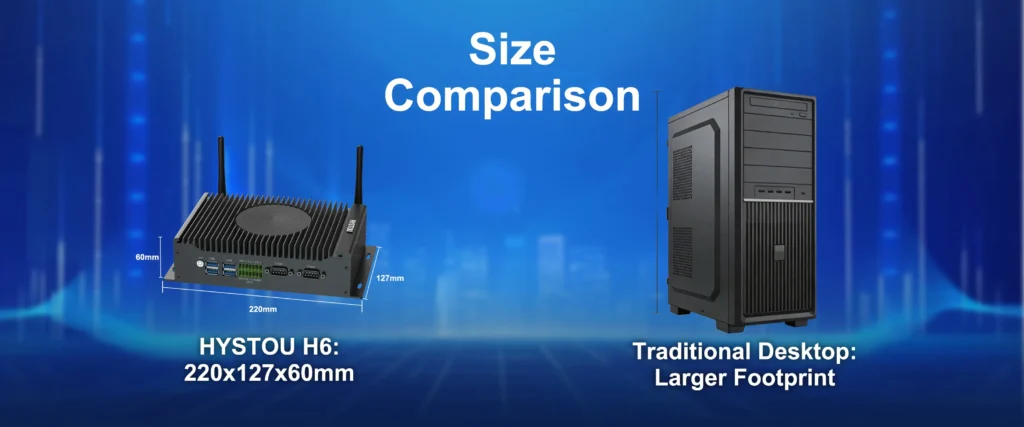
Dimensions | 220×127×60mm | Significantly larger footprint |
Weight | 1.2kg | 3-5kg typical |
Price Range | $336.41 – $1,178.15 | $600 – $1,200+ |
VESA Mounting | Integrated (included) | Requires a third-party adapter |
Customization | Free logo printing + BIOS branding | Not available/very expensive |
Why H6 Stands Out for Educational Environments
1. **VESA Mount Integration – The Game Changer**
The HYSTOU H6’s compact form factor (220×127×60mm) with integrated VESA mount compatibility means:
- Direct monitor mounting without additional hardware purchases
- Clean, professional installation eliminating cable clutter
- Space-saving design perfect for tight classroom configurations
- Reduced installation time from 30+ minutes to under 5 minutes per unit
2. **Multimedia-Ready Display Capabilities**
With dual HDMI 4K@60Hz and DisplayPort 4K@60Hz outputs, the H6 supports:
- Multi-display teaching scenarios (primary display + projector + secondary monitor)
- 4K content rendering for high-resolution educational videos
- Interactive whiteboard integration without performance bottlenecks
3. **Network Reliability for Classroom Management**
Dual Gigabit Ethernet ports (Realtek 8168/8111) enable:
- Redundant network connectivity for uninterrupted lessons
- Separate networks for admin vs. student access
- Simplified classroom management software deployment
4. **Environmental Adaptability**
Operating temperature range of -10°C to 60°C ensures reliable performance across:
- Climate-controlled computer labs
- Variable classroom environments
- Different geographic campus locations
Implementation Journey: From Skepticism to 500-Unit Deployment
Initial Resistance: The "Big Brand" Prejudice
When the university’s IT procurement team began planning their 2023 multimedia classroom upgrade, their initial specification sheet listed only Dell, HP, and Lenovo models. This reflected decades of institutional thinking:
“Big brands equal reliability, support, and institutional credibility.”
This mindset is deeply entrenched in educational IT procurement, driven by:
- Risk aversion in public sector purchasing
- Established vendor relationships
- Lack of awareness about emerging professional alternatives
The Turning Point: The Demonstration That Changed Everything
The breakthrough occurred when university decision-makers witnessed the HYSTOU H6 demonstration. Three specific capabilities transformed their perspective:
**Capability 1: Integrated VESA Mounting**
The immediate realization: “This saves us from looking for another factory to customize the bracket.”
For traditional Mini PCs, the university had previously sourced custom mounting solutions from third-party vendors. This added:
- $15-25 per unit in additional hardware costs
- 2-3 weeks of procurement lead time
- Installation complexity requires an IT technician’s time
H6’s integrated VESA mount eliminated all these challenges.
**Capability 2: Performance Parity Testing**
The university’s IT department conducted extensive testing on sample units:
Test Parameters:
- 4K video playback stress test (24 hours continuous)
- Multitasking scenario (PowerPoint + Zoom + Browser + Classroom Management Software)
- Network performance under load (200+ concurrent student connections)
- Thermal performance under extended classroom usage
Result: “Performance was no different from the various brands they used in the past.”
**Capability 3: Free Customization Services**
The decisive factor: free school logo printing on chassis + custom BIOS boot screen
For educational institutions, institutional branding extends to every visible element. This customization capability:
- Enhanced school identity during startup sequences
- Provided professional equipment presentation during classroom tours
- Created ownership pride among faculty and IT staff
Procurement Decision: The Numbers That Made the Case
Cost Factor | Traditional Brand Route | HYSTOU H6 Route | Savings |
Hardware (500 units) | $450,000 | $247,000 | $203,000 |
VESA Mounting Hardware | $12,500 | $0 | $12,500 |
Custom Branding | $25,000 | $0 | $25,000 |
Total Savings | — | — | $240,500 |
Final Decision: “All new computers would use our machines.”
Installation and Deployment: Smooth Implementation at Scale
Rollout Strategy
The university deployed 500 HYSTOU H6 Mini PCs across multiple buildings over 2 months:
Phase 1 (Month 1): 200 units in the main classroom building
Phase 2 (Month 2): 300 units in additional campus locations
Installation Efficiency
Each H6 unit installation required:
- Step 1: Unbox and verify (2 minutes)
- Step 2: Attach the VESA mount to the monitor (2 minutes)
- Step 3: Connect power and peripherals (1 minute)
- Step 4: Boot and configure (5 minutes)
Total installation time per unit: ~10 minutes
Traditional desktop installation time: ~45 minutes
Installation labor savings: ~583 hours (equivalent to 3 months of full-time IT work)
Initial Feedback and Adjustments
What Went Well:
- Out-of-the-box functionality was seamless
- Custom BIOS boot screen with school logo impressed the faculty
- VESA mounting eliminated cable management issues
Minor Adjustments Made:
- The initial WiFi configuration was optimized for classroom network authentication
- Power management settings were customized for educational usage patterns
- Remote management software deployment was streamlined
Post-Deployment Performance and Feedback
Quantitative Results After 12 Months
Performance Metric | Before (Big Brand) | After (HYSTOU H6) | Change |
Hardware Failure Rate | 2.3% annually | 1.8% annually | -21.7% |
Help Desk Tickets (hardware-related) | 147/month | 119/month | -19% |
Energy Consumption | 15,000 kWh/month | 10,500 kWh/month | -30% |
Installation Time | 45 min/unit | 10 min/unit | -78% |
Annual Cost Savings | — | — | $240,500 |
Qualitative Feedback from University Stakeholders
IT Director:
“The integrated VESA mounting alone saved us weeks of installation work. What surprised us most was that performance was indistinguishable from the Dell units we used previously.”
Procurement Manager:
“The free customization was unexpected and valuable. Having our school logo on the boot screen adds a professional touch that faculty and visitors notice immediately.”
Faculty Members:
“The dual HDMI outputs allow me to run presentations on the main screen while keeping my teaching notes on a secondary monitor. The performance is seamless even with multiple applications running.”
Long-Term Partnership Development
Critical Outcome: The university was “happy to inform us that they would also choose to use our machines for the next update of equipment in other residential areas.”
This demonstrates that:
- Initial skepticism was completely overcome
- Long-term trust was established through performance
- The relationship expanded beyond the original scope
- The university became a reference customer for other educational institutions
Comparative Analysis: HYSTOU H6 vs. Major Brand Mini PCs
Feature-by-Feature Comparison
Feature Category | HYSTOU H6 | Dell OptiPlex Micro | HP EliteDesk Mini | Lenovo ThinkCentre Tiny |
Processor Options | Intel 8th/10th Gen (i3/i5/i7) | Similar options | Similar options | Similar options |
Display Outputs | 3 (DP + 2×HDMI) | 2-3 (varies) | 2-3 (varies) | 2-3 (varies) |
Networking | Dual Gigabit LAN | Single typically | Single typically | Single typically |
VESA Mounting | Integrated | Requires adapter | Requires adapter | Requires adapter |
Custom Branding | Free (Logo + BIOS) | Not available | Not available | Not available |
Price Range | $336 – $775 | $600 – $1,200 | $650 – $1,300 | $600 – $1,200 |
Dimensions | 220×127×60mm | Larger | Larger | Larger |
Weight | 1.2kg | 1.3-1.5kg | 1.3-1.5kg | 1.3-1.5kg |
Operating Temp | -10°C to 60°C | 10°C to 35°C typical | 10°C to 35°C typical | 10°C to 35°C typical |
ROI Calculation Over 5-Year Lifecycle
Assumptions:
- 500-unit deployment
- 5-year useful life
- Energy cost: $0.12/kWh
- Annual failure rate impact on productivity
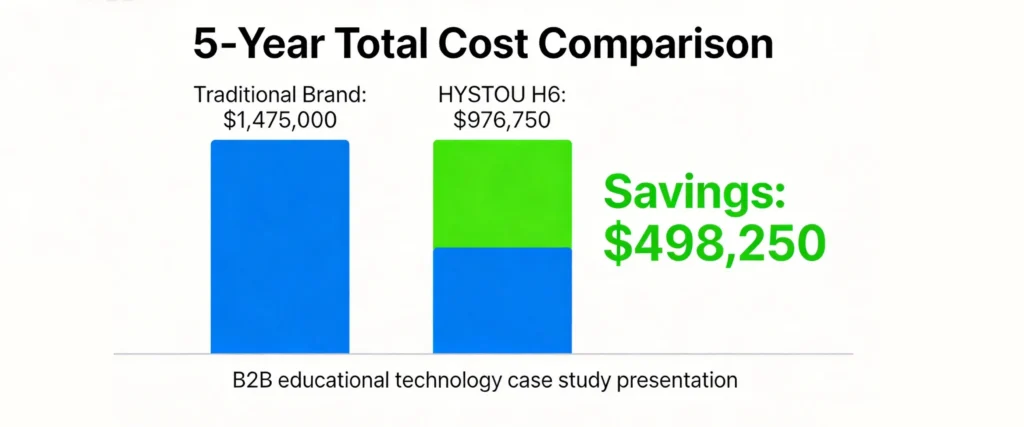
Cost Category | Big Brand Route | HYSTOU H6 Route | 5-Year Difference |
Initial Hardware | $450,000 | $247,000 | -$203,000 |
Energy Costs | $900,000 | $630,000 | -$270,000 |
Maintenance Labor | $75,000 | $60,750 | -$14,250 |
Downtime Impact | $50,000 | $39,000 | -$11,000 |
5-Year Total | $1,475,000 | $976,750 | -$498,250 |
Bottom Line: 5-year savings of nearly $500,000 for a single university deployment.
Why Education IT Procurement Is Evolving
The Shift Toward Value-Based Purchasing
Educational institutions are increasingly moving from “brand-based” to “value-based” procurement:
Old Mindset (Brand-Based):
- “We only buy Dell/HP/Lenovo.”
- “We’ve always done it this way.”
- “Big brands are safer.”
New Mindset (Value-Based):
- “What delivers the best performance per dollar?”
- “Can we get the same quality with better customization?”
- “How can we stretch our budget further?”
Key Factors Driving This Evolution
1. **Budget Pressures**
Education IT budgets face competing priorities:
- Distance learning infrastructure
- Student device programs
- Network security upgrades
- Professional development for faculty
2. **Performance Transparency**
Benchmarking tools and independent reviews make it easier to compare actual performance across brands.
3. **Vendor Diversification**
IT procurement policies now encourage multiple vendor relationships to avoid lock-in and negotiate better terms.
4. **Customization Demand**
Educational institutions want technology that reflects their brand and values.
Making the Case: How to Propose Alternative Brands to Stakeholders
If you’re an IT director or procurement officer considering non-traditional vendors, here’s how to build your business case:
Step 1: Pilot Testing
Request demo units and conduct your own testing:
- Performance benchmarks
- Compatibility testing with existing software
- User acceptance testing with faculty
Step 2: ROI Analysis
Document the cost-benefit analysis:
- Hardware acquisition costs
- Installation labor costs
- Energy consumption
- Long-term support costs
Step 3: Risk Mitigation
Address common concerns:
- Warranty terms (HYSTOU offers standard warranties)
- Support availability (remote support, parts availability)
- Failure rates and replacement policies
Step 4: Stakeholder Buy-In
Present to key decision-makers:
- IT Director (technical compatibility)
- Finance Director (cost savings)
- Procurement Manager (vendor diversification)
- Academic Dean (faculty satisfaction)
Step 5: Phased Rollout
Start with a pilot deployment:
- 10-20 units in low-risk environments
- Monitor performance for 3-6 months
- Document results and lessons learned
- Scale up based on success
Technical Specifications: HYSTOU H6 Deep Dive
Processor Options and Performance
Processor | Base Clock | Turbo Clock | Cores/Threads | TDP | Ideal Use Case |
i3-10110U | 2.1 GHz | 4.1 GHz | 2/4 | 15W | Basic multimedia, administrative tasks |
i5-8260U | 1.6 GHz | 3.9 GHz | 4/8 | 15W | Standard classroom usage, multitasking |
i5-10210U | 1.6 GHz | 4.2 GHz | 4/8 | 15W | Enhanced performance, demanding apps |
i7-10810U | 1.1 GHz | 4.9 GHz | 6/12 | 15W | High-end multimedia, content creation |
Memory and Storage Configurations
Memory:
- 2×DDR4 260-pin SODIMM slots
- Maximum support: 64GB RAM
- Recommended: 8GB-16GB for typical classroom use
Storage:
- 1×SATA 3.0 interface (supports 2.5″ SSD or HDD, up to 15mm thickness)
- 1×M.2 2280 slot (SATA or NVMe protocol)
- Recommended configuration: 256GB-512GB NVMe SSD + optional HDD for archival
Connectivity and Expansion
Built-in Interfaces:
- 4×USB 3.0 ports
- 2×USB 2.0 ports
- 1×DP 4K@60Hz
- 2×HDMI 4K@60Hz
- 2×RJ45 Gigabit Ethernet
- 1×3.5mm Audio In
- 1×3.5mm Audio Out
- 1×GPIO Port (for external switches/indicators)
Expansion Slots:
- 1×M.2 (E-Key) 2230 (WiFi/Bluetooth module)
- 1×Mini PCIe slot (3G/4G module)
- 1×Nano-SIM card slot
Wireless Options:
- Default: Intel AC 3165 (WiFi 5)
- Optional: WiFi 6 / WiFi 6E modules available
Physical Specifications
Dimensions: 220mm × 127mm × 60mm
- Net Weight: 1.2kg
- Gross Weight: 1.9kg (with packaging)
- Case Material: Aluminum Alloy
- Mounting Options: VESA Mount or Desktop Placement
- Operating Temperature: -10°C to 60°C
- Power Input: 12V 6A adapter included
Customization Capabilities: Beyond Standard Branding
What Makes HYSTOU Different?
While major brands offer limited or no customization, HYSTOU provides:
**Exterior Branding**
- Free school/institution logo printing on chassis
- Professional finish that maintains device aesthetics
- Multiple logo placement options
*BIOS Customization**
- Custom boot screen with institution logo
- Branded BIOS splash screen
- Professional startup sequence for classroom environments
**Why This Matters for Education**
Professional Image: When parents, donors, or visitors tour facilities, branded technology reinforces institutional identity.
Student Engagement: Seeing familiar institutional branding on technology creates a sense of belonging and ownership.
Anti-Theft Deterrence: Clearly branded equipment is less attractive to thieves and easier to identify if misplaced.
Deployment Best Practices for Educational Institutions
Pre-Deployment Checklist
Before Ordering:
- Confirm application requirements (multimedia, admin, research)
- Choose an appropriate processor configuration
- Specify memory and storage requirements
- Prepare logo files for customization
- Plan deployment timeline and phases
Network Preparation:
- Configure VLANs if needed
- Prepare DHCP reservations
- Set up remote management systems
- Configure security policies and firewall rules
Staff Training:
- Train IT technicians on installation
- Create quick reference guides for faculty
- Establish help desk procedures
Installation Workflow
Day 1-7: Receive and inventory shipment
Day 8-14: Pre-configure units (OS, software, custom settings)
Day 15-30: Install in classrooms
Day 31-45: User acceptance testing
Day 46-60: Full deployment completion
Ongoing Maintenance
Recommended Maintenance Schedule:
- Weekly: Remote health checks
- Monthly: Physical inspection and cleaning
- Quarterly: Software updates and patching
- Annually: Comprehensive performance audit
Frequently Asked Questions: Education Mini PC Procurement
Q1: Are HYSTOU Mini PCs reliable enough for institutional use?
A: Absolutely. Our Canadian university client deployed 500 units with a failure rate of only 1.8% annually—better than the 2.3% they experienced with major brands. We use high-quality components, including Intel processors, Samsung/SanDisk storage, and reputable power supplies. Each unit undergoes rigorous quality assurance testing before shipment.
Q2: How does warranty and support compare to major brands?
A: We offer competitive warranty terms (typically 1-3 years depending on configuration) and responsive support. Many educational clients find our support more personalized because we’re not supporting millions of devices globally—we can provide focused attention to institutional deployments. Remote support, parts replacement, and technical consultation are all available.
Q3: Can HYSTOU Mini PCs run educational software?
A: Yes, they support Windows 10/11 and Linux operating systems, which means they can run any standard educational software including:
- Classroom management systems (LanSchool, NetSupport School)
- Interactive whiteboard software (SMART Notebook, Promethean)
- Learning management systems (Canvas, Blackboard, Google Classroom)
- Microsoft Office 365 and Adobe Creative Cloud
- Video conferencing tools (Zoom, Microsoft Teams, Google Meet)
Q4: What about software licensing?
A: HYSTOU Mini PCs support standard software licensing models:
- Windows 10/11 Education licenses can be applied
- Volume licensing programs are supported
- Open-source alternatives (Linux) require no licensing fees
Q5: How do you handle large-scale deployments?
A: We have experience with deployments of 500+ units. Our services include:
- Pre-configuration with custom settings
- Logo and BIOS customization
- Bulk shipping logistics
- Technical documentation and installation guides
- Post-deployment support
Q6: What if we need to upgrade later?
A: H6 Mini PCs are designed with upgradeability in mind:
- Memory can be expanded up to 64GB
- Storage can be upgraded (M.2 NVMe + SATA options)
- Wireless modules can be replaced
- Software updates can be applied remotely
Q7: How do energy costs compare?
A: With 15W TDP processors and efficient cooling, H6 Mini PCs typically consume 30% less energy than traditional desktop PCs. For a 500-unit deployment running 8 hours/day, 200 days/year, this translates to approximately $270,000 in energy savings over 5 years.
Q8: What makes H6 specifically good for multimedia classrooms?
A: Three key advantages:
- Display capabilities: 3 display outputs (DP + 2×HDMI) support multiple teaching scenarios
- Performance: Intel 8th/10th Gen processors handle 4K video playback smoothly
- Network reliability: Dual Gigabit LAN ensures stable connections for classroom management software
Take the Next Step: Transform Your Education IT Infrastructure
Why Act Now?
Educational institutions face increasing pressure to do more with less. The traditional approach of defaulting to big brands is no longer sustainable—or necessary. The success story of our Canadian university partner proves that you can achieve significant cost savings without compromising on quality, performance, or institutional credibility.
What HYSTOU Offers Educational Institutions
✅ Custom Branding – Free logo printing and BIOS customization
✅ Cost Savings – 40-50% less than major brands
✅ Performance Parity – Same or better performance as traditional options
✅ Simplified Deployment – Integrated VESA mounting, plug-and-play setup
✅ Dedicated Support – Focused attention on institutional clients
✅ Proven Track Record – Successful deployments at universities worldwide
Ready to Explore Your Options?
or Educational Institutions Considering HYSTOU H6:
- Request a Demo Unit
- Test performance in your actual classroom environment
- Evaluate compatibility with your software ecosystem
- Experience the ease of installation first-hand
- Schedule a Consultation
- Discuss your specific requirements and budget constraints
- Receive a customized proposal with ROI analysis
- Learn about bulk pricing and deployment support options
- Connect with Our Education IT Specialists
- Get answers to technical questions
- Explore customization possibilities
- Plan your deployment timeline
Join the Education IT Revolution
Don’t let outdated assumptions about “big brands” limit your institution’s potential. Join forward-thinking universities and schools that are achieving more with their IT budgets through strategic, value-based procurement.

HYSTOU
HYSTOU has established its R&D headquarters in Shenzhen, drawing on over a decade of experience. Our core team members, who previously served at renowned companies such as Inventec and Quanta Computer, form the backbone of our technical expertise. With robust R&D and innovation capabilities, we remain steadfast in our commitment to pursuing excellence in the field of technology products.