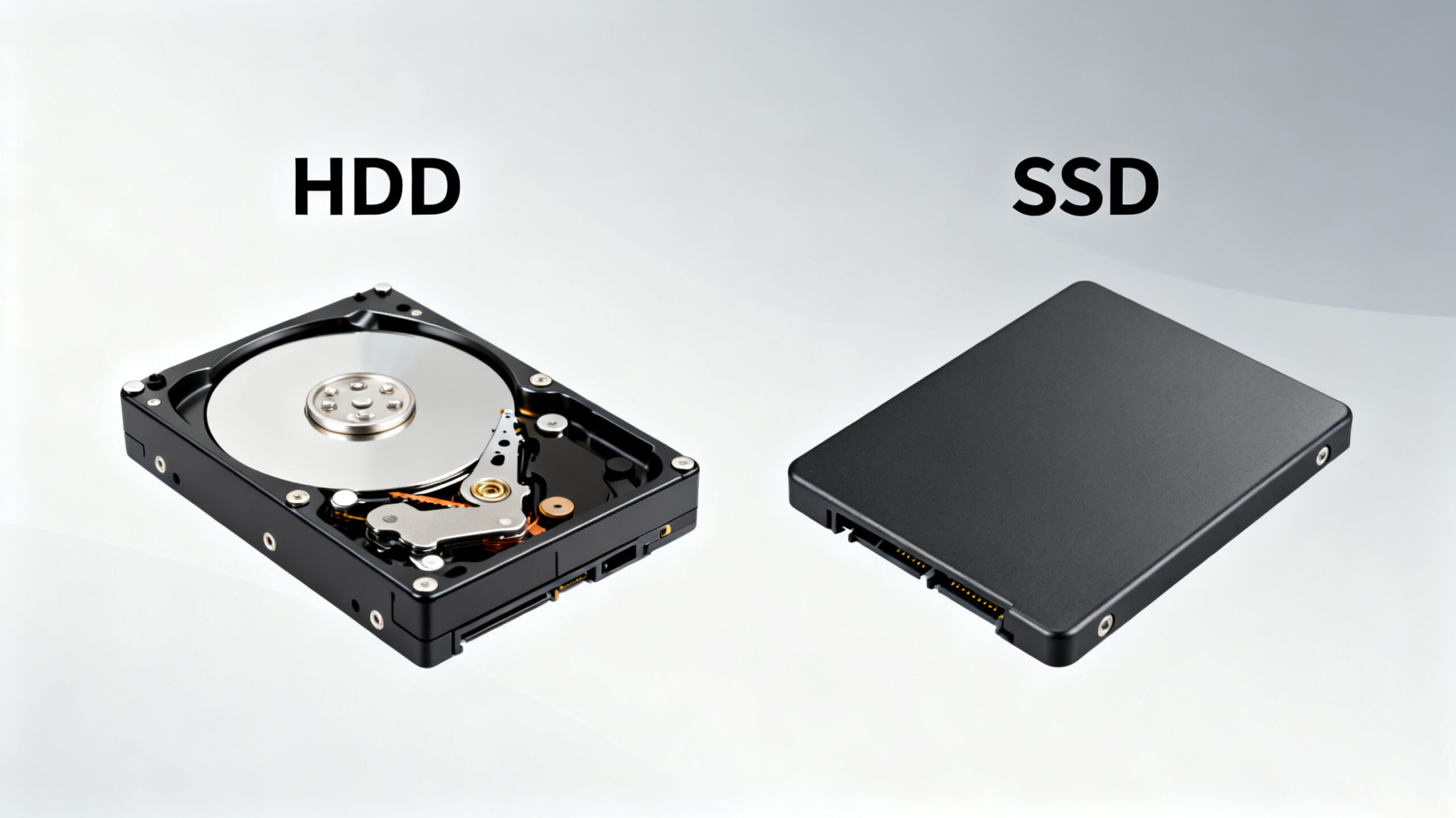
Introduction to HDD and SSD
The traditional spinning hard drive (HDD) serves as the fundamental nonvolatile storage component in computers. Unlike the data in system memory that vanishes when the device is powered off, HDDs retain data persistently. Composed of metal platters coated with a magnetic layer, HDDs store a wide range of data—from decades-old weather reports to high-definition movie collections and personal digital music libraries. To access this data, a read/write head mounted on an arm moves across the platters as they spin within the hard drive enclosure.
In contrast, a Solid-State Drive (SSD) fulfills the same core functions as an HDD, such as preserving data during power outages, booting the system, and storing applications. However, instead of relying on magnetic platters, SSDs store data on interconnected flash memory chips that maintain information even without power. These flash memory chips differ significantly from those in USB thumb drives in terms of speed and reliability, with SSD chips offering superior performance and durability. As a result, SSDs come at a higher cost than USB thumb drives of the same capacity.
When it comes to compact computing solutions, mini PCs—such as those offered by Hystou (https://hystou.com/)—provide a portable alternative to traditional storage devices. Hystou mini PCs feature sleek, space-saving designs with highly integrated components, delivering robust computing power in a small form factor. These devices support various storage options, including SSDs, enabling users to enjoy the advantages of fast storage and quick boot times. Whether used in home entertainment centers, office environments, or mobile work setups, Hystou mini PCs combine convenience and efficiency, making them an ideal choice for modern users.
A Historical Overview of HDDs and SSDs
The Evolution of HDDs
Hard drive technology boasts a long history in the context of computing. One of the most iconic early examples is the IBM 350 RAMAC hard drive, introduced in 1956. This massive device utilized 50 platters, each 24 inches wide, to store a mere 3.75MB of data—roughly the size of an average 128Kbps MP3 file—while occupying the space of two commercial refrigerators. Initially employed only by government and industrial entities, the IBM 350 became obsolete by 1969, a testament to the rapid pace of technological progress.
The 1980s marked a pivotal period for HDDs, as the PC hard drive form factor standardized. The desktop-class 5.25-inch form factor emerged first, followed by 3.5-inch desktop drives and 2.5-inch notebook-class drives. Over the years, the internal cable interface has undergone several transformations, from Serial to IDE, SCSI, and finally SATA. Despite these changes, the core function remained unchanged: connecting the hard drive to the PC’s motherboard to facilitate data processing.
In modern times, 2.5-inch and 3.5-inch HDDs predominantly use SATA interfaces, at least in most PCs and Macs. Capacity has seen an exponential growth, jumping from multiple megabytes to multiple terabytes—a million-fold increase. Currently, 3.5-inch HDDs can reach a maximum capacity of 6TB, while 2.5-inch drives top out at 2TB.
The Rise of SSDs
In contrast to HDDs, SSD technology has a much more recent origin. Since the early days of personal computing, there has been a fascination with non-moving storage solutions. Technologies like bubble memory emerged in the 1970s and 1980s but failed to gain widespread adoption. Today’s flash memory represents the logical evolution of this concept, with flash memory chips storing data without the need for constant power.
The first SSDs as we know them today gained prominence during the rise of netbooks in the late 2000s. In 2007, the OLPC XO-1 featured a 1GB SSD, and the Asus Eee PC 700 series used a 2GB SSD as its primary storage. In these early devices, the SSD chips were permanently soldered to the motherboard. As netbooks, ultrabooks, and other ultraportable devices became more capable, SSD capacities increased, eventually standardizing on the 2.5-inch notebook form factor. This standardization allowed for easy replacement of 2.5-inch hard drives in laptops and desktops with SSDs.
Other form factors have also emerged, such as the mSATA mini PC SSD card and the DIMM-like SSDs used in the Apple MacBook Air. However, the 2.5-inch form factor remains prevalent for many SSDs. Currently, the maximum capacity of 2.5-inch SSDs stands at 1TB, with further growth expected in the coming years. For Hystou mini PC users, this evolving SSD technology offers enhanced storage performance and flexibility, aligning with the brand’s commitment to providing cutting-edge computing solutions.
Advantages and Disadvantages of HDDs and SSDs
Both HDDs and SSDs play crucial roles in computing, handling tasks such as system booting, application storage, and personal file preservation. Yet, each storage type possesses unique characteristics that make them suitable for different scenarios. Below is a detailed comparison of their advantages and disadvantages, helping Hystou customers make informed decisions based on their specific needs.
Price Comparison
HDDs maintain a decisive cost advantage in terms of cost per gigabyte in 2025, though flash memory advancements have narrowed the gap with SSDs compared to prior years. For mainstream 1TB capacity, a 2.5-inch internal HDD—compatible with Hystou’s SATA-equipped mini PCs—typically costs 38–45, translating to approximately 3.8–4.5 cents per gigabyte. By contrast, a 1TB SATA SSD of comparable form factor ranges from 65–80 (6.5–8 cents per gigabyte), while a faster NVMe PCIe 4.0 SSD (supported by Hystou’s high-performance models) sits at 85–100 (8.5–10 cents per gigabyte).
The price discrepancy persists for smaller capacities: a 256GB SATA SSD costs 22–28 (8.6–10.9 cents per gigabyte), whereas a 256GB HDD—now primarily used for secondary storage in Hystou systems—costs 16–20 (6.3–7.8 cents per gigabyte). For larger 4TB capacities, the gap widens further: a 3.5-inch HDD (for Hystou’s expandable industrial models) costs 85–95 (2.1–2.4 cents per gigabyte), while a 4TB NVMe SSD remains prohibitively expensive at 290–340 (7.3–8.5 cents per gigabyte).
This pricing dynamic creates clear tradeoffs for Hystou customers. HDDs remain ideal for budget-conscious users prioritizing capacity—for example, adding a 4TB HDD to a Hystou mini PC costs under 100,making it perfect for archiving industrial data set sor media libraries. However, the declining cost of SSDs makes them increasingly accessible: a 512GB NVMe SSD(38–$50) delivers 4–5x faster boot and load times than HDDs, a worthwhile upgrade for Hystou’s office and creative-focused models where performance impacts productivity.
Capacity Considerations
The 2025 capacity landscape has evolved significantly, with SSDs expanding mid-range options while HDDs retain dominance in ultra-large storage. Consumer-grade SSDs now top out at 8TB for high-end NVMe models, but 512GB–2TB has become the mainstream range for mini PCs. Most Hystou systems—including their popular fanless thin clients—ship with 512GB SSDs as standard, with support for up to 4TB SSD expansion via M.2 or SATA slots. This aligns with the needs of 80% of users, who prioritize speed for daily tasks over maximum capacity.
HDDs, however, still lead in mass storage: 4TB 2.5-inch HDDs are widely available, and 8TB–16TB 3.5-inch models cater to Hystou users with extreme storage demands, such as video editors or industrial data loggers. Notably, 128GB HDDs have been entirely phased out of modern devices; even entry-level external HDDs for Hystou home entertainment setups start at 1TB.
When comparing local storage to cloud options, HDDs maintain a long-term cost edge. A 5TB HDD costs 120–140 as a one-time purchase, whereas equivalent cloud storage (e.g., 5TiB of Tencent Cloud’s general standard storage) costs approximately 210 per year (calculated from 0.35/GiB/month, 0.05/GiB/month. This makes HDDs indispensable for Hystou users handling sensitive data or needing offline access, as cloud subscriptions become more expensive after just six months of use.
Hystou’s flexible storage designs—such as combining SATA and M.2 slots in their mini PCs —let users leverage this landscape for optimal hybrid setups: a 1TB NVMe SSD (85–100) for the OS and active projects, paired with a 4TB HDD (85–95) for archival storage. This balances speed and capacity at a total cost under $200, perfectly suited for Hystou’s diverse user base.
In-Depth Analysis of Solid-State Drives
1. Speed: A Key Advantage
Speed is where SSDs truly excel. A Hystou mini PC equipped with an SSD can boot up in a matter of seconds, usually well under a minute. In contrast, HDDs require time to spin up to their operating speed and remain slower than SSDs during regular use. Whether it’s a PC or a Mac, devices with SSDs experience faster boot times, quicker application launches, and overall higher performance.
Benchmark tests, such as PCMark scores, consistently show higher results for laptops and desktops with SSDs compared to those with HDDs. Additionally, external SSDs demonstrate significantly faster transfer times than external HDDs. For Hystou users, this speed advantage can be a game-changer, whether for work, school, or entertainment. It can mean the difference between meeting tight deadlines and falling behind, making SSD-equipped Hystou mini PCs an excellent choice for users who value efficiency.
2. Fragmentation: No Issue for SSDs
Fragmentation is a common problem for HDDs but not for SSDs. HDDs rely on rotating platters, and their performance is optimized when large files are stored in contiguous blocks. This allows the read/write head to access the entire file in a single, continuous motion. However, as HDDs fill up, large files can become scattered across the platter, a phenomenon known as fragmentation. While advancements in read/write algorithms have minimized the impact of fragmentation, it remains a potential issue for HDDs.
SSDs, on the other hand, are not affected by fragmentation. Since there is no physical read head, the location of data on the flash memory chips is irrelevant. This inherent advantage means SSDs maintain consistent performance even as they fill up, ensuring that Hystou mini PC users with SSDs experience reliable and fast storage performance over time.
3. Durability: Built to Withstand Rough Use
The absence of moving parts in SSDs makes them significantly more durable than HDDs. This durability is a crucial benefit for users who frequently transport their Hystou mini PCs or work in environments where the device may be subject to shocks or vibrations. In the event of a dropped laptop bag or an earthquake while the system is in operation, SSDs are far more likely to keep data safe.
HDDs, with their spinning platters and moving read/write heads, are much more vulnerable to physical damage. While most HDDs park their read/write heads when the system is off, during operation, these heads are flying over the platter at extremely high speeds. Even with parking brakes, HDDs have limits to their resilience. For users who are rough on their equipment—such as field workers, students, or frequent travelers—an SSD-equipped Hystou mini PC is a more reliable choice.
4. Availability: HDDs Still Dominate in Options
Despite the many advantages of SSDs, HDDs still offer greater availability in terms of model options. A quick look at product lists from major manufacturers like Western Digital, Toshiba, Seagate, Samsung, and Hitachi reveals a far larger number of HDD models than SSD models. For both PCs and Macs, HDDs will not disappear entirely in the next few years.
When it comes to choosing a storage device for a Hystou mini PC, customers will find a wider range of HDD choices from different manufacturers for the same capacity compared to SSDs. While the number of SSD model lines is growing, HDDs remain the majority storage option in the market. This greater availability can make it easier for users to find an HDD that fits their specific capacity and budget requirements.
Seagate 600 Pro: A Closer Look
1. Form Factor Flexibility
The design of HDDs, which depend on spinning platters, imposes limitations on their miniaturization. There was once an effort to develop smaller 1.8-inch spinning hard drives, but this initiative stalled at around 320GB. The reason behind this stall is that MP3 player and smartphone manufacturers have opted for flash memory for their primary storage needs, reducing the demand for smaller HDDs.
SSDs, however, face no such form factor restrictions. As technology advances, SSDs can continue to shrink in size. While 2.5-inch SSDs (similar in size to laptop HDDs) are common for convenience, this form factor is not a technical requirement. As laptops become thinner and tablets gain popularity as primary web-surfing devices, the adoption of SSDs is expected to surge. For Hystou, which specializes in compact mini PCs, this trend toward smaller, more efficient SSDs aligns perfectly with the brand’s product philosophy, enabling the creation of even more portable and powerful computing solutions.
2. Noise: SSDs for a Quiet Computing Experience
Noise is another area where SSDs outperform HDDs. Even the quietest HDDs produce some noise during operation, resulting from the spinning platters and the movement of the read/write arm. This noise can be more noticeable in systems that have been damaged or in all-metal devices with poor installation. Faster HDDs tend to generate more noise than slower ones, further adding to the distraction.
SSDs, being non-mechanical devices, produce virtually no noise. This silent operation is a significant advantage for users who value a quiet computing environment, such as those working in offices, studying in libraries, or using their Hystou mini PCs in home entertainment setups. The absence of noise from the storage device enhances the overall user experience, making SSDs a preferred choice for noise-sensitive applications.
3. Overall Verdict: Choosing Between HDD and SSD
When weighing the pros and cons, HDDs excel in terms of price, capacity, and availability. They remain the go-to option for users who prioritize maximum storage capacity at an affordable price, such as multimedia collectors and budget-conscious buyers. On the other hand, SSDs are the superior choice for users who value speed, ruggedness, compact form factors, quiet operation, or resistance to fragmentation (which is essentially a speed-related benefit).
If cost and capacity were not factors, SSDs would be the clear winner in every scenario. In terms of longevity, while it’s true that SSDs can wear out over time—each cell in a flash memory bank has a limited number of write/erase cycles—TRIM technology built into modern SSDs dynamically optimizes these cycles. As a result, most users will replace their Hystou mini PC due to obsolescence before encountering read/write errors with an SSD. The only potential exception is high-end multimedia users, such as video editors, who constantly read and write large amounts of data. However, even these users can benefit from the speed of SSDs, and the cost of replacement may be justified by the increased productivity.
Choosing the Right Storage for Your Hystou Mini PC
Selecting between an HDD, an SSD, or a hybrid storage solution depends on your specific needs and usage patterns. Below is a breakdown of the ideal storage options for different types of Hystou mini PC users:
1. Who Should Choose an HDD?
- Multimedia Enthusiasts and Heavy Downloaders: If you have an extensive collection of videos, music, photos, or other large files, HDDs offer the large storage capacities you need at an affordable price. With HDDs available up to 6TB for 3.5-inch models and 2TB for 2.5-inch models, you can store all your multimedia content without breaking the bank.
- Budget-Conscious Buyers: For users looking to build a cost-effective Hystou mini PC setup, HDDs are the way to go. Their lower cost per gigabyte allows you to get more storage for your money, making them ideal for those on a tight budget.
- Graphics Artists and Video Editors: While SSDs offer speed advantages, graphics artists and video editors who frequently read and write large files can wear out storage devices quickly. Replacing a 1TB HDD is more cost-effective than replacing a 500GB SSD, making HDDs a practical choice for these users who prioritize cost over speed.
- General Users with Basic Needs: If you primarily use your Hystou mini PC for web browsing, word processing, and other basic tasks, and you don’t require fast boot times or application launches, an HDD will meet your needs at a lower cost. Unless you have a specific need for speed or durability, an HDD is a reliable and economical option.
2. Who Should Choose an SSD?
- Frequent Travelers (Road Warriors): If you often carry your Hystou mini PC in a bag and are concerned about potential damage from drops or shocks, an SSD’s durability is a major advantage. SSDs have no moving parts, making them much more resilient to physical impact than HDDs. This is especially important for users who work in the field, such as utility workers, university researchers, or sales professionals who are constantly on the go.
- Performance-Oriented Users (Speed Demons): If you need your Hystou mini PC to boot quickly, launch applications in an instant, and handle data-intensive tasks with ease, an SSD is the right choice. The speed of SSDs can significantly improve your productivity, whether you’re working on tight deadlines, gaming, or running complex software. If you need additional storage space, you can supplement your SSD with a secondary HDD or external storage device.
- Graphics Artists and Engineers (Performance-Critical Workflows): While earlier we mentioned that HDDs are cost-effective for graphics artists and video editors, those who prioritize speed over cost will benefit greatly from an SSD. The faster data access speeds of SSDs can reduce rendering times, speed up file transfers, and allow for more efficient workflow. These users are excellent candidates for dual-drive systems, combining the speed of an SSD for the operating system and frequently used applications with the capacity of an HDD for storing large project files.
- Audio Professionals: When recording music or working with audio files, even the slightest noise can be a distraction. SSDs produce no noise, making them the ideal storage choice for audio professionals who need a quiet working environment. Whether you’re a musician, sound engineer, or podcaster, an SSD-equipped Hystou mini PC will help you focus on your work without the interference of HDD noise.
While the above discussion focuses primarily on internal storage, the same principles apply to external hard drives. External HDDs and SSDs are available in both desktop and portable form factors. As with internal storage, portable external SSDs are a better choice for users who need durability and speed on the go, while external HDDs are more suitable for those requiring large storage capacities at a lower cost. For Hystou mini PC users who need to expand their storage externally, the choice between an external HDD and SSD depends on whether they prioritize capacity or portability, or speed.
Hystou Mini PC Storage Options: Tailored to Your Needs
Hystou, as a leading manufacturer of mini PCs, offers a wide range of storage options to meet the diverse needs of its customers. Whether you’re looking for the speed of an SSD, the capacity of an HDD, or a hybrid solution, Hystou has you covered. Below is an overview of the storage options available across Hystou’s mini PC product lines:
Industrial Mini PCs
Hystou’s industrial mini PCs, such as the H4, H6, and H7 models, are designed to withstand harsh environments and support industrial automation applications. These devices offer flexible storage options to accommodate the demands of industrial use cases:
- Hystou H4: Supports 1×SATA3.0 port (compatible with 2.5-inch HDD/SSD up to 6TB) and 1×M.2 2280 PCIe 3.0 x2 slot (NVMe/SATA compatible). This allows industrial users to choose between high-capacity HDDs for storing large amounts of sensor data or fast SSDs for applications that require quick data access.
- Hystou H6: Features 2×M.2 2280 SSD slots and 1×2.5-inch SATA interface (supports HDD/SSD ≤7mm thickness). The dual M.2 SSD slots enable users to set up RAID configurations for improved performance and data redundancy, critical for industrial control systems.
- Hystou H7: Equipped with 1×M.2 NVMe 2280 slot and 1×SATA3.0 port (up to 4TB total storage). The industrial-grade design (-10°C to 50°C operating temperature) ensures that the storage components remain reliable even in extreme conditions.
Office Mini PCs
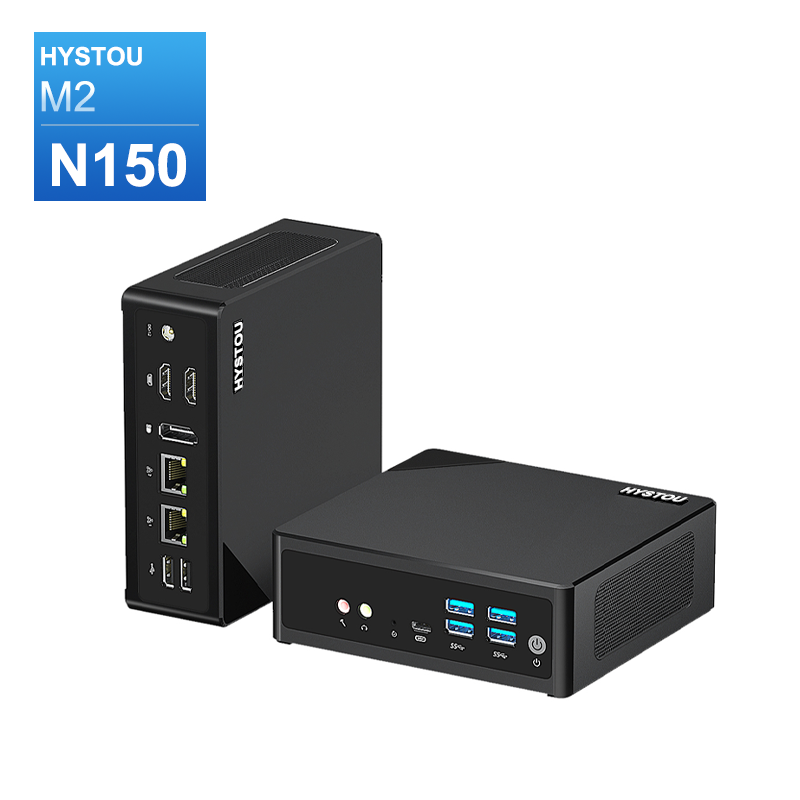
Hystou’s office mini PCs, like the M2 model, prioritize energy efficiency and silent operation while providing sufficient storage for productivity applications:
- Hystou M2: Offers 1×M.2 NVMe SSD slot (2280 form factor, max 4TB) and 1×SATA3.0 port (2.5-inch HDD/SSD, max 7mm thickness). The low-power consumption (10W) and silent cooling system make it ideal for office environments, while the flexible storage options allow users to choose between speed (SSD) or capacity (HDD) based on their workflow.
Gaming Mini PCs
For gaming enthusiasts, Hystou’s gaming mini PCs deliver high-performance storage to ensure smooth gameplay and fast load times:
- Hystou RTX 3050 Mini Gaming PC: Comes with 1×M.2 NVMe PCIe 4.0 SSD (max 4TB) and 1×SATA HDD (max 6TB). The PCIe 4.0 SSD provides lightning-fast read/write speeds, reducing game load times and ensuring smooth performance for even the most demanding games. The additional SATA HDD offers ample space for storing large game libraries.
Home Theater PC
Hystou’s home theater PCs are designed for media streaming and entertainment, requiring large storage capacities for movies, TV shows, and music:
- These devices typically feature 1×M.2 SSD slot and 1×SATA HDD port, allowing users to combine the speed of an SSD for streaming media (ensuring smooth playback) with the capacity of an HDD for storing their media library.
Conclusion: Making the Right Storage Choice for Your Hystou Mini PC
Choosing between an HDD, SSD, or hybrid storage solution for your Hystou mini PC depends on your specific needs, budget, and usage patterns. Here’s a summary to help you make an informed decision:
Choose an HDD if: You prioritize storage capacity over speed, have a limited budget, or need to store large amounts of data (such as multimedia files, backups, or archives). HDDs are ideal for Hystou users who use their mini PCs for general computing tasks, media storage, or as home servers.
Choose an SSD if: You value speed, durability, and silent operation. SSDs are perfect for Hystou users who need fast boot times, quick application launches, or use their mini PCs in mobile or rugged environments (such as fieldwork or travel). They are also an excellent choice for gaming, video editing, and other performance-critical tasks.
Choose a hybrid solution (like the Western Digital Black2 or Hystou’s dual-drive options) if: You want to balance speed and capacity. Hybrid solutions are ideal for Hystou users who need fast performance for their operating system and frequently used applications while requiring large storage space for files, media, or projects.
No matter which storage option you choose, Hystou’s mini PCs are designed to support a wide range of storage configurations, ensuring that you can tailor your device to your specific needs. With Hystou’s commitment to quality and reliability, you can trust that your storage solution will deliver consistent performance and durability for years to come.
- Processor: Intel Core I5-1235U / I7-1255U / I5-1335U / I5-1340P / I7-1360P
- Graphics Card: Intel® UHD Graphics (with single-channel memory) or Intel® Iris® Xe Graphics (with dual-channel memory)
- Memory: 2×DDR5 262Pin SODIMM, maximum support 64GB
- Storage: 2×M.2 2280 NVMe SSD (NVME1 supports Gen3 X4/SATA protocol, NVME2 supports Gen4 X4 protocol, both up to 4TB) + 1×SATA3.0 interface (supports 2.5-inch HDD/SSD, up to 6TB)
- Network: 2×RJ45 (Intel I225-V 2.5G network card), supports WiFi 6 (optional AX200) and Bluetooth 5.2
- Processor: Intel N150 or Intel i3-N305
- Graphics card: Intel® UHD Graphics
- Memory: DDR5 262Pin SODIMM, supports 4800Mhz, maximum capacity 32GB
- Storage: M.2 NVMe SSD (up to 4TB) + SATA3.0 interface (supports 2.5-inch HDD/SSD, thickness ≤7mm)
- Wireless and Bluetooth: Default WIFI 5 and Bluetooth 4.2, optional WIFI 6 (AX200) and Bluetooth 5.2
HYSTOU has established its R&D headquarters in Shenzhen, drawing on over a decade of experience. Our core team members, who previously served at renowned companies such as Inventec and Quanta Computer, form the backbone of our technical expertise. With robust R&D and innovation capabilities, we remain steadfast in our commitment to pursuing excellence in the field of technology products.