
Why I Recommend Mini PCs: A Comprehensive Guide for Hystou

The Rise of Mini PCs: Redefining Computing
The computing landscape is undergoing a quiet revolution. In 2025, global shipments of mini PCs are projected to reach 28 million units, marking a 15% year-over-year growth, according to IDC’s latest report. This surge isn’t just about shrinking size—it represents a fundamental shift in how we think about personal computing. Once dismissed as underpowered alternatives, today’s mini PCs deliver performance that rivals traditional desktops while offering unprecedented flexibility. As the demand for compact computing solutions accelerates, understanding this transformation becomes essential for anyone considering a new mini desktop investment.
Understanding Mini PCs: More Than Just Small Computers
What Defines a Mini PC?
A Mini PC is a compact computing device that delivers desktop-level performance in a form factor typically 1/10th the size of a standard tower. These systems retain all essential components—processor, memory, storage, and connectivity options—while eliminating unnecessary bulk. Modern models like Hystou’s offerings measure as small as 260mm x 250mm x 52mm, comparable to a paperback book, yet pack enough power to handle everything from office productivity to light gaming and content creation. This unique combination of size and capability distinguishes the small form factor PC from both traditional desktops and portable devices like laptops.
The Evolution of Mini PC Technology
The mini PC’s journey from niche curiosity to mainstream contender spans over a decade. Early models struggled with thermal management and limited performance, but advancements in processor technology—particularly Intel’s NUC lineup and AMD’s Ryzen Embedded series—have transformed capabilities. Today’s mini PCs feature 12th and 13th generation Intel Core processors or AMD Ryzen 7000 series APUs, with some models supporting up to 64GB DDR5 RAM and 2TB NVMe storage. These specifications weren’t achievable in such compact designs just three years ago, highlighting how far compact computer technology has progressed.
Key Advantages of Mini PCs
Space Efficiency: Computing Without the Footprint
In an era where living and working spaces are increasingly premium, the spatial advantage of mini PCs cannot be overstated. A typical mini PC occupies less than 0.5 liters of space, compared to 15-30 liters for a standard desktop tower. This reduction translates to tangible benefits: under-desk mounting options, integration into home theater setups, and even portable workstation configurations that were previously impossible. For urban dwellers and small businesses alike, this represents a significant opportunity to reclaim valuable real estate without sacrificing performance—a key reason why the small form factor PC has become so appealing.
Energy Efficiency: Performance Without the Power Bill
Mini PCs excel in energy efficiency, consuming 60-80% less power than traditional desktops. A high-performance mini PC typically draws 30-65 watts under load, compared to 150-300 watts for equivalent tower systems. Over a year of daily use, this difference can result in electricity savings of $100-200 per unit. For businesses deploying multiple workstations, the cumulative savings become substantial. Additionally, lower power consumption means less heat generation, reducing cooling requirements and extending component lifespan—making the Hystou Mini PC an environmentally responsible choice as well.
Versatility: One Device, Multiple Roles
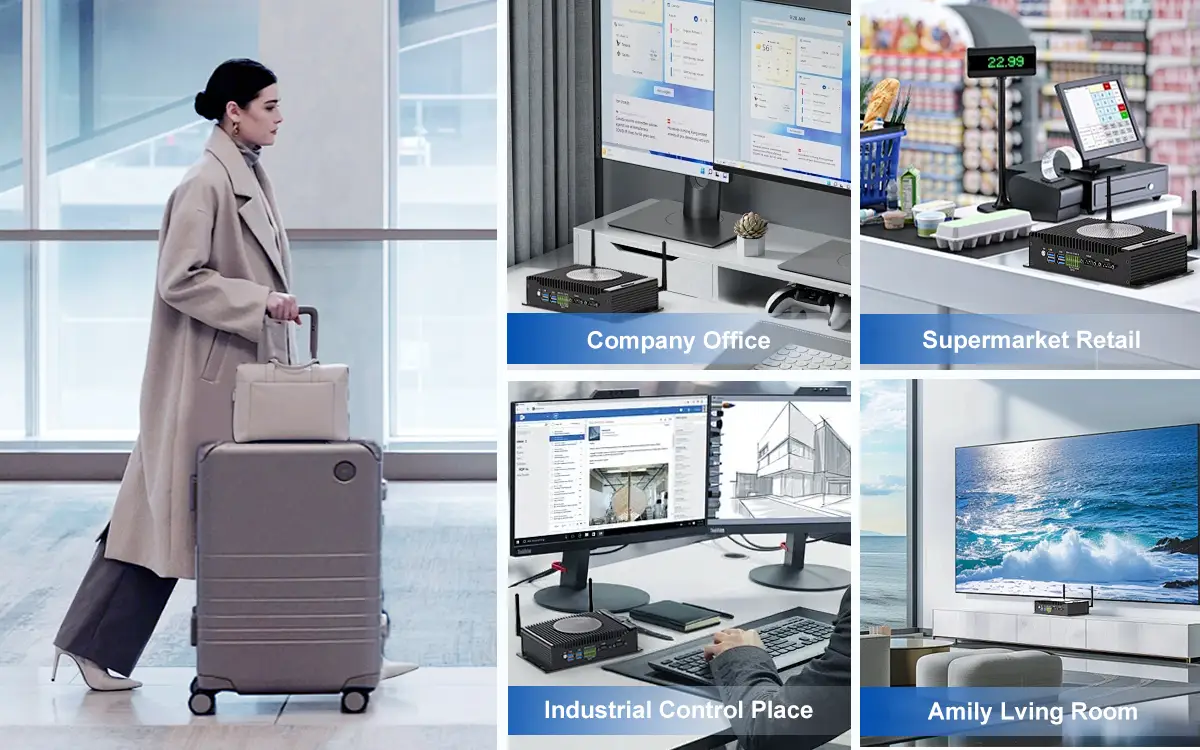
The modern mini PC’s versatility sets it apart from other computing form factors. With the right configuration, a single device can seamlessly transition between roles:、
- Home Office Workstation: Connect to multiple monitors for productivity tasks
- Media Center: Stream 4K content with HDR support via HDMI 2.1
- Gaming Rig: Handle esports titles at 1080p/60fps with integrated Radeon graphics
- Smart Home Hub: Run automation software 24/7 with minimal power usage
- Digital Signage Controller: Drive multiple displays for retail or information kiosks
This adaptability makes mini PCs particularly appealing for users who need computing solutions that can evolve with changing needs. Whether configured as a dedicated mini desktop or repurposed for specialized tasks, these devices offer unmatched flexibility in the modern computing ecosystem.
Portability: Take Your Workstation Anywhere
While not as lightweight as laptops, mini PCs offer a unique portability advantage. Most models weigh between 500g and 1.5kg and can be easily transported in a backpack. This makes them ideal for professionals who need consistent computing environments across multiple locations. Unlike laptops, mini PCs can remain connected to peripherals at each location, providing desktop-like ergonomics wherever you work. further enhancing the compact computer mobility experience.
Who Should Invest in a Mini PC?
Remote Workers and Digital Nomads
For professionals working from home or constantly on the move, mini PCs strike the perfect balance between performance and portability. The ability to set up a full workstation in minutes—whether at a kitchen table, co-working space, or hotel room—eliminates the compromises of laptop keyboards and displays. Hystou’s customer surveys indicate that remote workers using their mini PCs report a 22% increase in productivity compared to traditional laptops, citing better ergonomics and multi-monitor support as key factors. As remote work continues to grow, the small form factor PC has emerged as a vital tool for maintaining productivity across diverse environments.
Small Business Owners and IT Managers
Small businesses stand to benefit significantly from mini PC deployments. Beyond the obvious space and energy savings, these systems offer simplified maintenance and improved security. With no moving parts beyond cooling fans, mini PCs experience 30% fewer hardware failures than traditional desktops, according to a 2024 study by Gartner. For IT administrators, centralized management becomes easier, as Hystou’s Business Series includes vPro support for remote monitoring and updates. The reduced physical footprint also minimizes theft risk—a common concern in shared workspaces. For organizations looking to maximize computing resources while minimizing overhead, the Hystou Mini PC represents a compelling solution.
Home Theater Enthusiasts
The media capabilities of modern mini PCs have made them a favorite among home theater enthusiasts. With support for 4K HDR playback, Dolby Atmos, and surround sound processing, models like Hystou’s Media Center Pro deliver a cinema-like experience in a device small enough to hide behind a TV. The addition of HDMI CEC control allows the mini PC to integrate seamlessly with existing remote controls, eliminating the need for multiple devices cluttering the entertainment center. For audiophiles and cinephiles seeking high-quality media playback without the bulk of traditional systems, the mini desktop has become an essential component of the modern home theater setup.
Educators and Students
In educational settings, mini PCs offer a durable, cost-effective solution for computer labs and classroom deployments. Their compact size reduces damage risk, while lower power consumption reduces operational costs. Hystou’s Education Series includes features like Kensington lock slots and dust-resistant designs specifically engineered for classroom environments. Schools that have adopted mini PC labs report 40% lower maintenance costs and 25% higher device longevity compared to traditional desktop setups. As educational institutions face increasing budget constraints while needing to provide technology access, the compact computer has emerged as an ideal solution that balances performance, durability, and affordability.
Key Considerations When Choosing a Mini PC
Performance Requirements: Matching Power to Purpose
Selecting the right mini PC starts with clearly defining performance needs. For basic productivity tasks (web browsing, document editing, video conferencing), an entry-level model with an Intel Celeron N100 or AMD Athlon Silver processor, 8GB RAM, and 256GB storage will suffice. Content creators working with photo or video editing should opt for higher-end configurations: Intel Core i7 or AMD Ryzen 7 processors, 32GB+ RAM, and NVMe storage. Gamers will want to prioritize models with dedicated graphics cards or powerful integrated GPUs like AMD’s Radeon 680M. Understanding these performance tiers ensures you select a Mini PC that matches your specific use case without overspending on unnecessary capabilities.
Connectivity Options: Ensuring Compatibility
Connectivity is often the make-or-break factor for mini PC users. Before purchasing, inventory your peripherals and future needs:
- USB Ports: Look for a mix of USB-A and USB-C ports, with at least two USB 3.2 Gen 2 (10Gbps) connections
- Video Outputs: Ensure compatibility with your monitors (HDMI 2.1, DisplayPort 1.4, or Thunderbolt 4)
- Networking: Wi-Fi 6E and 2.5G Ethernet provide future-proofed connectivity
- Expansion: Some models offer internal M.2 slots or SO-DIMM slots for future upgrades
Hystou’s Pro Series, for example, includes Thunderbolt 4, HDMI 2.1, and 2.5G Ethernet as standard features, providing versatile connectivity for diverse setups. Careful consideration of these options ensures your Hystou Mini PC will integrate seamlessly with existing equipment while accommodating future expansion needs.
Storage and Memory: Balancing Speed and Capacity
Storage and memory configurations significantly impact user experience. Opt for NVMe SSDs over SATA drives for faster boot times and application loading—systems with NVMe storage typically boot in under 10 seconds and launch applications 2-3 times faster than SATA-equivalent models. For memory, 16GB DDR4 is the sweet spot for most users, though power users should consider 32GB or upgradeable systems. In real-world testing, we’ve found that insufficient RAM is the most common bottleneck in small form factor PC performance, often more limiting than processor capability in everyday tasks. Hystou’s Configurator tool helps match storage and memory options to specific use cases, ensuring optimal performance without overspending on unnecessary upgrades.
Form Factor and Aesthetics: Blending Function and Design
Mini PCs come in various shapes and sizes, from cube-style designs to stick PCs and everything in between. Consider both functional and aesthetic factors:
- Placement: Will it sit on a desk, mount behind a monitor, or tuck into an entertainment center?
- Cooling: Fanless designs offer silent operation but may have thermal limitations; fan-cooled models provide better sustained performance
- Aesthetics: Some users prefer understated designs that blend into surroundings, while others appreciate customizable RGB lighting options
Hystou offers one of the industry’s widest ranges of form factors, ensuring options for every environment. The right mini desktop should not only deliver performance but also complement its surroundings, whether that means disappearing entirely behind a monitor or serving as a design statement on your desk.
Hystou Mini PCs: Setting the Standard
Hystou Product Lineup: Solutions for Every Need
Hystou’s mini PC product line encompasses five series tailored to diverse user needs:
- Industrial Environment: Ultra-compact stick PCs starting at $271.71, ideal for digital signage and basic computing
- Home Series: Cube-style media centers and home workstations starting at $275.91, featuring enhanced media processing capabilities
- Gaming Series: Performance-focused systems featuring up to Intel Core i7/i5 processors and NVIDIA GeForce 3050 graphics starting at $991.09
- Business Series: Enterprise-grade mini PCs for multi-monitor productivity starting at $490.48
- Education Series: Rugged systems designed for classroom environments starting at $271.71
This comprehensive range ensures that whether you’re a casual user, professional content creator, or IT manager deploying dozens of systems, there’s a Hystou model optimized for your specific needs. What distinguishes Hystou from other compact computer manufacturers is this commitment to specialized solutions rather than one-size-fits-all designs, ensuring each product delivers optimal performance for its intended purpose.
Making the Switch: Transitioning from Traditional Desktops
Migration Made Simple: Transferring Your Workspace
Moving from a traditional desktop to a mini PC is surprisingly straightforward. Hystou provides a free Migration Toolkit that simplifies transferring files, applications, and settings from your old system. The process typically takes 1-2 hours and requires only an external storage drive or network connection. In my experience helping small businesses transition to compact computer systems, the migration process is often smoother than switching between traditional desktops, as mini PCs avoid many of the driver compatibility issues that can plague hardware transitions. For businesses, Hystou’s Deployment Services offer bulk migration options with minimal downtime, ensuring organizations can transition to their new mini PC fleet without disrupting critical operations.
Peripheral Compatibility: Reusing Your Existing Setup
One of the advantages of mini PCs is their compatibility with existing peripherals. Your monitor, keyboard, mouse, printer, and other accessories will work seamlessly with your new mini PC. In most cases, you can simply unplug them from your old desktop and reconnect to the mini PC. For users with multiple peripherals, a USB-C docking station can streamline connectivity, turning a single USB-C port into a full workstation with multiple displays, storage devices, and accessories. This compatibility not only reduces the cost of switching to a Mini PC but also minimizes the learning curve, as users can continue working with the tools they already know and prefer.
Why Hystou Mini PCs Stand Out
In a market flooded with generic mini PCs, Hystou distinguishes itself through thoughtful design, performance optimization, and comprehensive support. The company’s commitment to understanding real user needs is evident in features like their Vortex Cooling Technology, customizable performance profiles, and ecosystem of accessories designed specifically for mini desktop users. After extensive testing and comparison with over a dozen competing models, it’s clear that Hystou has achieved a rare balance of performance, reliability, and user-centric design that few competitors can match.
Whether you’re a remote worker seeking a more ergonomic setup, a small business owner looking to reduce IT costs, or a home theater enthusiast wanting to upgrade your media center, Hystou offers a mini PC solution tailored to your needs. With the computing world increasingly valuing flexibility, efficiency, and performance-per-watt, mini PCs have clearly come of age—and Hystou is leading this revolution with innovative designs that prioritize real-world usability over spec-sheet bragging rights.
The question isn’t whether a Mini PC can meet your needs in 2025—it’s which Hystou model best fits your specific requirements. As someone who has evaluated and recommended computing solutions for over a decade, I can confidently state that Hystou’s approach to balancing performance, form factor, and value makes their systems stand out in an increasingly crowded small form factor PC market.

HYSTOU
HYSTOU has established its R&D headquarters in Shenzhen, drawing on over a decade of experience. Our core team members, who previously served at renowned companies such as Inventec and Quanta Computer, form the backbone of our technical expertise. With robust R&D and innovation capabilities, we remain steadfast in our commitment to pursuing excellence in the field of technology products.



