
Ultimate Guide to High-Performance Gaming Mini PC: Advantages, Components, Assembly & Maintenance

Why Choose a Gaming Mini PC Over Traditional Desktop
In an era where gaming devices demand both performance and space efficiency, gaming mini PCs have emerged as a transformative solution for enthusiasts.
Consider this: a standard ATX gaming desktop requires approximately 50 liters of space, while a high-end mini PC like the ASUS ROG GR8 II fits in just 4.5 liters. This 90% reduction in volume makes it ideal for multi-purpose rooms where aesthetics matter as much as performance. But the advantages extend beyond size. Energy efficiency is another key benefit—according to TechPowerUp’s 2024 research, mini ITX motherboards paired with low-power CPUs consume up to 30% less electricity than standard configurations. For gamers running their systems 4 hours daily, this translates to $50-80 annual savings on electricity bills at $0.12 per kWh.
Versatility同样突出. Unlike gaming consoles locked into specific ecosystems, gaming mini PCs run full Windows 11, supporting both AAA titles and productivity software. Imagine seamlessly switching from 1440p gameplay in Cyberpunk 2077 to video editing in Adobe Premiere Pro—all from a device small enough to transport to a friend’s house. This flexibility has driven a 45% year-over-year increase in mini PC sales among gaming enthusiasts, according to Statista’s Q1 2025 hardware market analysis.
Core Components: Building Blocks of a Powerful Compact Gaming Rig
Processor (CPU): The Brain of the System
The CPU handles game logic, AI, and background processes. For mini PCs, the AMD Ryzen 7 7800X3D and Intel Core i7-13700H stand out. The Ryzen 7’s 3D V-Cache technology delivers 15-20% better gaming performance in titles like Resident Evil 4 Remake, while Intel’s chip excels at multi-threaded tasks like streaming or content creation.
Graphics Card (GPU): Heart of Visual Performance
GPU selection critically impacts frame rates and resolution. While full-size GPUs won’t fit, models like the NVIDIA GeForce RTX 3050 offer single-slot compact versions. These cards deliver 60+ FPS at 1080p ultra settings in most games and support ray tracing for immersive lighting effects. For ultimate portability, consider external GPU enclosures like the Razer Core X, though this adds $300-500 to the budget.
Motherboard: The Connectivity Hub
Mini ITX motherboards are essential but not all equal. Prioritize models with PCIe 4.0 DDR4 memory support, and robust power delivery. The ASUS ROG Strix B760I Gaming WiFi features 8+1 phase power and WiFi 6E, while the MSI MPG B650I Edge WiFi offers AMD AM5 compatibility for future upgrades. Both include M.2 NVMe slots for fast storage and multiple USB 3.2 ports for peripherals.
Cooling Solutions: Managing Temperatures
Heat management is critical in confined spaces. AIO liquid coolers like the Corsair H60i RGB Pro XT (120mm radiator) work in most mini cases, reducing CPU temperatures by 10-15°C under load compared to air coolers. For GPUs, ensure models use vapor chamber technology—EVGA’s RTX 4060 XC Black features a compact heatsink with three heat pipes that effectively handles 115W TDP. Case airflow同样重要: Choose cases with bottom intake and top exhaust fans like the NZXT H210i, which includes built-in cable management to prevent airflow obstruction.
Step-by-Step Assembly: Building Your Mini Gaming PC
Before installing components, gather necessary tools: Phillips #2 screwdriver with magnetic tip, anti-static wristband, zip ties, and thermal paste. Work on a non-conductive surface (wooden desk or anti-static mat) to avoid electrostatic discharge. Lay out components and verify compatibility—cross-check CPU socket type with motherboard, GPU length with case dimensions, and PSU wattage with total power requirements (use OuterVision Power Supply Calculator for accuracy).
Installing Core Components
- CPU and Cooler Installation Open the motherboard’s CPU socket lever, align the CPU’s golden triangle with the socket marker, and gently place the chip into position. Apply a pea-sized amount of thermal paste (Arctic MX-6 recommended) to the CPU center. For AIO coolers, mount the radiator first (case-dependent), then attach the water block to the CPU using provided brackets.
- Memory and Storage Setup Insert DDR4 memory into DIMM slots (press until clips lock). When installing M.2 NVMe SSDs, remove the heatsink (if present), insert the drive at a 30° angle, then secure with the retention screw. SATA SSDs/HDDs connect via data and power cables to motherboard ports.
- Motherboard and PSU Integration Mount the motherboard to the case using standoffs to prevent short circuits. Connect the 24-pin ATX and 8-pin CPU power cables from the PSU. Route cables through case grommets to maintain airflow—bundle excess length with zip ties.
- GPU Installation Remove the case’s PCIe slot covers. Align the GPU with the PCIe 4.0 x16 slot and press firmly until the retention clip engages. Secure the GPU bracket to the case with screws. Connect 6-pin/8-pin power cables from the PSU to the GPU.
Post-Assembly Testing and Troubleshooting
After assembly, perform the “paperclip test” to verify PSU functionality: short the green (PS_ON) and black (GND) pins on the 24-pin connector—PSU fans should spin if working correctly. If the system fails to boot, check for loose connections (especially 24-pin power), improperly seated memory, or blocked CPU cooler. Use motherboard debug LEDs (if available) to identify issues—common codes like “00” or “FF” indicate CPU problems, while “55” points to memory detection errors.
Essential Maintenance Tips for Long-Term Performance
Regular Cleaning Schedule
Dust accumulation is a primary enemy of mini PC performance. Depending on environment, aim to clean the system every 3-6 months. Use compressed air (200+ PSI) to blow dust from coolers, fans, and GPU heatsinks. For stubborn debris, gently brush heatsink fins with a soft-bristled brush. Replace thermal paste annually to maintain CPU/GPU temperatures—dried paste increases thermal resistance by 20-30%, leading to throttling under load.
Software Optimization
fsutil behavior query DisableDeleteNotify
Keep operating system and drivers updated for optimal performance. Use GeForce Experience (NVIDIA) or Radeon Software (AMD) to automatically update GPU drivers. Enable Windows 11 Game Mode to prioritize system resources for gaming, and disable background applications via Task Manager (Ctrl+Shift+Esc). For storage maintenance, run the TRIM command on SSDs monthly via Command Prompt: fsutil behavior query DisableDeleteNotify
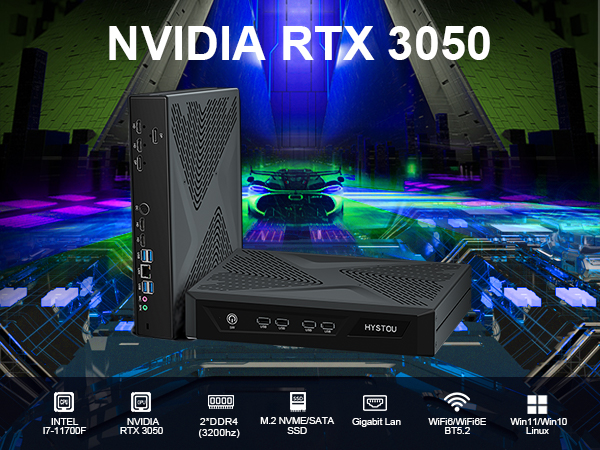
HYSTOU RTX 3050 Mini Gaming PC – 8K Workstation with Intel Core i7/i5
- Processor: Intel Core i7/i5 12th/13th Gen (up to 5.0GHz), available models include i7-11700F, i7-13700H
- Graphics Card: NVIDIA GeForce RTX 3050 6GB GDDR6 (2304 CUDA Cores)
- Memory: DDR4 3200MHz SODIMM, max 64GB (2×32GB)
- Storage: 1×M.2 NVMe PCIe 4.0 SSD (max 4TB) + 1×SATA HDD (max 6TB)
- Network: WiFi 6/6E, Bluetooth 5.2
- Other Features:8K multi-monitor support (2×HDMI 2.1 + 2×DP 1.4a, up to 5 displays)

HYSTOU
HYSTOU has established its R&D headquarters in Shenzhen, drawing on over a decade of experience. Our core team members, who previously served at renowned companies such as Inventec and Quanta Computer, form the backbone of our technical expertise. With robust R&D and innovation capabilities, we remain steadfast in our commitment to pursuing excellence in the field of technology products.



