

![Boot Option filter configuration [UEFI only];](https://hystou.com/wp-content/uploads/2025/11/Boot-Option-filter-configuration-UEFI-only.png)





Secure Boot, or Secure Boot is a security standard defined by UEFI (Unified Extensible Firmware Interface) firmware to prevent malware from loading and executing during the system boot process.
Prevent malware attacks: Effectively prevents malware, such as rootkits, from being injected into the system during the boot phase, as unauthorised software usually lacks valid digital signatures and cannot be verified by Secure Boot.
Ensure system integrity: By verifying the signatures of boot components, you ensure that the original, untampered components are loaded during the system boot process, preventing attackers from modifying the boot file to implant malicious code or carry out other malicious activities.
Support genuine software: It can restrict the installation and operation of unauthorized operating systems or drivers, helping to protect the intellectual property rights of software developers and ensuring that users are using genuine software.
Compatibility issues: Some old hardware devices, operating systems, or specific software may not support Secure Boot, such as some old computer motherboards with too low a BIOS version to enable the feature, or compatibility issues may occur after enabling it, resulting in some special drivers not being able to load properly and the device not working properly.
Complex key management: It involves a series of complex operations such as key generation, storage, distribution, and management etc. For common users and system administrators, if the key is lost, damaged, or improperly managed, it may cause the system to fail to boot normally and require professional knowledge and tools for recovery, which increases the management cost and difficulty.
Restriction of user freedom: To a certain extent, it restricts the user’s freedom to configure system startup items. Users may not be able to easily install some custom operating systems, bootloaders, or drivers that are not digitally signed, and even if they are safe and reliable in their own right, they may still be prevented from loading them due to failure to pass the Secure Boot authentication.
Potential Performance Impact: The time and system resources required to digitally sign and validate each boot component at system startup may result in a slight slowdown of system startup, although this performance impact is generally not noticeable on most modern hardware devices.
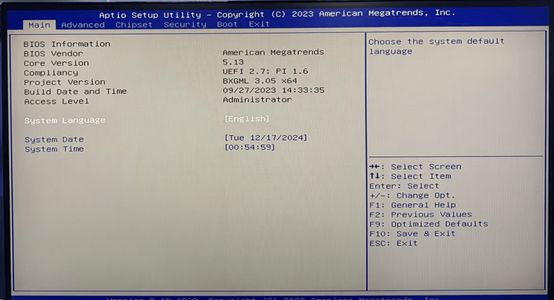
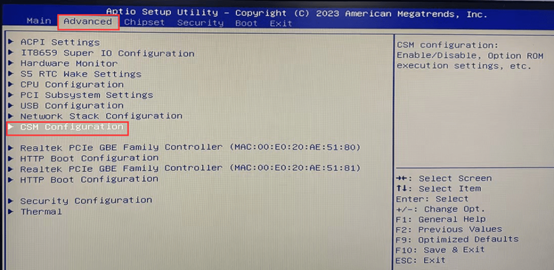
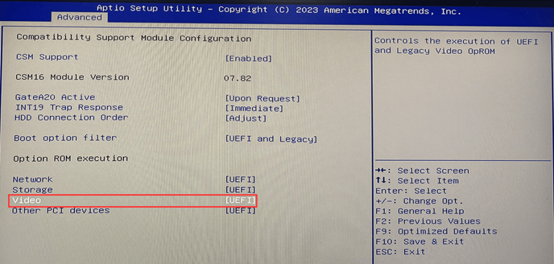
2, into the BIOS, select Advanced>CSM Configuration>Video configuration [UEFI], Boot Option filter configuration [UEFI only];
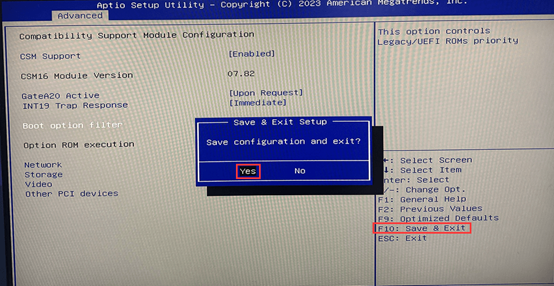
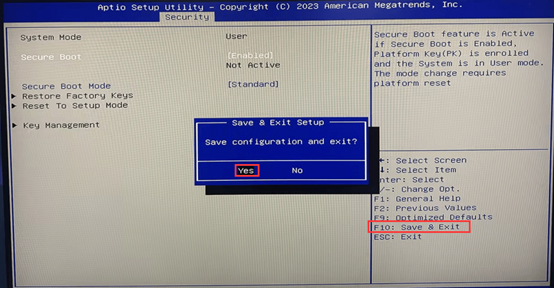
4. At this time, the computer will restart. Again, hit the keyboard Del key to enter the BIOS Setup, in turn, select Advanced > CSM Configuration > CSM Support will be configured as [Enabled]. After the configuration is complete, press F10 > Enter to select Yes to save and exit.
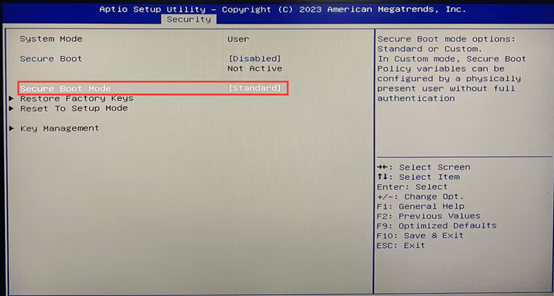
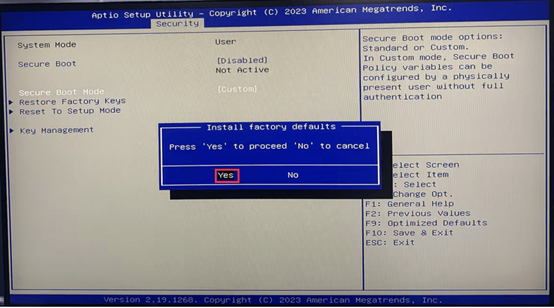
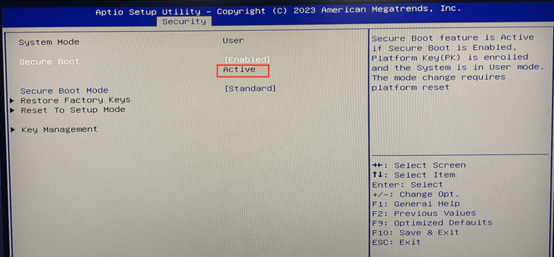
5. At this time, the computer will restart, hit the Del key again to enter the BIOS Setup, in turn, select Security>Secure Boot> Secure Boot Mode configuration for [Standard], in the pop-up window, select Yes.
HYSTOU
HYSTOU has established its R&D headquarters in Shenzhen, drawing on over a decade of experience. Our core team members, who previously served at renowned companies such as Inventec and Quanta Computer, form the backbone of our technical expertise. With robust R&D and innovation capabilities, we remain steadfast in our commitment to pursuing excellence in the field of technology products.
Recently, scammers have been impersonating our company staff to commit payment fraud. To protect your interests, please pay attention to the following matters:
Verify Sender: Check if the email domain is @hystou.com. Immediately delete any emails from non-Hystou domains.
Double-Check: For any account modification requests, cross-verify via the customer service hotline listed on our official website hystou.com or through existing partnership channels.
Refuse Private Transactions: Do not trust claims like “urgent notifications,” “confidentiality requirements,” or “tax policy updates.” All business changes must follow official procedures.