
Solid State Drive Types: Buyer Guide for Mini PC Users

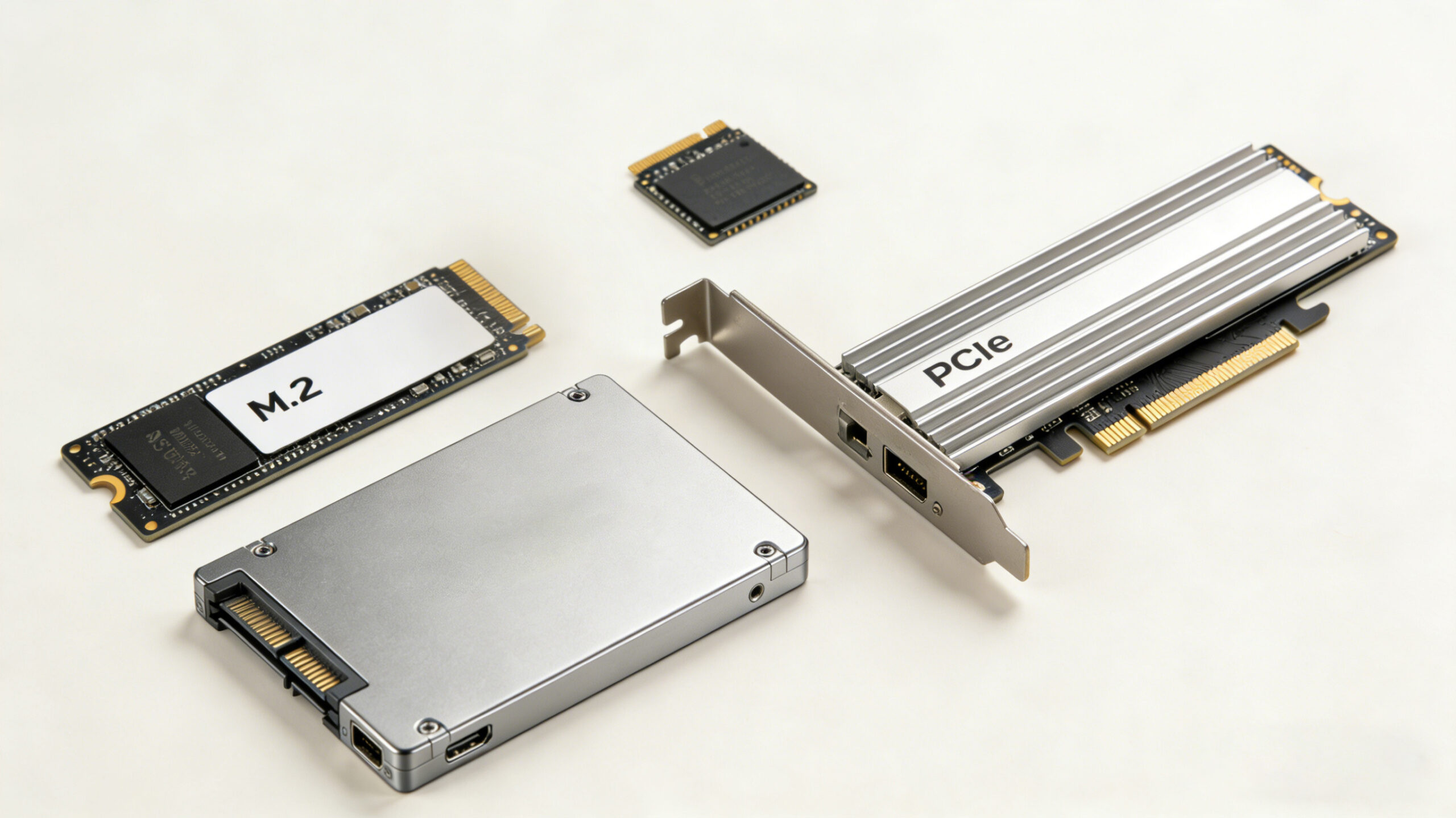
Understanding SSD Interfaces: Which One Fits Your Mini PC
When building or upgrading a mini PC, choosing the right SSD interface is critical for balancing performance and compatibility. The interface determines how fast data travels between your storage and the rest of the system, directly impacting boot times, application loading speeds, and overall responsiveness. Let’s break down the three main interface types available in 2025 and which mini PC configurations they best suit.
SATA III: The Reliable Workhorse
SATA III remains a viable option for older mini PCs or those on a tight budget. With a maximum throughput of 6 Gbps (approximately 600 MB/s), SATA SSDs like the Crucial MX500 offer a significant upgrade over mechanical hard drives while maintaining broad compatibility. These drives typically come in 2.5-inch form factors or M.2 SATA variants, making them easy to install in most systems. While SATA III can’t match newer interfaces in raw speed, it provides excellent value for everyday tasks like web browsing, document editing, and media consumption. For mini PCs used as home theater systems or basic workstations, SATA III SSDs deliver more than enough performance at a lower cost point.
NVMe over PCIe 3.0/4.0: The Sweet Spot for Most Users
NVMe (Non-Volatile Memory Express) SSDs have revolutionized storage performance by leveraging the PCIe bus directly. PCIe 3.0 x4 NVMe drives offer theoretical bandwidth up to 32 Gbps (around 3500 MB/s), while PCIe 4.0 x4 models like the Western Digital Black SN850X push this to 64 Gbps (approximately 7300 MB/s). These drives use the compact M.2 form factor, perfect for space-constrained mini PCs. The Samsung 990 Pro, with its sequential read speeds of 7450 MB/s, demonstrates the performance potential of PCIe 4.0 NVMe. For gaming mini PCs or content creation workstations, PCIe 4.0 NVMe SSDs provide a noticeable improvement in load times and file transfers without the premium price tag of the latest generation.
PCIe 5.0: Future-Proofing for Power Users
The newest addition to the SSD landscape, PCIe 5.0 NVMe drives like the Crucial T705, boast theoretical speeds up to 128 Gbps (around 14000 MB/s). While these speeds are impressive on paper, their real-world benefits in mini PCs are currently limited by both hardware and software constraints. Most mini PC motherboards as of 2025 still feature PCIe 4.0 slots, and few applications can fully utilize the increased bandwidth. However, for users building high-end mini PCs with the latest processors and planning to keep their system for several years, PCIe 5.0 offers future-proofing. It’s important to note that these drives often require active cooling to manage heat, which can be challenging in the compact enclosures typical of mini PCs.
Decoding NAND Flash: TLC vs QLC in Mini PC Applications
The type of NAND flash memory used in an SSD significantly impacts its performance, durability, and cost. In 2025, TLC (Triple-Level Cell) and QLC (Quad-Level Cell) are the most common options, each with distinct advantages for mini PC users.
TLC: Balancing Performance and Endurance
TLC flash stores three bits of data per memory cell, striking an excellent balance between speed, durability, and affordability. Modern TLC SSDs, such as the Samsung 990 Pro, utilize advanced controllers and SLC caching to deliver impressive performance. With typical endurance ratings of 600-1200 TBW (Terabytes Written) for 1TB drives, TLC is well-suited for most mini PC applications, including gaming, content creation, and daily productivity tasks. The Crucial P310, featuring TLC NAND, demonstrates how this technology can deliver sequential read speeds up to 7100 MB/s at a reasonable price point. For users who demand consistent performance and plan to keep their mini PC for 3-5 years, TLC remains the recommended choice.
QLC: Maximizing Capacity on a Budget
QLC flash increases storage density by packing four bits per cell, enabling higher capacities at lower cost per gigabyte. Drives like the Western Digital Blue SN580 QLC offer 2TB or more of storage at prices that compete with smaller TLC models. While QLC traditionally lagged in write performance and endurance (typically 300-600 TBW for 1TB drives), advancements in controller technology and over-provisioning have significantly improved their viability. QLC SSDs excel in read-heavy scenarios, making them ideal for media libraries, backup drives, or secondary storage in mini PCs. For users prioritizing capacity over raw performance, QLC provides an excellent value proposition, though it’s generally not recommended as the primary drive in systems requiring frequent large file writes.
Form Factors and Mini PC Compatibility
The physical design of an SSD is crucial when building or upgrading a mini PC, where space is often at a premium. Understanding the different form factors available in 2025 will help ensure a seamless installation and optimal performance.
“HYSTOU Mini PCs feature versatile internal slots and external ports, supporting multiple SSD configurations for flexible storage expansion.”

Intel Slots:
- 2×M.2 PCIe 4.0 SSD slots (NVMe 2 supports PCIe 4.0×4)
- 1×SATA 3.0 interface (for 2.5″ HDD/SSD, ≤7mm thickness)
External Ports:
- 6x USB 3.2 + 2x USB 2.0 ports
- 1x Type-C(Supports Thunderbolt 4, with a maximum transmission bandwidth of 40Gbps.)
M.2: The Compact Champion
M.2 has become the dominant form factor for modern SSDs, particularly in mini PCs. These small, stick-like drives come in various lengths (2230, 2242, 2260, 2280, 22110) [AI生成] and widths, with 2280 being the most common. M.2 SSDs can use either SATA or NVMe protocols, so it’s essential to check your mini PC’s motherboard specifications. The advantage of M.2 is its direct mounting on the motherboard, eliminating the need for data and power cables. This not only saves space but also improves airflow in compact cases. For example, the Kingston NV3 M.2 NVMe SSD fits easily into tight spaces while delivering speeds up to 6000 MB/s, making it perfect for small form factor builds.
2.5-inch: The Versatile Veteran
While less common in new mini PC designs, 2.5-inch SSDs still have their place, especially in older systems or those requiring multiple drives. These drives typically use the SATA III interface and connect via standard SATA data and power cables. The Samsung 870 Evo demonstrates the enduring value of this form factor, offering reliable performance and easy installation. Some mini PCs, particularly those designed for expandability, include 2.5-inch drive bays alongside M.2 slots, allowing users to combine the speed of an NVMe boot drive with the capacity of a 2.5-inch SSD for storage. When considering a 2.5-inch SSD, be sure to check your mini PC’s physical dimensions and power supply capabilities.
U.2 and Add-in Cards: Enterprise Options for Specialized Builds
For enthusiasts building high-end mini PCs with enterprise-grade components, U.2 and add-in card (AIC) SSDs offer additional flexibility. U.2 drives use the PCIe interface with a SATA-like connector, supporting NVMe protocols and high capacities. Add-in cards, as the name suggests, plug directly into PCIe slots, making them suitable for mini PCs with available PCIe slots and sufficient cooling. These form factors are less common in consumer mini PCs but worth considering for specialized applications like video editing workstations or small servers. Examples include the Intel Optane P5800X, which prioritizes low latency and endurance for demanding workloads.
mSATA: The Pioneering Miniature Interface
mSATA emerged as a pivotal small-form-factor solution in the early 2010s, designed to bring solid-state storage to space-constrained devices long before M.2 became prevalent. Based on the SATA III protocol, these tiny drives (measuring 50.95mm × 30mm) utilized the PCIe Mini Card form factor, making them ideal for legacy mini PCs, industrial embedded systems, and compact laptops like Intel NUC第一代产品. While limited by SATA’s maximum bandwidth (600MB/s), mSATA drives offered a significant upgrade over traditional 2.5-inch HDDs in both speed and physical size.
When working with mSATA, ensure your system’s BIOS supports SATA III mode and verify physical clearance around the slot, as some implementations require specific screw mounting points.
Performance Metrics That Matter for Mini PC Users
When evaluating SSDs for your mini PC, focusing on the right performance metrics will ensure you get the best value for your specific needs. While manufacturers often highlight sequential read and write speeds, real-world performance depends on several factors.
Sequential vs. Random Performance
Sequential speeds, measured in MB/s, represent how quickly large files can be read or written. This is important for tasks like video editing or transferring large datasets. The Crucial T705’s sequential read speed of 14,500 MB/s is impressive for such workloads. However, for most everyday tasks and gaming, random performance (measured in IOPS, or Input/Output Operations Per Second) has a more significant impact on perceived responsiveness. Random 4K read/write speeds determine how quickly the system can access small files, affecting application launch times and multitasking capabilities. A drive like the Samsung 990 Pro, with random read speeds exceeding 1.5 million IOPS, will feel noticeably snappier than a drive with lower random performance but similar sequential speeds.
Endurance and Reliability
SSD endurance, measured in TBW (Terabytes Written), indicates how much data can be written to the drive before potential degradation. For mini PCs used as daily drivers, a 1TB SSD with 600 TBW should provide several years of reliable service. The Western Digital Black SN850X offers 600 TBW for its 1TB model, suitable for most users. Additionally, features like DRAM cache and advanced error correction (LDPC) contribute to long-term reliability. While consumer SSDs typically come with 5-year warranties, it’s worth considering drives with higher TBW ratings if you anticipate heavy write workloads, such as content creation or virtualization.
Thermal Management
Heat is a critical consideration in mini PCs, where compact enclosures can restrict airflow. SSDs, particularly high-performance NVMe models, generate significant heat under load, which can lead to thermal throttling and reduced performance. Drives like the Corsair MP700 Pro include built-in heatsinks to mitigate this issue. If your mini PC lacks active cooling for M.2 drives, consider purchasing a third-party heatsink or choosing a drive with a single-sided PCB design, which generally runs cooler. Monitoring software like HWMonitor can help track SSD temperatures and ensure your system remains within safe operating ranges.
“HYSOU Mini PCs feature innovative cooling solutions with both fanless and active cooling options, ensuring quiet operation and reliable performance even with high memory configurations.”
Making the Right SSD Choice for Your Mini PC
Selecting the ideal SSD for your mini PC requires balancing performance, compatibility, and budget. By understanding the differences between SATA, NVMe, and emerging PCIe 5.0 interfaces, you can determine which best suits your needs. Consider the form factor that fits your system, prioritizing M.2 for space-constrained builds or 2.5-inch drives for older systems. Performance metrics like random IOPS and TBW ratings often have a more significant impact on daily use than headline sequential speeds.
For most users in 2025, PCIe 4.0 NVMe drives like the Western Digital Black SN850X offer the best combination of performance and value. They provide a noticeable upgrade over SATA III while remaining compatible with most modern mini PCs. If you’re building a future-proof system or working with large media files, investing in a PCIe 5.0 drive with adequate cooling might be worthwhile. Budget-conscious users or those with basic needs will find excellent options in SATA III or entry-level NVMe drives.
Ultimately, the best SSD for your mini PC is one that matches your specific usage patterns and system capabilities. Whether you’re building a compact gaming rig, a home theater PC, or a professional workstation, the right SSD will serve as the foundation for a responsive and reliable system.

HYSTOU
HYSTOU has established its R&D headquarters in Shenzhen, drawing on over a decade of experience. Our core team members, who previously served at renowned companies such as Inventec and Quanta Computer, form the backbone of our technical expertise. With robust R&D and innovation capabilities, we remain steadfast in our commitment to pursuing excellence in the field of technology products.



