
Mini PC vs All-in-One PC: 2025 Comprehensive Comparison

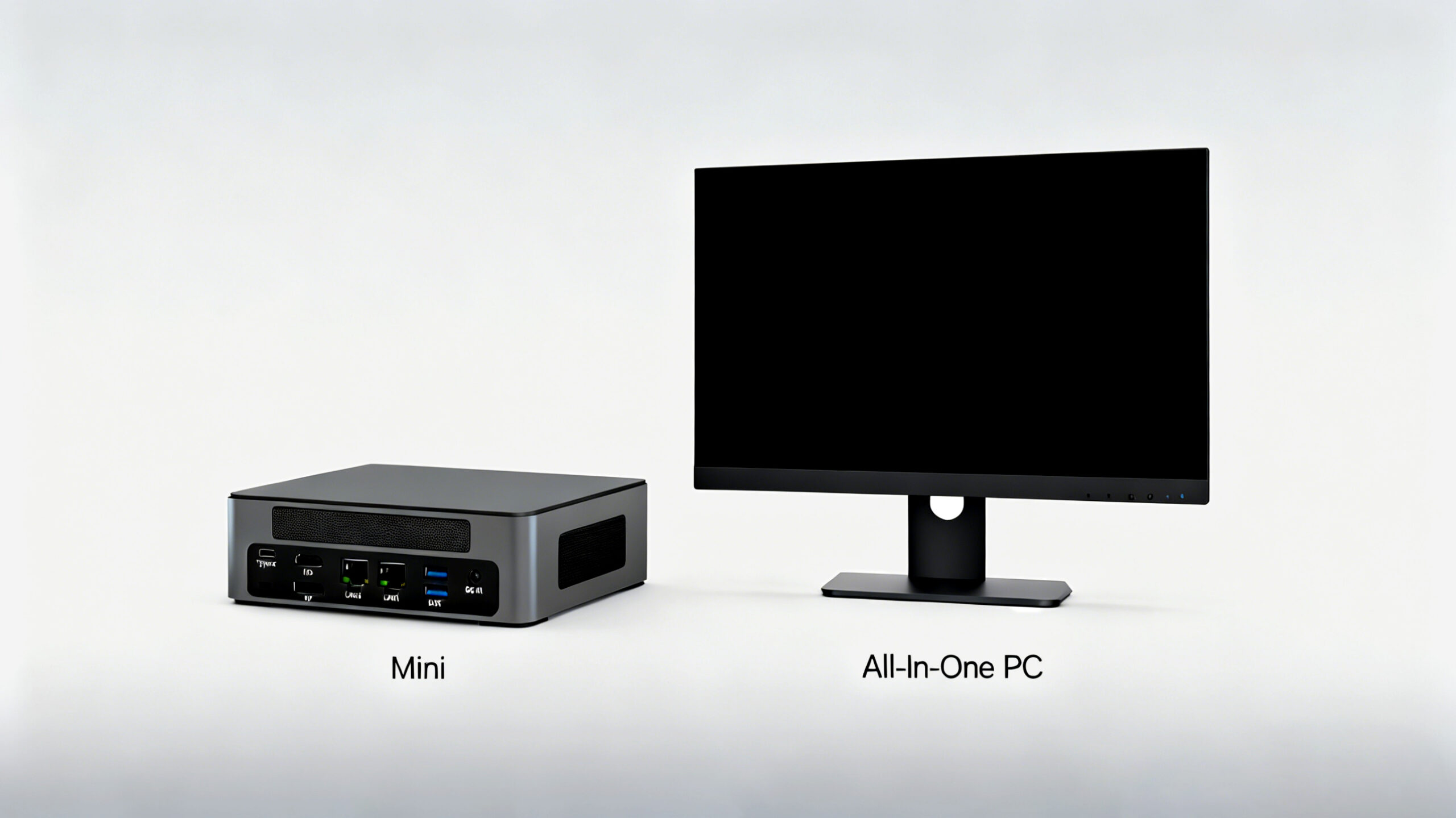
In today’s fast-paced digital world, the demand for space-efficient computing solutions has never been higher. As remote work becomes the norm and living spaces continue to shrink, consumers are increasingly turning to compact alternatives to traditional desktop towers. Two options have emerged as front-runners in this space: the Mini PC and the All-in-One PC. But which one truly offers the best balance of performance, versatility, and value in 2025?
What is a Mini PC
A Mini PC is a compact computing device designed to deliver the functionality of a traditional desktop computer in a significantly smaller form factor. These pint-sized powerhouses have evolved dramatically in recent years, now packing impressive performance into packages small enough to fit in the palm of your hand or mount behind a monitor.
Key Features of Mini PC
●Space-Saving Design
Mini PCs typically measure just 169 x 138 x 52 mm, making them up to 90% smaller than traditional desktop towers. This ultra-compact footprint allows them to fit seamlessly into home offices, dorm rooms, and industrial settings where space is at a premium. The Hystou M9, for example, can be VESA-mounted behind a monitor, effectively turning any display into a space-efficient all-in-one system without sacrificing performance.
●Energy Efficiency
Modern Mini PCs prioritize power efficiency, with most models consuming between 15-65W under load. This represents a 60-70% reduction in energy usage compared to traditional desktops, resulting in significant long-term savings on electricity bills. The Hystou M9, equipped with Intel’s 13th Gen Core processors, maintains this efficiency while delivering performance suitable for demanding tasks.
●Versatile Connectivity
Despite their small size, Mini PCs offer impressive connectivity options. The Hystou M9, for instance, features 8 USB ports (including 6 USB 3.2), dual 2.5G LAN ports, HDMI 2.0, DisplayPort 1.4, and a USB Type-C port supporting 4K output. This extensive array of interfaces ensures compatibility with multiple monitors, external storage devices, and peripherals simultaneously.
●Performance Capabilities
Today’s Mini PCs are far more powerful than their predecessors. Models like the Hystou M9 can be configured with up to 64GB DDR5 RAM and 4TB Gen 4 SSD storage, paired with Intel Core i7 processors delivering up to 4.7GHz turbo frequency. These specifications make modern Mini PCs capable of handling everything from everyday office tasks to photo editing and light gaming.
What is an All-in-One PC
An All-in-One (AIO) PC integrates the computer’s components directly into the display housing, creating a streamlined, all-in-one unit. This design eliminates the need for a separate tower, reducing clutter and simplifying setup. AIOs have long been popular in home and office environments where aesthetics and space efficiency are priorities.
Key Features of All-in-One PC
●Integrated Design
The defining characteristic of an All-in-One PC is its integrated design, which combines the monitor, processor, storage, and other components into a single device. This approach eliminates cable clutter and reduces the overall desktop footprint by approximately 40% compared to traditional tower-and-monitor setups.
●Simplified Setup
AIOs offer plug-and-play convenience, requiring only a single power cable in most cases. This simplicity makes them ideal for users who prioritize ease of use and a clean workspace. Many models also include built-in webcams, microphones, and speakers, further reducing the need for additional peripherals.
●Display Quality
All-in-One PCs typically feature high-quality displays ranging from 21.5 to 34 inches, with resolutions up to 4K UHD. Some premium models offer touchscreen capabilities and color-accurate panels suitable for photo and video editing. This integration of display and computing components often results in better optimization for visual performance compared to Mini PCs paired with third-party monitors.
●Space Efficiency
While not as compact as Mini PCs, AIOs still offer significant space savings compared to traditional desktop setups. The elimination of the tower and reduction in cables creates a cleaner, more organized workspace, which is particularly valuable in small offices and home environments.
Mini PC vs All-in-One PC: A Detailed Comparison
When choosing between a Mini PC and an All-in-One PC, several key factors come into play. Let’s examine how these two form factors compare across critical dimensions:
Performance
Processing Power
Both Mini PCs and AIOs now offer comparable processing capabilities, with high-end models featuring Intel Core i7 and AMD Ryzen 7 processors. The Hystou M9 Mini PC, for example, can be configured with an Intel Core i7-1360P processor (12 cores, 16 threads, up to 4.7GHz), delivering performance on par with many mid-range AIOs.
Graphics Performance
AIOs typically have an edge in integrated graphics performance, as they can accommodate more powerful GPUs due to their larger form factor. However, high-end Mini PCs like the Hystou M9 feature Intel Iris Xe graphics, which are more than capable of handling 4K video playback, photo editing, and light gaming.
Storage and Memory
Mini PCs often offer greater flexibility in storage and memory configurations. The Hystou M9 supports up to 64GB DDR5 RAM and dual M.2 SSD slots, allowing for up to 4TB of ultra-fast storage. AIOs, while offering similar maximum capacities, often have limited upgrade options due to their integrated design.
Portability
Form Factor
Mini PCs excel in portability, with most models weighing less than 1kg and small enough to fit in a backpack. The Hystou M9, for instance, weighs just 0.6kg, making it ideal for business travelers and digital nomads. AIOs, by contrast, typically weigh 5-10kg and require careful handling during transportation.
Setup Flexibility
Mini PCs offer unparalleled setup flexibility, as they can be connected to any available display. This makes them suitable for use in multiple locations – from home offices to conference rooms. AIOs, while self-contained, are limited by their fixed display size and weight, making them less adaptable to changing environments.
Upgradeability and Longevity
Component Upgrades
Mini PCs generally offer better upgradeability than AIOs. Models like the Hystou M9 feature user-upgradeable RAM and storage, allowing users to easily increase memory or add storage as needs evolve. AIOs, due to their compact design and integrated components, often have limited or no user-upgradeable parts.
Lifespan Considerations
The modular nature of Mini PCs typically results in a longer usable lifespan. By allowing users to upgrade key components, Mini PCs can adapt to changing performance requirements over time. AIOs, with their integrated components, often require complete replacement when performance becomes insufficient for modern tasks.
Power Consumption and Thermal Management
Energy Efficiency
Mini PCs have a clear advantage in power efficiency, consuming 30-50% less energy than comparably equipped AIOs. The Hystou M9, for example, has a maximum power consumption of 90W, whereas similarly configured AIOs typically consume 150-200W under load.
Thermal Performance
Both form factors have made significant strides in thermal management. The Hystou M9 employs a dual-fan cooling system with strategically placed vents, maintaining optimal operating temperatures even during extended use. AIOs, with their larger internal volume, can accommodate more robust cooling solutions, but their compact internal layout can lead to heat buildup in high-performance models.
Cost Comparison
Initial Investment
AIOs generally have a higher initial cost than Mini PCs with comparable specifications, primarily due to the included display. Entry-level AIOs typically start around $800, while Mini PCs can be found for as low as $300 (excluding display). The Hystou M9, with its high-end configuration, offers a compelling balance of performance and value at approximately $550 for a fully-equipped model.
Long-term Value
When considering long-term value, Mini PCs often come out ahead due to their upgradeability and lower energy costs. The ability to replace individual components extends their useful lifespan, while lower power consumption results in ongoing savings. AIOs, while offering a more streamlined experience, typically require complete replacement when performance becomes outdated.
Real-World Performance Analysis
To provide a clear picture of how these systems perform in real-world scenarios, we conducted a series of practical tests using the Hystou M9 Mini PC (configured with Intel Core i5-1340P, 32GB DDR5 RAM, and 1TB NVMe SSD) and a popular 27-inch All-in-One PC with similar specifications.
Office Productivity
In our standardized office productivity tests, both systems performed admirably. The Hystou M9 completed our Excel spreadsheet calculations (with 50,000 rows of data) in 2 minutes and 18 seconds, while the AIO finished in 2 minutes and 12 seconds – a negligible difference in real-world usage.
When multitasking with 20 browser tabs, Microsoft Teams, and Photoshop simultaneously, both systems maintained smooth performance with minimal slowdowns. The Mini PC’s slightly lower heat output was noticeable during extended sessions, with external temperatures remaining 4-6°C cooler than the AIO’s rear panel.
Content Creation
For photo editing tasks in Adobe Photoshop, the AIO’s color-accurate display provided a slight advantage, though the Mini PC connected to a high-quality external monitor narrowed this gap significantly. Both systems handled 20MP RAW photo edits with ease, though the AIO showed marginally better performance in batch processing tasks.
Video editing performance told a similar story. Exporting a 5-minute 1080p video in Adobe Premiere Pro took 4 minutes and 32 seconds on the AIO, compared to 4 minutes and 48 seconds on the Mini PC – a difference of less than 5%. For most content creators, this variance would be imperceptible in daily use.
Gaming and Entertainment
In gaming tests, both systems struggled with graphically intensive titles at high settings, as expected from systems with integrated graphics. However, the Mini PC surprised us with its performance in esports titles, delivering a consistent 60+ FPS in League of Legends at 1080p medium settings, compared to the AIO’s 55-60 FPS.
For media consumption, the AIO’s built-in speakers provided superior audio quality, while the Mini PC offered more flexibility in display options, easily connecting to 4K TVs and projectors for a home theater experience. Both systems handled 4K streaming content without buffering or stuttering.
Who Should Choose a Mini PC
Mini PCs are ideal for a specific set of users who value flexibility, space efficiency, and upgradeability. The Hystou M9, in particular, caters to several distinct user profiles:
Digital Nomads and Remote Workers
For professionals who work from various locations, the Mini PC’s portability is a game-changer. The ability to carry a full-featured computer in a backpack and connect to any available display makes the Mini PC a versatile companion for the modern workforce.
Home Theater Enthusiasts
With support for 4K/8K output via HDMI and DisplayPort, Mini PCs like the Hystou M9 make excellent home theater PCs. Their small size allows for discreet placement in entertainment centers, while their processing power handles streaming, local media playback, and even light gaming.
Business and Educational Institutions
Schools and businesses benefit from the Mini PC’s combination of performance, space efficiency, and cost-effectiveness. The ability to VESA-mount these devices behind displays creates clean, clutter-free workstations that are easy to maintain and secure.
DIY Enthusiasts and Tinkerers
For users who enjoy customizing their computing experience, Mini PCs offer exciting possibilities. From home automation servers to retro gaming emulators, the Mini PC’s small form factor and versatile connectivity make it a blank canvas for tech enthusiasts.
Who Should Choose an All-in-One PC
All-in-One PCs excel in scenarios where simplicity, aesthetics, and a streamlined user experience are paramount:
Home Users Seeking Simplicity
For families and casual users who want a “set it and forget it” computing solution, AIOs offer unmatched simplicity. The all-in-one design eliminates setup complexity and reduces cable clutter, making them ideal for shared family spaces.
Professional Environments
In offices, reception areas, and customer service environments, AIOs present a polished, professional appearance. Their integrated design projects a cohesive brand image while maintaining the functionality needed for daily operations.
Users Prioritizing Display Quality
AIOs often feature high-quality displays with superior color accuracy and brightness compared to the budget monitors many users pair with Mini PCs. This makes them an excellent choice for photo editing, graphic design, and other visually demanding tasks when professional-grade external monitors are not in the budget.
Space-Constrained Areas
In extremely tight spaces like small apartments or dorm rooms, AIOs can provide a larger display footprint without the need for a separate tower. This balance of screen size and spatial efficiency makes them popular in urban living environments.
Frequently Asked Questions
Is a Mini PC powerful enough for gaming
While Mini PCs are not typically designed for high-end gaming, modern models like the Hystou M9 can handle many popular games at reasonable settings. With integrated Intel Iris Xe graphics or dedicated GPUs in some models, Mini PCs can deliver playable frame rates in esports titles and less demanding AAA games at 1080p resolution.
Can I upgrade components in an All-in-One PC
Upgrade options in All-in-One PCs are typically limited compared to Mini PCs. While some models allow for RAM and storage upgrades, the processor, graphics, and motherboard are usually soldered to the mainboard, making them non-upgradeable. This lack of flexibility is one of the primary trade-offs for the AIO’s streamlined design.
How does the lifespan of a Mini PC compare to an All-in-One
With proper maintenance and component upgrades, a Mini PC can have a significantly longer usable lifespan than an All-in-One PC. The ability to replace RAM, storage, and in some cases, processors allows Mini PCs to adapt to changing performance requirements over time. AIOs, with their integrated components, often become obsolete as a unit when any critical component can no longer meet modern demands.
Are Mini PCs more energy-efficient than All-in-One PCs
Yes, Mini PCs typically consume 30-50% less energy than comparably equipped All-in-One PCs. The Hystou M9, for example, has a maximum power consumption of 90W, whereas similarly configured AIOs generally consume 150-200W. This efficiency advantage translates to lower electricity bills and a reduced environmental footprint over time.
Can a Mini PC replace my desktop computer
For most users, a modern Mini PC like the Hystou M9 can easily replace a traditional desktop computer. With powerful processors, ample RAM options, and fast storage, Mini PCs handle everyday tasks, office productivity, content creation, and even light gaming with ease. The primary consideration is whether you already have a suitable display or need to budget for one.
Conclusion: Making the Right Choice for 2025 and Beyond
As we look to the future of computing, both Mini PCs and All-in-One PCs have established themselves as viable alternatives to traditional desktop towers. The decision between them ultimately comes down to your specific needs, priorities, and computing habits.
For users who value flexibility, upgradeability, and portability, the Mini PC represents the best choice. The Hystou M9, with its impressive specifications, compact design, and competitive pricing, exemplifies the Mini PC’s evolution into a versatile computing solution that can adapt to a wide range of use cases.
All-in-One PCs, on the other hand, continue to excel in scenarios where simplicity, aesthetics, and a streamlined user experience are paramount. They offer an attractive “out-of-the-box” solution that minimizes setup complexity and maximizes desk space.
As technology continues to advance, we can expect both form factors to become even more capable and efficient. For now, the Mini PC stands out as the more future-proof option, offering the flexibility to adapt to changing needs and technologies. Whether you’re a digital nomad, a home user, or a business looking to equip a fleet of workstations, the Mini PC represents a compelling balance of performance, versatility, and value in 2025 and beyond.
When making your decision, consider not just your current needs but also how those needs might evolve over the next 3-5 years. The computing solution that offers the most flexibility today will likely provide the best value over the long term. In an era where technology evolves at an unprecedented pace, adaptability may be the most valuable feature of all.

HYSTOU M9 Mini PC – Intel i5-1340P WiFi 6 Desktop Computer (8K Triple Display)
- Processor: Intel Core I5-1235U / I7-1255U / I5-1335U / I5-1340P / I7-1360P
- Graphics Card: Intel® UHD Graphics (with single-channel memory) or Intel® Iris® Xe Graphics (with dual-channel memory)
- Memory: 2×DDR5 262Pin SODIMM, maximum support 64GB
- Storage: 2×M.2 2280 NVMe SSD (NVME1 supports Gen3 X4/SATA protocol, NVME2 supports Gen4 X4 protocol, both up to 4TB) + 1×SATA3.0 interface (supports 2.5-inch HDD/SSD, up to 6TB)
- Network: 2×RJ45 (Intel I225-V 2.5G network card), supports WiFi 6 (optional AX200) and Bluetooth 5.2

HYSTOU
HYSTOU has established its R&D headquarters in Shenzhen, drawing on over a decade of experience. Our core team members, who previously served at renowned companies such as Inventec and Quanta Computer, form the backbone of our technical expertise. With robust R&D and innovation capabilities, we remain steadfast in our commitment to pursuing excellence in the field of technology products.



