
Kensington Lock: The Complete Guide to Securing Your Mini PC

Why Do Mini PCs Need Physical Security?
When you invest in a high-performance Mini PC for office work, education, or home entertainment, software security like firewalls and antivirus programs is only half the battle. Physical security—preventing unauthorized access or theft of the device itself—often gets overlooked until it’s too late. Imagine walking away from your open office desk for 30 seconds, only to return and find your Mini PC gone, taking critical data and hardware investment with it.
This is where the Kensington Lock (also called K-Slot or security slot) comes in. Invented by Kensington in 1990, this industrial-standard anti-theft system has protected over 300 million devices worldwide, from laptops to monitors—and yes, Mini PCs too. For devices in high-risk areas like classrooms, retail stores, or shared workspaces, it’s not just a “nice-to-have” accessory but a critical line of defense.
What Exactly Is a Kensington Lock?
At its core, a Kensington Lock is a simple yet effective security system that anchors your Mini PC to a fixed object (like a desk or wall) using a steel cable and a specialized lock mechanism. Here’s how it works:
The K-Slot: Your Mini PC’s Security Portal
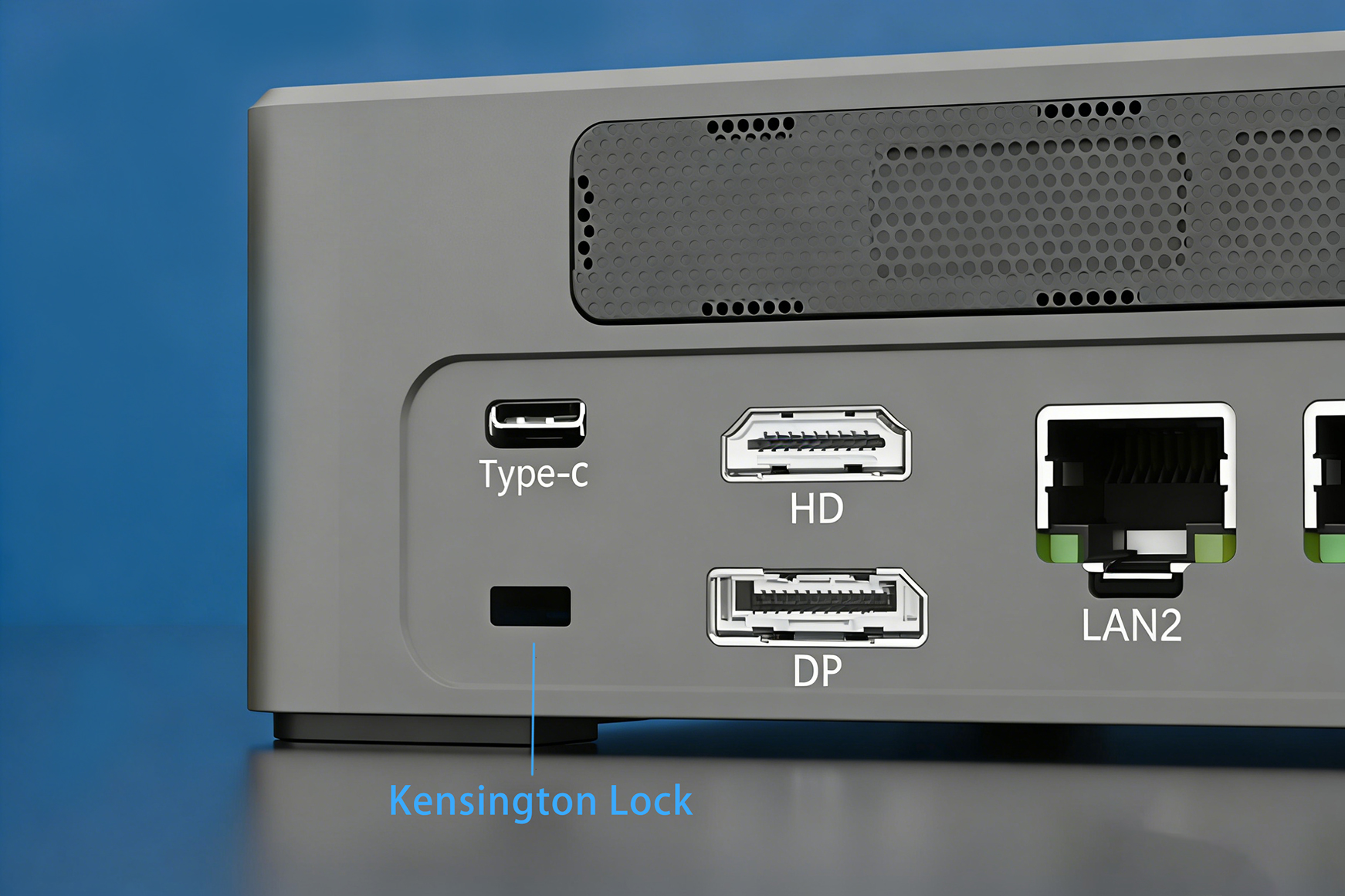
Look at the side or back of your Mini PC—you’ll likely spot a small rectangular slot (roughly 3mm wide x 7mm long). This is the K-Slot, the universal interface for Kensington Locks. Most commercial-grade Mini PCs include this slot, often marked with a small padlock icon.
How It Secures Your Device
The lock system has two main parts:
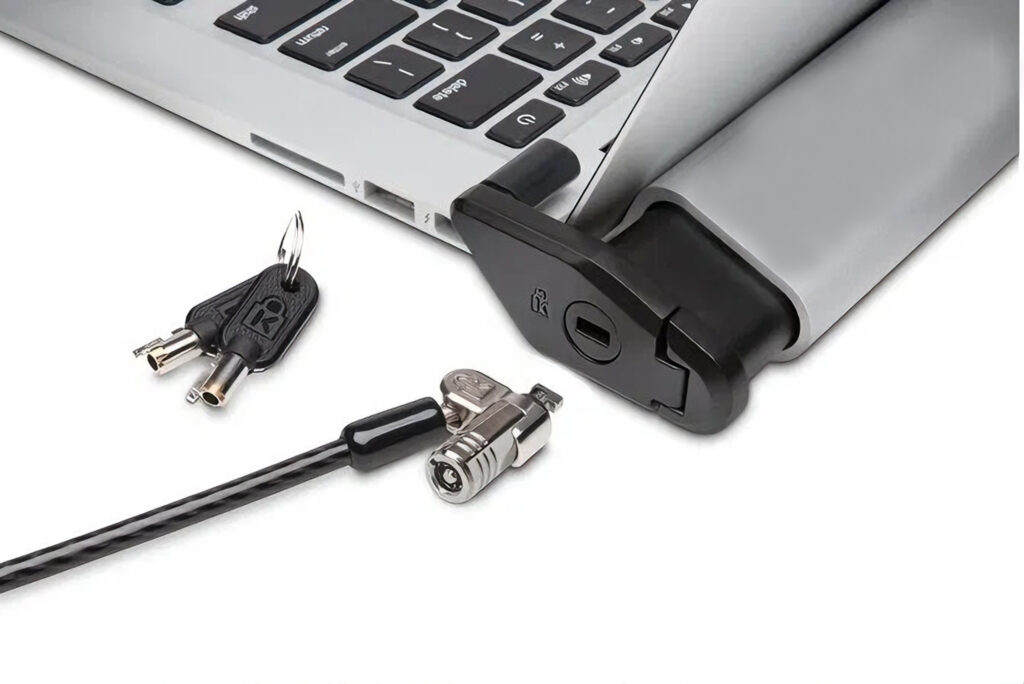
T-shaped Lock Head: Inserted into the K-Slot and rotated to lock into place.
Steel Cable: Attaches to the lock head on one end and wraps around a fixed object (e.g., desk leg, wall anchor) on the other.
Anti-theft mechanism:The lock’s T-bolt inserts into the K-Slot and rotates to lock. The steel cable wraps around a fixed anchor point (such as a table leg or wall mount), creating a physical barrier against theft—thieves would need to cut the thick steel cable or damage the device to remove it.
Does Your Mini PC Support Kensington Lock?
Most commercial-grade mini PCs come standard with a Kensington lock slot. Here’s how to verify compatibility:
✅Check specifications: View the specifications on the product details page of the product you purchased.
✅Inspect the device chassis: Carefully examine the sides and back of the device for the rectangular lock slot.
Exceptions to Note
Some ultra-compact Mini PCs may skip the K-Slot to save space. If yours lacks one, don’t worry—we’ll cover workarounds later!
How to Use a Kensington Lock: 3 Simple Steps
Securing your Mini PC takes less than 5 minutes. Here’s how to do it right:
Step 1: Choose the Right Lock
Kensington Locks aren’t one-size-fits-all. Pick based on your needs:
Key Locks: Traditional and reliable. Best for personal use.
Combination Locks: No keys to lose . Great for shared devices.
Smart Locks: App-controlled or RFID-enabled. Ideal for enterprise IT teams managing multiple devices.
Pro Tip: Opt for a cable thickness of 4mm or more with anti-cut technology (like Kevlar reinforcement). Look for products with TAA compliance certification (for government/education procurement) or “Sold Secure” certification to ensure anti-theft performance. Kensington’s original locks are a reliable choice, and third-party brands like Master Lock also offer compatible models.
Step 2: Install the Lock Head
Align the T-shaped lock tongue with the K-Slot on your Mini PC.
Push firmly and rotate the key (or enter your combination) clockwise until you hear a “click.”
Tug gently on the lock to ensure it’s anchored—no wobbling means it’s secure.
Step 3: Anchor the Cable
Wrap the steel cable around a fixed, immovable object (e.g., metal desk leg, floor anchor). Avoid wooden legs (they can be sawed through).
Thread the cable end back through the lock’s loop or clasp to create a tight, secure loop.
Pull the cable to remove slack—this minimizes leverage for thieves trying to pry the lock loose.
Real-World Scenarios & Expert Tips
Where Kensington Locks Shine
Open Offices: Preventing “Opportunistic Theft” of Company Assets
Retail Stores: Securing Mini-PCs Powering In-Store Displays
Classrooms/Labs: Protecting Shared Educational Equipment
Home Use: Preventing Device Falls Caused by Children Pulling
Pro Security Hacks
Record Serial Numbers: Store lock serial numbers in a secure location
Regular Inspections: Check cables for wear and locks for rust quarterly
Multi-Layer Protection: Implement “physical + data” dual security through BIOS passwords and hard drive encryption
FAQs: Your Kensington Lock Questions Answered
Q1: My Mini PC has no K-Slot. What now?
Use a VESA Mount Adapter (e.g., Kensington VESA Mount Security Plate) to attach your Mini PC to the back of a monitor, then lock the monitor via its K-Slot. Alternatively, use an anti-theft cabinet or cable management tray with built-in locks.
Q2: Can thieves just cut the cable?
High-quality cables (like Kensington’s Carbon Fiber Reinforced models) resist bolt cutters and wire snips. While no lock is 100% theft-proof, the goal is to make theft time-consuming enough to deter opportunistic thieves.
Q3: Are Kensington Locks travel-friendly?
Yes! Compact models like the Kensington NanoSaver (1.8m cable) are lightweight enough for travel. Just wrap the cable around a hotel desk leg or luggage rack (always ask hotel staff for permission first).
Small Lock, Big Peace of Mind
In an era where mini PCs are widely used in business operations and home media centers, protecting your hardware investment shouldn’t be an afterthought. Kensington Lock offers a cost-effective and easy-to-use solution that can be set up in minutes, significantly reducing the risk of theft and allowing you to focus on the efficient use of your devices.
Stay secure, and keep your Mini PC where it belongs—with you.

HYSTOU
HYSTOU has established its R&D headquarters in Shenzhen, drawing on over a decade of experience. Our core team members, who previously served at renowned companies such as Inventec and Quanta Computer, form the backbone of our technical expertise. With robust R&D and innovation capabilities, we remain steadfast in our commitment to pursuing excellence in the field of technology products.



