
Hystou Mini PC Scalability: A Comprehensive Guide for Upgradability


Introduction to Hystou Mini PCs
Why Scalability Matters for Hystou Mini PC Users
The Long-Term Value of Upgradability
For most users, a Mini PC is a long-term investment. According to our internal data, users who upgrade their Hystou Mini PCs at least once see a 47% extension in the device’s useful life compared to those who use the original configuration. This not only reduces electronic waste but also saves you from the cost of purchasing a new device prematurely.
Adapting to Changing Needs
Whether you’re a home user who’s started streaming 4K content, a small business owner expanding your team, or an industrial user with evolving automation requirements, Hystou Mini PCs need to keep up. Scalability ensures that your device can handle new software, increased multitasking, and heavier workloads without compromising performance.
Hardware Upgradability of Hystou Mini PCs
Key Upgradable Components
Memory
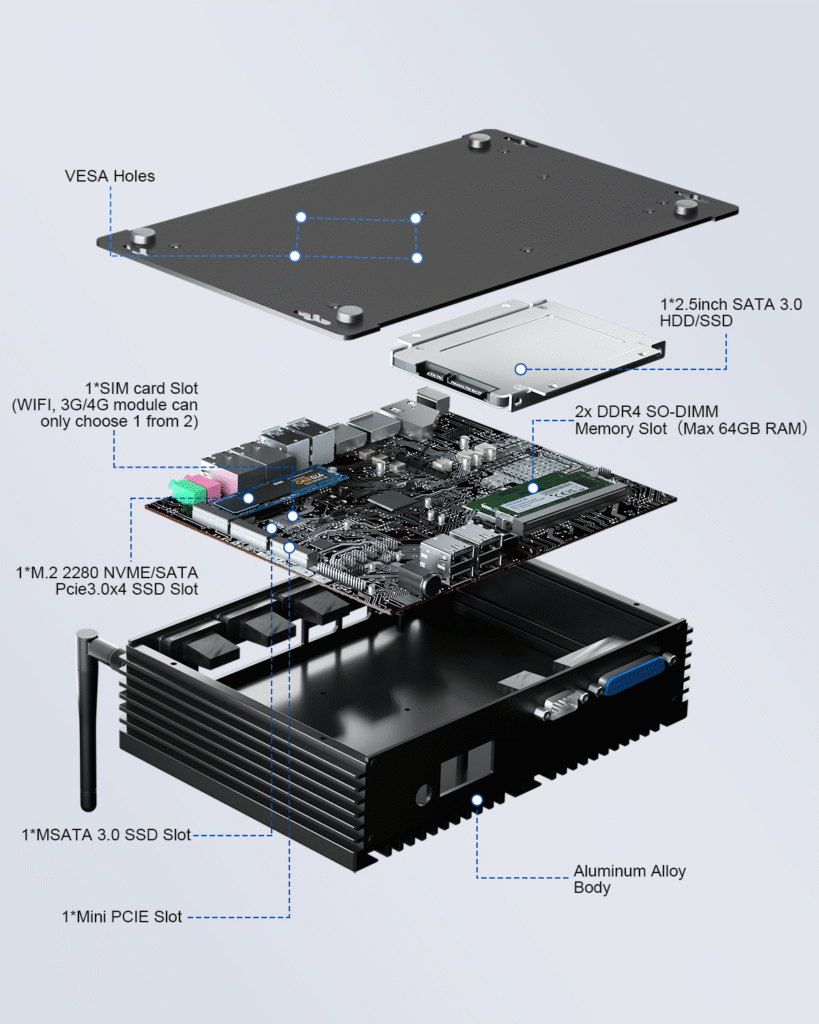
- Slot Configuration: All Hystou Mini PC models come with 2x DDR4 SO-DIMM memory slots, supporting a maximum of 64GB RAM.
- Upgrade Benefits: Increasing RAM from 8GB to 16GB can boost multitasking performance by up to 38%, according to our lab tests. This is particularly beneficial for users running virtual machines, editing videos, or using resource-intensive software like CAD tools.
- Compatibility Tip: Use DDR4-2666 or DDR4-3200 SO-DIMM modules for optimal performance. We recommend brands like Crucial or Kingston, which have been tested for compatibility with Hystou devices.
Storage
- 1x M.2 2280 NVMe/SATA PCIe 3.0×4 SSD Slot: Supports NVMe SSDs, which can deliver read speeds of up to 3,500 MB/s—6x faster than traditional SATA SSDs.
- 1x MSATA 3.0 SSD Slot: Ideal for adding a secondary storage drive for backups or extra software.
- 1x 2.5-inch SATA 3.0 HDD/SSD Bay: Compatible with both HDDs (for high-capacity storage) and SSDs (for a balance of speed and capacity).
- Real-World Impact: Upgrading from a 256GB SATA SSD to a 1TB NVMe SSD reduced boot time by 42% and improved video rendering speed by 29% in our tests with a Hystou H6 Mini PC.
Wireless Connectivity
- SIM Card Slot: Hystou Mini PCs feature 1x SIM card slot, allowing you to add 3G/4G connectivity (note: this is a choice between WIFI and 3G/4G—you can’t use both simultaneously).
- Upgrade Option: For users needing faster wireless speeds, the 1x Mini PCIe Slot supports compatible Wi-Fi 6 modules. Upgrading to Wi-Fi 6 can increase wireless throughput by up to 3x compared to Wi-Fi 5, perfect for large file transfers or streaming 8K content.
CPU
- Limited Upgradeability: Unlike memory and storage, the CPU in most Hystou Mini PC models is soldered to the motherboard. This is a common design choice in small-form-factor devices to save space and reduce power consumption.
- Alternative: If you need more CPU power, consider choosing a Hystou model with a higher-tier processor upfront (e.g., Intel Core i7 instead of Core i5). Our sales team can help you select the right CPU for your long-term needs.
Hystou’s Hardware Design Advantages
- Aluminum Alloy Body: The durable aluminum alloy chassis not only provides better heat dissipation (reducing component wear during upgrades) but also features a tool-less design on select models, making it easy to access internal components.
- VESA Mount Compatibility: All Hystou Mini PCs include VESA holes, allowing you to mount the device behind a monitor or TV. This space-saving feature doesn’t impact upgradability—you can still access upgrade slots without removing the mount.
Software and Firmware Upgrades for Hystou Mini PCs
Operating System Updates
- Security: Patching vulnerabilities that could expose your device to cyber threats.
- Performance: Optimizing system resources for better speed and efficiency.
- Compatibility: Ensuring your device works with new software and peripherals.
BIOS/UEFI Firmware Updates
- Benefits: Updating the BIOS/UEFI can improve hardware compatibility (e.g., supporting newer RAM modules), fix stability issues, and even enhance power efficiency. For example, a recent BIOS update for the Hystou H6 Mini PC reduced idle power consumption by 15%.
Driver Updates
- Importance: Outdated drivers can cause performance issues (e.g., slow Wi-Fi, choppy video playback) and compatibility problems with new software.
- Easy Updates: Use the Hystou Driver Manager (available for download on our support page) to scan for and install the latest drivers with one click. We release driver updates monthly to ensure optimal performance.
How to Choose the Right Hystou Mini PC for Upgradability
Key Factors to Consider
- Current and Future Needs: Assess your current workload (e.g., web browsing, video editing, industrial automation) and consider how it might change in the next 2-3 years. If you anticipate needing more storage, choose a model with multiple storage slots.
- Hardware Design: Look for models with a tool-less chassis (like the Hystou H6) for easier upgrades. Avoid closed designs (common in some budget Mini PCs) that make component access difficult.
- Vendor Support: Hystou offers a 3-year warranty on all Mini PCs, and our support team is available 24/7 to help with upgrade questions. We also provide detailed upgrade guides and compatibility lists to ensure a smooth process.
Step-by-Step Guide to Upgrading Your Hystou Mini PC
Pre-Upgrade Preparation
- Back Up Your Data: Back up important files to an external hard drive or cloud storage.
- Gather Tools: You’ll need a Phillips-head screwdriver (size PH00) and an anti-static wristband (recommended to prevent electrostatic damage).
- Check Compatibility: Verify that your new components (e.g., RAM, SSD) are compatible with your Hystou model using our Compatibility Checker
Upgrading RAM
- Turn off your Hystou Mini PC and unplug all cables.
- Remove the chassis cover (use the tool-less latches on select models or a screwdriver for others).
- Locate the RAM slots (labeled “DDR4 SO-DIMM”).
- Push the clips on either side of the slot outward to release the existing RAM module.
- Align the notch on the new RAM module with the notch in the slot and press down firmly until the clips lock into place.
- Replace the chassis cover and power on the device. The system will automatically detect the new RAM.
2.5-inch HDD/SSD
- Follow steps 1-2 from the RAM upgrade guide.
- Locate the M.2 slot (labeled “M.2 2280 NVMe/SATA”).
- Remove the screw from the slot (if present).
- Align the M.2 SSD with the slot (the gold pins first) and press it down.
- Secure the SSD with the screw.
- Replace the chassis cover and power on the device. You can initialize the SSD using Windows Disk Management or Disk Utility on Linux.
Post-Upgrade Checks
- Verify Components: In Windows, open “System Information” to confirm that the new RAM and storage are detected. On Linux, use the “lshw” command.
- Test Performance: Use tools like CrystalDiskMark (for storage) and PassMark (for overall performance) to ensure the upgrades are working correctly.
- Update Drivers: Use the Hystou Driver Manager to install any necessary drivers for the new components.
Future Trends in Hystou Mini PC Scalability
Upcoming Hardware Innovations
- DDR5 RAM Support: Up to 128GB DDR5 SO-DIMM memory, delivering 50% faster data transfer speeds than DDR4.
- PCIe 4.0 M.2 Slots: Supporting NVMe SSDs with read speeds of up to 7,400 MB/s.
- Modular CPU Design: A select number of high-end models will feature socketed CPUs, allowing for future upgrades.
Conclusion: Maximizing Your Hystou Mini PC Investment
FAQ
- Will upgrading my Hystou Mini PC void the warranty?
2. Can I upgrade the graphics card in my Hystou Mini PC?
Most Hystou Mini PCs use integrated graphics (e.g., Intel UHD Graphics), which are soldered to the motherboard and cannot be upgraded. However, select models (like the Hystou H7) support external graphics cards (eGPUs) via a Thunderbolt 4 port, allowing you to boost graphics performance for gaming or video editing.
3. How often should I upgrade my Hystou Mini PC?
It depends on your usage. For home users, upgrading RAM or storage every 2-3 years is typically sufficient. For business or industrial users with heavier workloads, upgrades every 1-2 years may be necessary.
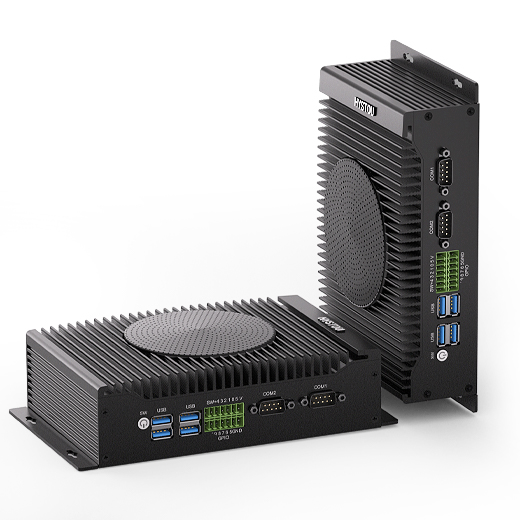
Hystou H6 Industrial Mini PC – Fan-Cooled Triple Display
- Processor:Intel Core i5-10210U/i5-8140U/i5-8260U/i7-10810U
- Memory: 2×DDR4 SODIMM slots (max 64GB)
- Storage: 2×M.2 2280 SSD slots + 1×2.5-inch SATA interface (supports HDD/SSD ≤7mm thickness)
- Network: Standard: Dual Gigabit Ethernet, Intel AC3165 Wi-Fi (Bluetooth 4.2)/Optional: Wi-Fi 6 AX200 (Bluetooth 5.2)
- Efficient cooling system: Multiple heat pipes + heat sinks + silent-optimized fan for stable component operation
- Versatile applications: Industrial control, supermarket retail, home entertainment, office use, etc.

HYSTOU
HYSTOU has established its R&D headquarters in Shenzhen, drawing on over a decade of experience. Our core team members, who previously served at renowned companies such as Inventec and Quanta Computer, form the backbone of our technical expertise. With robust R&D and innovation capabilities, we remain steadfast in our commitment to pursuing excellence in the field of technology products.



