
Are Mini PCs Good for School?


Are Mini PCs the Future of Classroom Technology
In today’s digital age, educational institutions are constantly seeking ways to enhance the learning experience while managing budget constraints. One technology that has gained significant attention is the mini PC – a compact, affordable computing solution that promises to transform classrooms. As schools evaluate technology options, the mini PC for school environments stands out as a versatile choice that balances performance and cost-effectiveness. But are these tiny devices really suitable for school environments? This article explores the benefits, challenges, and real-world applications of mini PCs in education, providing valuable insights for educators, IT administrators, and decision-makers considering an education mini computer deployment.
Understanding Mini PCs for Educational Environments
What Defines a School-Ready Mini PC
A school-ready mini PC is more than just a small computer. It’s a carefully designed device that balances performance, durability, and cost-effectiveness to meet the unique needs of educational settings. These compact powerhouses typically measure less than 20 cm in any dimension, making them ideal for space-constrained classrooms. But size isn’t the only consideration. A truly education-friendly mini PC should offer robust processing capabilities, multiple connectivity options, and energy efficiency – all while maintaining an affordable price point.
Key Technical Specifications for Education Use
When evaluating mini PCs for school use, certain technical specifications stand out as particularly important. Processor performance is crucial, with modern Intel Core, Pentium, or AMD Ryzen processors offering the best balance of power and efficiency for educational applications. RAM capacity should be at least 4GB, though 8GB is recommended for smoother multitasking and future-proofing. Storage options have evolved significantly, with solid-state drives (SSDs) now the preferred choice for their speed, durability, and energy efficiency compared to traditional hard disk drives (HDDs).
For education-focused deployments, here are three recommended mini PC models with their key specifications:
Model | Processor | RAM | Storage | Connectivity | Price Range |
Intel N150 | 8GB (upgradable to 32GB) | 128GB SSD | 4x USB 3.0, 2xUSB2.0HDMI, DisplayPort, Wi-Fi 6 | $275-630 | |
ASUS PN41 | Intel Celeron N5105 | 8GB LPDDR4 | 256GB NVMe SSD | 2x USB 3.2, 2x USB 2.0, HDMI, Wi-Fi 6 | $299-350 |
Lenovo IdeaCentre Mini 5i | Intel Core i3-10100T | 8GB DDR4 (upgradable to 32GB) | 512GB NVMe SSD | 4x USB 3.2, HDMI, DisplayPort, Wi-Fi 6 | $380-450 |
These models represent different price points and performance levels, allowing schools to choose the best education mini computer based on their specific needs and budget constraints. The Acer Chromebox offers excellent value for basic classroom tasks, while the HYSTOU M2 provides more processing power for specialized educational software.
Connectivity is another vital aspect, with USB 3.0 ports, HDMI outputs, and Wi-Fi 6 compatibility being standard features for modern educational mini PCs. Many models also offer optional Ethernet ports for more stable network connections in environments with high device density. Operating system flexibility is important too, with most education-focused mini PCs supporting Windows 10/11, Chrome OS, or various Linux distributions to accommodate different educational software requirements.
Advantages of Mini PCs in School Settings
Cost-Effectiveness and Budget Management
One of the most compelling arguments for adopting mini PCs in schools is their cost-effectiveness. Traditional desktop computers can cost anywhere from $500 to $1,000 per unit, while high-quality education-focused mini PCs typically range from $200 to $400. This price difference can result in significant savings, especially for schools looking to equip entire classrooms or computer labs.
But the savings don’t stop at the initial purchase. Mini PCs consume far less energy than traditional desktops – often as little as 15-30 watts compared to 100+ watts for standard towers. Over the typical 3-5 year lifespan of educational technology, these energy savings can add up to hundreds of dollars per device. When multiplied across an entire school district, the financial impact becomes substantial, freeing up funds for other educational priorities.
Space-Saving Design and Classroom Flexibility
Classroom space is a precious commodity in most educational institutions. Traditional desktop computers, with their bulky towers and separate monitors, can take up valuable desk space and limit classroom layout flexibility. The mini PC for school environments offers an ideal solution to this challenge, with its compact design allowing for versatile placement options that maximize available learning space. An education mini computer typically occupies less than 20% of the space required by a traditional desktop, making it perfect for crowded classrooms and shared workspaces.
Many schools are adopting “all-in-one” setups, where mini PCs are mounted directly behind monitors or under desks, creating clean, uncluttered workspaces. This not only maximizes available desk area but also reduces cable management issues – a common headache in busy classrooms. The reduced footprint also makes it easier to reconfigure classroom layouts for different teaching styles, from traditional lectures to collaborative group work.
Energy Efficiency and Environmental Benefits
In an era of increasing environmental awareness, the energy efficiency of mini PCs offers significant ecological benefits. By consuming 70-80% less power than traditional desktop computers, these compact devices help schools reduce their carbon footprint while saving on energy costs. For example, a school with 100 mini PCs instead of traditional desktops could save approximately 5,000 kWh annually – enough to power five average households for a month.
Many mini PC manufacturers also prioritize sustainable manufacturing practices and materials, further enhancing the environmental credentials of these devices. Some models even offer modular designs that make upgrades and repairs easier, extending the device lifespan and reducing electronic waste – a growing concern in education technology.
Durability and Longevity in School Environments
Schools demand technology that can withstand the rigors of daily use by students of all ages. Mini PCs, with their solid-state storage and lack of moving parts, offer superior durability compared to traditional laptops or desktops. This translates to fewer hardware failures, reduced maintenance costs, and longer device lifespans – typically 4-6 years for educational mini PCs versus 3-4 years for standard laptops.
The compact design also makes mini PCs less susceptible to accidental damage. Without exposed hinges, keyboards, or screens that can be easily damaged, these devices can better withstand the bumps and knocks common in busy school environments. Many manufacturers offer ruggedized models specifically designed for education, featuring reinforced casings and dust-resistant components.
Real-World Applications and Case Studies
Primary and Secondary Education Implementations
School districts around the world are successfully implementing mini PC solutions with impressive results. In the United Kingdom, the London Borough of Newham deployed over 2,000 mini PCs in primary schools, resulting in a 40% reduction in IT maintenance costs and improved classroom flexibility. Teachers reported that the compact devices made it easier to integrate technology into daily lessons without disrupting classroom dynamics.
In the United States, the Clark County School District in Nevada implemented a district-wide mini PC program, equipping over 50,000 classrooms with compact computing solutions. The initiative resulted in annual energy savings of over $1.2 million and significantly reduced IT support requests. Teachers praised the consistent performance and reliability of the devices, which allowed for more seamless integration of educational software and online resources.
Higher Education and University Settings
Mini PCs aren’t just for K-12 education – they’re also making waves in higher education. The University of Birmingham in the UK replaced traditional desktop computers with mini PCs in several departments, creating flexible learning spaces that can quickly adapt to different teaching styles and class sizes. The university reported savings of over £300,000 in hardware and energy costs within the first two years of implementation.
At the University of California, Berkeley, mini PCs have been instrumental in creating “smart classrooms” that support interactive learning technologies. The compact devices power interactive whiteboards, student response systems, and collaborative software, enhancing engagement and participation in lectures and seminars. IT administrators noted that the mini PC solution reduced deployment time by 60% compared to traditional classroom technology setups.
Special Education and Adaptive Learning Environments
Mini PCs have proven particularly valuable in special education settings, where customized learning environments are essential. The Royal Institute for Deaf and Blind Children in Australia implemented mini PC-based solutions to create adaptive learning stations tailored to individual student needs. The compact size of the devices allowed for flexible placement in specialized learning spaces, while the customizable software environment supported various assistive technologies.
In inclusive classrooms, mini PCs have enabled educators to create personalized learning stations that can be easily adjusted for different abilities and learning styles. Teachers reported that the devices’ reliability and low maintenance requirements were particularly valuable in these complex educational environments, where technical issues can significantly disrupt carefully planned lessons.
Addressing Potential Concerns and Limitations
Performance Considerations for Educational Software
A common concern when considering a mini PC for school use is whether these compact devices can deliver sufficient performance for modern educational software. The reality is that most educational applications – from productivity suites to specialized learning software – are not particularly resource-intensive. A well-chosen education mini computer, such as those featuring Intel Celeron N100 or AMD Ryzen 3 processors with 8GB of RAM, can easily handle these applications while providing a smooth user experience that supports effective learning.
For more demanding tasks such as video editing, 3D modeling, or programming, higher-end mini PCs with Intel Core i3/i5 processors or AMD Ryzen 5 chips offer performance comparable to traditional desktop computers. This versatility allows schools to select different mini PC models based on specific classroom needs, ensuring optimal performance without overspending on unnecessary hardware.
Storage Capacity and Expandability Options
Storage capacity is another area of concern for educational institutions. While mini PCs typically offer 128GB to 512GB of SSD storage – sufficient for most educational applications – schools may need to consider expandability options for specialized use cases. Fortunately, many mini PC models offer microSD card slots or M.2 SSD expansion slots, allowing for easy storage upgrades as needs evolve.
Network storage solutions can further extend storage capabilities, with mini PCs easily connecting to school servers or cloud storage services. This hybrid approach – combining local storage for essential applications with network storage for larger files and resources – provides an efficient and scalable solution for educational environments.
Networking and Security Considerations
In today’s connected classrooms, network security is a top priority. Mini PCs, like all networked devices, require proper security measures to protect sensitive student data and prevent unauthorized access. The good news is that mini PCs can be easily integrated into existing school network security infrastructure, including firewalls, antivirus software, and device management systems.
Many mini PC manufacturers offer education-specific security features, such as TPM 2.0 chips for secure boot processes and hardware-level data encryption. These features, combined with centralized device management software, allow IT administrators to maintain tight security controls across all school devices – even as computing environments become more distributed.
Maintenance and Technical Support Requirements
While mini PCs are generally reliable and low-maintenance, schools must still consider technical support requirements. The good news is that the simplified hardware design of mini PCs – with fewer moving parts and standardized components – often results in lower maintenance costs compared to traditional laptops or desktop computers.
Many manufacturers offer extended warranties and education-specific support packages tailored to the needs of schools. Additionally, the compact size of mini PCs makes them easy to collect and repair, reducing downtime when issues do occur. For schools with limited IT staff, some mini PC vendors even offer remote management tools that allow basic troubleshooting and updates without the need for on-site technicians.
Optimizing Mini PC Implementation in Schools
Best Practices for Classroom Deployment
Successful mini PC for school implementation requires careful planning and consideration of classroom dynamics. One best practice is to create standardized configurations across grade levels or departments, simplifying management and support for your education mini computer deployment. Schools should also consider the physical placement of devices, ensuring easy access for both students and teachers while protecting equipment from damage or theft.
Another key consideration is cable management. While mini PCs reduce cable clutter compared to traditional desktops, schools should still invest in cable organizers, USB hubs, and possibly wireless peripherals to create clean, safe learning environments. Adequate power management is also essential, with surge protectors and cable management solutions helping to prevent accidents and equipment damage.
Software Configuration and Management Solutions
Effective software management is crucial for maximizing the educational value of mini PCs. Schools should implement centralized device management solutions that allow for remote configuration, software updates, and monitoring. Tools like Microsoft Intune, Google Admin Console, or specialized education device management platforms enable IT administrators to maintain consistent software environments across all devices while minimizing disruption to classroom activities.
For schools implementing 1:1 computing initiatives, user profile management becomes particularly important. Cloud-based user profiles allow students to access their personalized learning environments from any mini PC in the school, enhancing flexibility and ensuring continuity of learning. This approach also simplifies device maintenance, as IT staff can reset or reimage devices without affecting student data or settings.
Budget Planning and Total Cost of Ownership Analysis
When planning for mini PC implementation, schools should consider the total cost of ownership (TCO) rather than focusing solely on initial hardware costs. TCO includes not just the purchase price of the devices, but also software licensing, network infrastructure, maintenance, energy consumption, and eventual disposal or recycling.
A comprehensive TCO analysis typically reveals that mini PCs offer significant long-term savings compared to traditional desktop computers or laptops. For example, a study by the Consortium for School Networking found that schools implementing mini PC solutions reduced their 5-year TCO by an average of 35% compared to traditional desktop deployments. This substantial cost savings can be redirected to other educational priorities, making mini PCs an attractive investment for budget-conscious schools.
Conclusion: Making the Right Choice for Your School
Evaluating Your Specific Educational Needs
The decision to implement a mini PC for school use should begin with a thorough evaluation of specific educational needs and constraints. Factors to consider include the age of students, types of educational software used, classroom layout, existing IT infrastructure, and budget limitations. By clearly defining these requirements, schools can select the ideal education mini computer models and configurations that provide the best fit for their unique circumstances and educational goals.
Educators should be actively involved in this evaluation process, providing insights into how technology is currently used in classrooms and how it might be enhanced. IT administrators can then translate these educational requirements into specific technical specifications, ensuring that the selected mini PCs will effectively support teaching and learning objectives.
Future-Proofing Your Technology Investment
When selecting mini PCs for education, it’s important to consider not just current needs but also future educational trends. Features like USB-C connectivity, support for multiple displays, and compatibility with emerging educational technologies can significantly extend the useful lifespan of mini PC investments. Schools should look for devices that offer a balance of current performance and future expandability, ensuring that their technology infrastructure can adapt to evolving educational practices.
The modular nature of many mini PC designs is particularly valuable in this regard. Devices that allow for RAM upgrades, storage expansion, or even processor replacement can be gradually enhanced over time, extending their useful life and maximizing return on investment. This approach also allows schools to implement technology upgrades in phases, aligning with budget cycles and educational priorities.
Final Recommendations for Different Educational Settings
Based on the comprehensive analysis presented in this article, mini PCs represent a compelling technology solution for most educational environments. For primary and middle schools focused on core curriculum delivery, entry-level mini PCs with Intel Celeron or AMD Athlon processors, 4-8GB of RAM, and 128-256GB SSD storage offer an optimal balance of performance and affordability.
Secondary schools and vocational training centers may benefit from mid-range mini PCs with Intel Core i3/i5 or N100 processors, 8-16GB of RAM, and 256-512GB storage to handle more demanding applications. These devices can effectively support specialized subjects such as computer science, digital media, and engineering technology.
For higher education institutions, a mix of mid-range and high-performance mini PCs allows for flexible deployment across lecture halls, computer labs, and specialized facilities. The compact size and quiet operation of these devices make them particularly suitable for libraries, collaborative learning spaces, and faculty workstations.
In conclusion, mini PCs offer a versatile, cost-effective, and future-proof computing solution for educational institutions of all types and sizes. By carefully evaluating specific needs, planning for proper implementation, and selecting appropriate configurations, schools can leverage these compact powerhouses to enhance teaching and learning while maximizing their technology investment. As education continues to evolve in the digital age, mini PCs are poised to play an increasingly important role in creating dynamic, engaging, and effective learning environments.
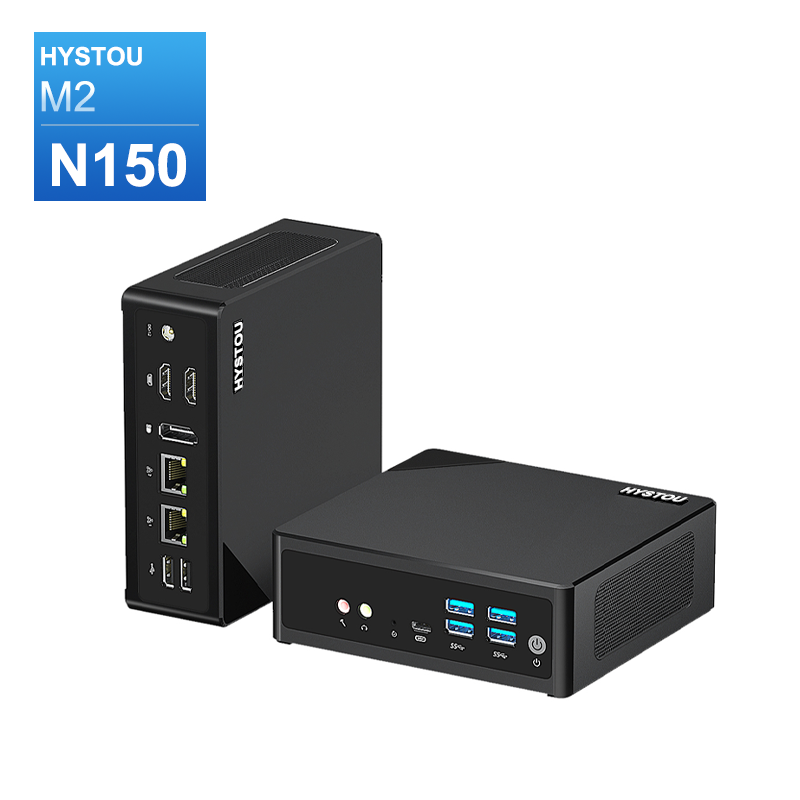
HYSTOU M2 Mini PC with Intel N150/N305 CPU – Dual Gigabit Ethernet & 4K Display
- Processor: Intel N150 or Intel i3-N305
- Graphics card: Intel® UHD Graphics
- Memory: DDR5 262Pin SODIMM, supports 4800Mhz, maximum capacity 32GB
- Storage: M.2 NVMe SSD (up to 4TB) + SATA3.0 interface (supports 2.5-inch HDD/SSD, thickness ≤7mm)
- Wireless and Bluetooth: Default WIFI 5 and Bluetooth 4.2, optional WIFI 6 (AX200) and Bluetooth 5.2

HYSTOU
HYSTOU has established its R&D headquarters in Shenzhen, drawing on over a decade of experience. Our core team members, who previously served at renowned companies such as Inventec and Quanta Computer, form the backbone of our technical expertise. With robust R&D and innovation capabilities, we remain steadfast in our commitment to pursuing excellence in the field of technology products.
Lorem ipsum dolor sit amet, consectetur adipiscing elit. Ut elit tellus, luctus nec ullamcorper mattis, pulvinar dapibus leo.



